
Torna indietro   Hardware Upgrade Forum > Networking e sicurezza > Networking > Guide e thread ufficiali

Recensione Samsung Galaxy S26 Ultra: finalmente qualcosa di nuovo
Per diversi giorni il Galaxy S26 Ultra di Samsung è stato il nostro compagno di vita. Oltre alle conferme del colosso coreano come la qualità del display e una suite AI senza rivali, arriva il Privacy Display, un unicum nel mondo smartphone. Ci sono ancora alcuni gap che non sono riusciti a colmare lato batteria e fotocamera, seppur con alcuni miglioramenti.
Diablo II Resurrected: il nuovo DLC Reign of the Warlock
Abbiamo provato per voi il nuovo DLC lanciato a sorpresa da Blizzard per Diablo II: Resurrected e quella che segue è una disamina dei nuovi contenuti che abbiamo avuto modo di sperimentare nel corso delle nostre sessioni di gioco, con particolare riguardo per la nuova classe dello Stregone
Deep Tech Revolution: così Area Science Park apre i laboratori alle startup
Siamo tornati nel parco tecnologico di Trieste per il kick-off del programma che mette a disposizione di cinque startup le infrastrutture di ricerca, dal sincrotrone Elettra ai laboratori di genomica e HPC. Roberto Pillon racconta il modello e la visione
Tutti gli articoli Tutte le news

Vai al Forum
Rispondi
 
Strumenti
Old 07-10-2025, 17:15   #41
wrad3n
Senior Member
 
L'Avatar di wrad3n
 
Iscritto dal: Nov 2010
Messaggi: 9038
Disponibile il fritzos 8.20:

https://download.avm.de/fritzbox/fri...TE-08.20.image

Quote:
**New features:**
------------------------------------------------------------

- The new Online Monitor offers a clear graphical overview of the internet usage of top consumers and selected home network devices
- Mesh optimization - for greater stability and improved data throughput, FRITZ!Repeaters independently select the ideal connection in the Mesh
- More options for triggering routines in the smart home and many other interesting new features
- The new, easy-to-use FRITZ!NAS sharing function makes it possible to share a folder, for example to collect and share photos after a family celebration
- Simplified user guidance for the parental controls - access profiles and the home network devices assigned to it are now clearly displayed
- Reduce the FRITZ!Box's energy consumption with EEE (Energy Efficient Ethernet) Can now be individually configured for the LAN sockets

------------------------------------------------------------

With each FRITZ!OS update, FRITZ! also updates its security functions. Therefore we recommend performing the update for all devices.

------------------------------------------------------------

Note: Instructions for configuring and using Mesh functions are presented at en.fritz.com/mesh-faq

Below you find a complete list and descriptions of the new functions in the latest FRITZ!OS, along with a list of further improvements in this version.

-------------------------------------------------
# New features and improvements in FRITZ!OS 8.20
-------------------------------------------------

## Mobile Network:
- **Improvement** New software for the mobile modem with improved mobile connection stability
- **Improvement** Support for USSD over IMS
- **Improvement** Method for determining band share and band capacity revised
- **Improvement** Initial startup phase after device restart until a mobile connection is established has been shortened
- **Improvement** Detection and handling of mobile network errors has been revised and optimized

## Internet:
- **NEW** Online Monitor shows the network devices with the highest utilization of the internet connection (top consumers)
- **NEW** The Online Monitor for "individual devices" also displays the total current utilization of devices that were not selected individually
- **NEW** Simplified user guidance on the "Filter" pages (parental controls)
- **Improved** In the Online Monitor the display of the utilization of the internet connection allows selection of not only one day or two months but also an interval of 2 weeks
- **Improved** Device selection for display and data recording simplified in the Online Monitor
- **Improved** Reworked diagrams and colors in the Online Monitor
- **Improved** Online Monitor: Reworked display in the diagrams for the utilization of the internet connection
- **Improved** Improved stability when there are many simultaneous requests to internet services
- **Improved** Port 443 (HTTPS, QUIC) is taken into account when the network application "Surfing" is prioritized
- **Improved** In the access profiles for parental controls, it is now possible to select whether network applications should be blocked or allowed
- **Improved** Number of tickets to extend online time for devices blocked by parental controls was increased from 10 to 12
- **Improved** In the parental controls, limited online time for a network device can now be easily extended by 45 minutes

## Mesh:
- **NEW** Automatic detection of device type (e.g. smartphone, computer, or printer) for devices displayed in the Mesh Overview
- **NEW** Intelligent networking: FRITZ! products in the Mesh assess and optimize the connections among each other
- **NEW** Simplified login to Mesh Repeaters via the Mesh Overview of the Mesh Master

## Telephony:
- **NEW** Caller announcements for the integrated answering machine can now also be entered as text (text-to-speech)
- **Improvement** Support for hold, query call, and call brokering when using the SIM card's mobile number (VoLTE)
- **Improvement** Telephone connections via the SIM card's mobile number are displayed in the VoIP quality display
- **Improved** Support for the Vodafone IP Anlagen Anschluss

## DECT/FRITZ!Fon:
- **Improved** Podcasts can automatically continue from where they left off, even after a long interruption
- **Improved** Revised menu order and dialogs in the FRITZ!Fon user interface

## Home Network:
- **NEW** Save energy in the home network: EEE (Energy Efficient Ethernet) can now be set separately for each WAN/LAN port
- **Improved** Completely reworked network settings for improved user-friendliness

## Smart Home:
- **NEW** In the FRITZ!Box user interface of the Mesh Master, the registration of smart home devices with another FRITZ!Box or a FRITZ!Smart Gateway can be started
- **NEW** Data read by the FRITZ!Smart Energy 250 from the export meter is shown under "Smart Home > Devices and Groups"
- **NEW** With FRITZ!Smart Control 440, the following functions can now be controlled: the boost and frost protection functions for radiator controls, color and color temperature for lamps, activation and deactivation of routines, and the display of the QR code for Wi-Fi
- **NEW** Routines can also be triggered by a phone call, by reaching a target temperature, or by activating boost or antifreeze functions, as well as by important events on the FRITZ!Box
- **NEW** Templates and routines can be triggered with delay
- **Improved** The schedule for a radiator control can be disabled without discarding the configured schedule
- **Improved** Roller shutters can now be combined into groups

## Storage (NAS):
- **NEW** Upload sharing: Via fritz.nas a folder can be shared for users with a sharing link to upload and download contents, e.g. to collect photos after a family celebration
- **Improved** Better interoperability with FTP applications (e.g. Filezilla) through support for MFMT command
- **Improved** Simplified generation of sharing links to access files saved in FRITZ!NAS

## Security:
- **Improved** Push mail now also sends notifications about logins from FRITZ!Apps

## System:
- **Improved** File name for saved settings now includes name of individual FRITZ!Box
- **Improved** The "Diagnostics > Function" page now displays information on problems with time synchronization via NTP
- **Improved** If the configured/provisioned time server fails, automatic switch to public server
- **Improved** "Forgot Password" function of the push service can now be configured with a freely chosen recipient
- **Improved** Functional diagnostics now indicates when access for apps (TR-064) is disabled in the home network sharing settings
- **Improved** Reworked pages of the update functions under "System > Update"
- **Improved** Reworked user guidance for backing up or restoring settings
- **Improved** Warning on the overview page when push service is interrupted
- **Improved** Push service emails now clearly differentiate between function and security diagnostics through specific subject lines, adapted email texts, and file names
- **Improved** Accessibility support for FRITZ!Box, FRITZ!Mesh Set Master, and FRITZ!Fon (in accordance with GAA Ordinance)


------------------------------------------------------------

# Additional Improvements in FRITZ!OS 8.20

## Internet:
- **Changed** FRITZ! devices in the home network, e.g. FRITZ!Repeaters, are no longer offered in parental controls and prioritization; they always have unrestricted internet access with normal priority
- **Changed** Private IPv4 addresses (RFC 1918) are no longer posted via MyFRITZ!Net (DNS) if a publicly accessibly IPv6 address is available
- **Changed** When VPN connections are active for which all network traffic is routed via the VPN connection ("full tunnel"), the guest network is excluded from this and routed over the normal internet connection
- **Changed** Number of network devices for which the saving of internet data rates can be enabled was increased to 40
- **Fixed** Enabling the UPnP filter had no effects for IPv6
- **Fixed** For providers without support for IPv6, the Online Meter did not count consumption values as long as IPv6 was enabled in the account information of the FRITZ!Box
- **Fixed** Possible internet disruptions when using a large filter list for blocked websites
- **Fixed** For FRITZ! devices operated exclusively via IPv6, under some circumstance there was no search for new FRITZ!OS versions (updates)
- **Fixed** Creation of new WireGuard® VPN connections could fail if many WireGuard® VPN connections had already been created
- **Fixed** Under certain circumstances, a FRITZ! device operated exclusively via IPv6 could not obtain the system time via the Network Time Protocol
- **Fixed** The rate information in the Online Meter showed an incorrect end of the billing period
- **Fixed** Parental controls: Redeeming tickets to extend online time failed in certain scenarios
- **Fixed** Potential incorrect display in the Online Meter of the use of data capacity during the billing period

## Home Network:
- **Fixed** In rare cases the information on a new network device in the home network was not immediately entered in the event log or change notice
- **Fixed** In special scenarios it was possible for the IP address 192.168.178.1 to be displayed for a repeater in the home network instead of its own address
- **Fixed** "Home Network > Network Connections" page was not displayed (empty page) when a FRITZ!Box was configured as an internet gateway and a Mesh Repeater

## System:
- **Fixed** Push service sent the Forgot Password link of devices configured as IP clients with the incorrect IP address
- **Fixed** Despite correct rate settings, the "Info" LED did not flash when online volume exhausted
- **Fixed** Preview of personalized subject line from push service shows the suggested parentheses only if they were actually entered
wrad3n è offline   Rispondi citando il messaggio o parte di esso
Old 31-10-2025, 22:46   #42
nottolo
Senior Member
 
L'Avatar di nottolo
 
Iscritto dal: Mar 2001
Città: Silicon Valley
Messaggi: 1152
Buonasera a tutti per iniziare... posseggo il 6850 LTE da molto tempo e non ho mai avuto problemi.. quindi non ho seguito il thread ..
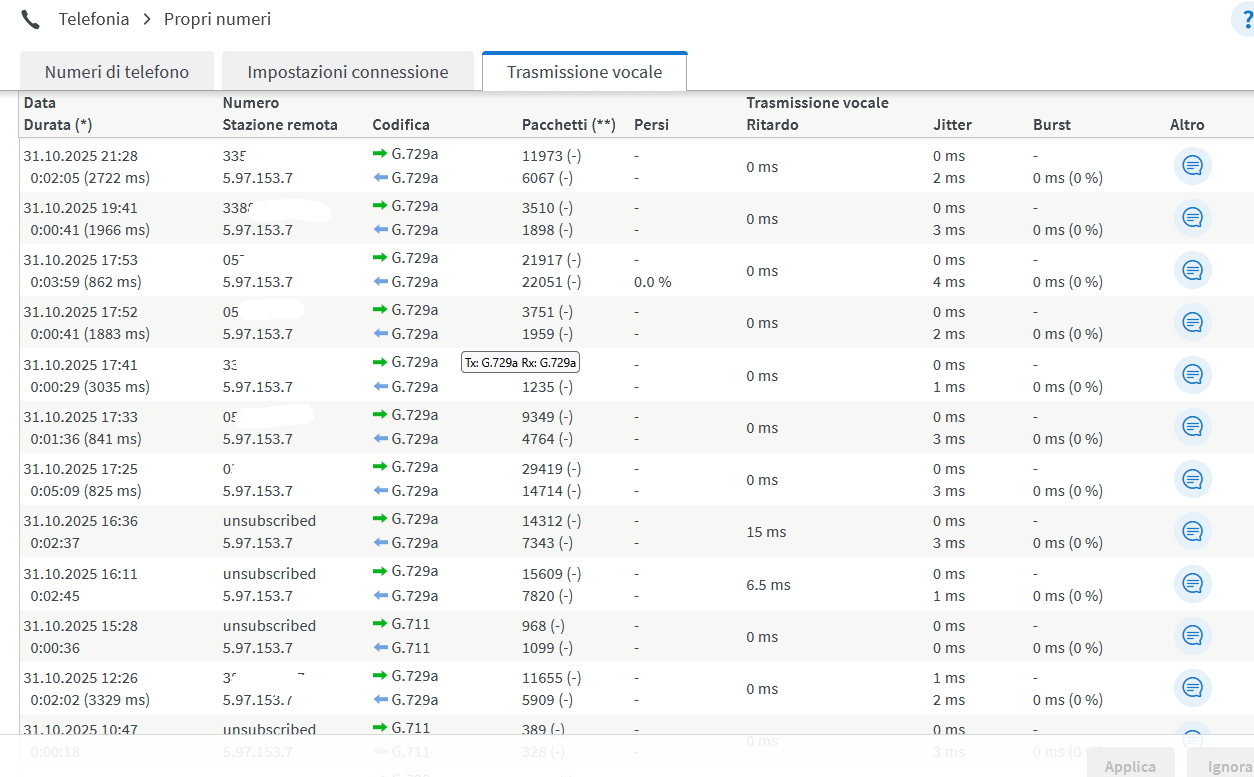
Oggi appunto entro nel registro chiamate, perchè ho ricevuto una telefonata anomala... e noto che le chiamate in entrata sono tutte Unsubscribed
Io ho una FTTH TIM in casa ho la ONT e con il cavo di rete entro nel Fritz.
TIM dovrebbe prevedere di default il Caller ID, ma il mio 6850 scorrendo indietro non visualizza alcun numero entrante.
Vero è che ho la versione 7.57, tutto funziona non mi sono interessato a mettere manualmente la 8.20 ma immagino di poterlo fare senza perdere nulla, giusto ?

MA il problema attuale prima, è capire perchè non vedo il numero entrante.
Nelle impostazioni è spuntato modalità semplice, ma nemmeno su avanzato vedo niente.
Noto alcune chiamate codificate G729a e alcune G711.. ma ne l'uno ne l'altro visualizza il numero.
I numeri che erano visibili nello screen qui sotto, erano le uscenti.. e le ho opportunamente oscurate.
Per me potrebbe essere sufficente vedere i numeri nel registro chiamate...

Che mi consigliate ??
__________________
I7-7700K + Gigabyte GAZ170x-UD3 + 2 X 16 Gb Crucial Ballistx + SSD M2 960 Evo Samsung 1 TB Gb + SSD 950 Evo Samsung 1 TB Gb + SSD Crucial MX 100 512 Gb + Nvidia GTX1070

Ultima modifica di nottolo : 31-10-2025 alle 22:50.
nottolo è offline   Rispondi citando il messaggio o parte di esso
Old 01-11-2025, 09:57   #43
rohrl
Member
 
Iscritto dal: Jun 2024
Messaggi: 216
Quote:
Originariamente inviato da nottolo Guarda i messaggi
Buonasera a tutti per iniziare... posseggo il 6850 LTE da molto tempo e non ho mai avuto problemi.. quindi non ho seguito il thread ..
Oggi appunto entro nel registro chiamate, perchè ho ricevuto una telefonata anomala... e noto che le chiamate in entrata sono tutte Unsubscribed
Io ho una FTTH TIM in casa ho la ONT e con il cavo di rete entro nel Fritz.
TIM dovrebbe prevedere di default il Caller ID, ma il mio 6850 scorrendo indietro non visualizza alcun numero entrante.
Vero è che ho la versione 7.57, tutto funziona non mi sono interessato a mettere manualmente la 8.20 ma immagino di poterlo fare senza perdere nulla, giusto ?

MA il problema attuale prima, è capire perchè non vedo il numero entrante.
Nelle impostazioni è spuntato modalità semplice, ma nemmeno su avanzato vedo niente.
Noto alcune chiamate codificate G729a e alcune G711.. ma ne l'uno ne l'altro visualizza il numero.
I numeri che erano visibili nello screen qui sotto, erano le uscenti.. e le ho opportunamente oscurate.
Per me potrebbe essere sufficente vedere i numeri nel registro chiamate...

Che mi consigliate ??
Sicuro di avere il servizio "chi è" di Tim? Non è di default.
Forse lo hai avuto gratuito per un po' e dopo te lo hanno tolto.
Chiama il 187 e domanda
rohrl è offline   Rispondi citando il messaggio o parte di esso
Old 01-11-2025, 12:46   #44
wrad3n
Senior Member
 
L'Avatar di wrad3n
 
Iscritto dal: Nov 2010
Messaggi: 9038
Quote:
Originariamente inviato da nottolo
Buonasera a tutti per iniziare... posseggo il 6850 LTE da molto tempo e non ho mai avuto problemi.. quindi non ho seguito il thread ..
Oggi appunto entro nel registro chiamate, perchè ho ricevuto una telefonata anomala... e noto che le chiamate in entrata sono tutte Unsubscribed
Io ho una FTTH TIM in casa ho la ONT e con il cavo di rete entro nel Fritz.
stai usando un 6850 o un 6890? perché il 6850 non ha una WAN ethernet (l'unico "ingresso" è tramite la connessione LTE) quindi non è collegabile ad un ONT.

Quote:
Originariamente inviato da nottolo
TIM dovrebbe prevedere di default il Caller ID, ma il mio 6850 scorrendo indietro non visualizza alcun numero entrante.
è un problema recente o l'ha sempre fatto? perché, come ha scritto rohrl, tim prevede un pagamento di 4€/mese per quel servizio:

https://www.tim.it/assistenza/per-la-tua-linea/chi-e

Quote:
Originariamente inviato da nottolo
Vero è che ho la versione 7.57, tutto funziona non mi sono interessato a mettere manualmente la 8.20 ma immagino di poterlo fare senza perdere nulla, giusto ?
controlla quale fritz possiedi, se sei fermo alla 7.57 è molto probabile che sia un 6890 ed è l'ultimo fw disponibile per quel modello.

Quote:
Originariamente inviato da nottolo
Noto alcune chiamate codificate G729a e alcune G711.. ma ne l'uno ne l'altro visualizza il numero.
il codec viene "scalato" in base ad alcuni parametri tra cui compatibilità, banda, latenza della catena di dispositivi degli interlocutori. Dal peggiore al migliore è una cosa tipo: G.729a < G.726 < G.711 < G.722-HD. ma è un fattore che riguarda solo la qualità della voce durante le telefonate.

Quote:
Originariamente inviato da nottolo
Che mi consigliate ??
quello che ha scritto rohrl, oppure controlla da mytim (sito o app) se manca il servizio "chi è".
wrad3n è offline   Rispondi citando il messaggio o parte di esso
Old 01-11-2025, 14:42   #45
nottolo
Senior Member
 
L'Avatar di nottolo
 
Iscritto dal: Mar 2001
Città: Silicon Valley
Messaggi: 1152
Grazie a tutti delle risposte.. si ho sbagliato a scrivere il modem è un 6890.....

il numero non l'ho mai visto in realtà ma nemmeno ci avevo mai fatto caso.. mi sembrava fosse incluso nella FTTH di TIM
__________________
I7-7700K + Gigabyte GAZ170x-UD3 + 2 X 16 Gb Crucial Ballistx + SSD M2 960 Evo Samsung 1 TB Gb + SSD 950 Evo Samsung 1 TB Gb + SSD Crucial MX 100 512 Gb + Nvidia GTX1070
nottolo è offline   Rispondi citando il messaggio o parte di esso
Old 02-11-2025, 09:00   #46
Bovirus
Senior Member
 
L'Avatar di Bovirus
 
Iscritto dal: Nov 2003
Città: Milano
Messaggi: 31494
@nottolo

Thread dedicato 6890

https://www.hwupgrade.it/forum/showthread.php?t=2881662
Bovirus è offline   Rispondi citando il messaggio o parte di esso
Old 02-11-2025, 09:47   #47
nottolo
Senior Member
 
L'Avatar di nottolo
 
Iscritto dal: Mar 2001
Città: Silicon Valley
Messaggi: 1152
Grazie Bovirus
sono io che ho sbagliato "modello"
seguo
__________________
I7-7700K + Gigabyte GAZ170x-UD3 + 2 X 16 Gb Crucial Ballistx + SSD M2 960 Evo Samsung 1 TB Gb + SSD 950 Evo Samsung 1 TB Gb + SSD Crucial MX 100 512 Gb + Nvidia GTX1070
nottolo è offline   Rispondi citando il messaggio o parte di esso
 Rispondi


Recensione Samsung Galaxy S26 Ultra: finalmente qualcosa di nuovo Recensione Samsung Galaxy S26 Ultra: finalmente ...
Diablo II Resurrected: il nuovo DLC Reign of the Warlock Diablo II Resurrected: il nuovo DLC Reign of the...
Deep Tech Revolution: così Area Science Park apre i laboratori alle startup Deep Tech Revolution: così Area Science P...
HP OMEN MAX 16 con RTX 5080: potenza da desktop replacement a prezzo competitivo HP OMEN MAX 16 con RTX 5080: potenza da desktop ...
Recensione Google Pixel 10a, si migliora poco ma è sempre un'ottima scelta Recensione Google Pixel 10a, si migliora poco ma...
AWS e Cerebras uniscono le forze: nuova ...
Windows 11: accesso al drive C: bloccato...
BYD pronta a comprare un marchio storico...
Windows 11 si prepara ai monitor oltre i...
Apple avrebbe fissato un target di vendi...
Ultimi giorni per sfruttare le Offerte d...
I migliori smartphone in offerta ora su ...
Le migliori TV delle Offerte di Primaver...
Uno dei robot più avanzati del 2025 crol...
Robot aspirapolvere con stazione automat...
Il nuovo top di gamma compatto di OPPO n...
Nilox aggiorna la sua gamma di fat e-bik...
Meta valuta tagli fino al 20% della forz...
MacBook Neo sorprende iFixit: 'Non vedev...
Venus Optics presenta due nuovi obiettiv...
Chromium
GPU-Z
OCCT
LibreOffice Portable
Opera One Portable
Opera One 106
CCleaner Portable
CCleaner Standard
Cpu-Z
Driver NVIDIA GeForce 546.65 WHQL
SmartFTP
Trillian
Google Chrome Portable
Google Chrome 120
VirtualBox
Tutti gli articoli Tutte le news Tutti i download

Strumenti

Regole
Non Puoi aprire nuove discussioni
Non Puoi rispondere ai messaggi
Non Puoi allegare file
Non Puoi modificare i tuoi messaggi

Il codice vB è On
Le Faccine sono On
Il codice [IMG] è On
Il codice HTML è Off
Vai al Forum


Tutti gli orari sono GMT +1. Ora sono le: 15:48.


Powered by vBulletin® Version 3.6.4
Copyright ©2000 - 2026, Jelsoft Enterprises Ltd.
Served by www3v

