Torna indietro   Hardware Upgrade Forum > Hardware Upgrade > Articoli

Le novità MSI del 2026 per i videogiocatori
Con le nuove soluzioni della serie MEG, acronimo di MSI Enthusiast Gaming, l'azienda taiwanese vuole proporre per il 2026 una gamma di proposte desktop che si rivolgono direttamente all'utente più appassionato con schede madri, chassis e sistemi di raffreddamento. Non da ultimi troviamo anche gli alimentatori, che abbinano potenza a ricerca della massima sicurezza di funzionamento.
I nuovi schermi QD-OLED di quinta generazione di MSI, per i gamers
MSI continua ad investire nel proporre schermi pensati per rispondere alle esigenze dei videogiocatori, utilizzando la quinta generazione di tecnologia QD-OLED sviluppata da Samsung. Il modello MPG 341CQR QD-OLED X36 è lpultima novità al debutto in concomitanza con il CES 2026, uno schermo curvo di ampia risoluzione pensato per i videogiocatori più esigenti
Recensione vivo X300 Pro: è ancora lui il re della fotografia mobile, peccato per la batteria
vivo X300 Pro rappresenta un'evoluzione misurata della serie fotografica del produttore cinese, con un sistema di fotocamere migliorato, chipset Dimensity 9500 di ultima generazione e l'arrivo dell'interfaccia OriginOS 6 anche sui modelli internazionali. La scelta di limitare la batteria a 5.440mAh nel mercato europeo, rispetto ai 6.510mAh disponibili altrove, fa storcere un po' il naso
Tutti gli articoli Tutte le news

Vai al Forum
Rispondi
 
Strumenti
Old 31-07-2015, 09:02   #81
RAEL70
Senior Member
 
L'Avatar di RAEL70
 
Iscritto dal: Aug 2010
Messaggi: 2777
Personalmente l'ho installato sul mio notebook e, a mio avviso, è questo il dispositivo dove ha più senso beneficiare di questo aggiornamento gratuito.

Nonostante siano passati solamente due giorni, la prima impressione è positiva (provengo da Seven) anche se bisogna certamente abituarsi ai nuovi criteri di ordinamento delle varie funzioni.

Il passaggio è stato totalmente indolore dal punto di vista hardware (tutto riconosciuto al primo tentativo) ma qualche problema l'ho avuto dal punto di vista software; non so perché ma Firefox non mi apriva i siti appartenenti all'universo Google, tutti gli altri si ma Google, YouTube et simili assolutamente no.

Nonostante abbia disinstallato e reinstallato da zero il browser di Mozilla, il problema non si è risolto e mi ha costretto ad installare Maxthon (che funziona perfettamente); vabbè, non mi cambia la vita ma prima o poi questa problematica sarà risolta.

Per il resto non ho notato alcun problema evidente (in effetti ho sbattuto la testa contro la barra delle applicazioni che non ne voleva saperne di nascondersi automaticamente...ho risolto semplicemente riavviando) e ho percepito sensazioni positive.

Adesso rimane solamente da lavorarci quotidianamente e vedere REALMENTE quasi sono le magagne che ha al suo interno (perché nessun S.O. è perfetto).
RAEL70 è offline   Rispondi citando il messaggio o parte di esso
Old 31-07-2015, 09:09   #82
FuzzyL
Member
 
L'Avatar di FuzzyL
 
Iscritto dal: Mar 2011
Messaggi: 287
Quote:
Originariamente inviato da giovanni69 Guarda i messaggi
... ragnatela in background, implementando il Big Data planetario...
si chiama Skynet

niente 10 per me almeno fino a giugno dell'anno prossimo
__________________
SPIDR: aggregatore di notizie
FuzzyL è offline   Rispondi citando il messaggio o parte di esso
Old 31-07-2015, 09:12   #83
Krusty93
Senior Member
 
L'Avatar di Krusty93
 
Iscritto dal: Jul 2008
Città: Milano
Messaggi: 8789
Quote:
Originariamente inviato da *Pegasus-DVD* Guarda i messaggi
qualcuno s adove posso trovare il twek per togliere "aggiungi a start" ?

cmq oggi i miei amici son passati da 7 craccato a 10 originale con il tools della MS ... come è possibile?
Ma sicuramente non sarà attivo. Puoi controllare dalle impostazioni, il watermark non esce

Quote:
Originariamente inviato da jeremj Guarda i messaggi
Grande delusione con troppi problemi, forse è spiegato il perchè del rilascio gratuito!!


Io invece tutto ok su Surface e portatile, ma sul fisso soffro di freeze random di 10-30 secondi. Ho aggiornato i driver video manualmente ma niente.
Dovrei controllare la versione del bios e il firmware dell'ssd, non mi viene in mente altro
Per il resto ha trovato/mantenuto addirittura i driver del telecomando del pc
__________________
Windows 11 Pro - Asus Prime X299-A - i7 7820X- GTX970 - Corsair Vengeance LPX 16GB - Samsung 850 Evo 500GB - OCZ Vertex 3 120GB - Cooler Master Nepton 240M - Phanteks Eclipse P400S - Dell U3821DW - Logitech G602 - Logitech G110 - Logitech G920 - iPhone 16 Pro
Krusty93 è offline   Rispondi citando il messaggio o parte di esso
Old 31-07-2015, 09:21   #84
*Pegasus-DVD*
Senior Member
 
L'Avatar di *Pegasus-DVD*
 
Iscritto dal: Jan 2002
Città: Sondrio
Messaggi: 4199
Quote:
Originariamente inviato da Krusty93 Guarda i messaggi
Ma sicuramente non sarà attivo. Puoi controllare dalle impostazioni, il watermark non esce

invece è attivo, uno da 7 curato e l'altro da 8.1 curato ... son passati senza problemi a 10 col tools ....
io ci avevo provato 2 giorni fa e non ero riuscito e loro han provato ieri e sono riusciti (ho dovuto mettere 7 originale e aggiornarlo al 10 poi creare la iso e mettelro pulito)
anche in altri thread si fanno domande strane su questa cosa
__________________
Aorus X870E Extreme | AMD Ryzen7 9800x3D + Corsair H170 Link | Asus Rog 4070Ti Super | Corsair Dominator Titanium DDR5 32GB | 2x SSD Samung 9100Pro Gen5 | ASUS Thor III 1000w |
Corsair K95 Platinum+Nexus, Logitech Astro A50x, Mouse G502x Lightspeed | Monitor Benq Mobiuz Gaming EX3415R | Asus RT GT AX-6000 |
*Pegasus-DVD* è offline   Rispondi citando il messaggio o parte di esso
Old 31-07-2015, 09:40   #85
Krusty93
Senior Member
 
L'Avatar di Krusty93
 
Iscritto dal: Jul 2008
Città: Milano
Messaggi: 8789
Quote:
Originariamente inviato da *Pegasus-DVD* Guarda i messaggi
invece è attivo, uno da 7 curato e l'altro da 8.1 curato ... son passati senza problemi a 10 col tools ....
io ci avevo provato 2 giorni fa e non ero riuscito e loro han provato ieri e sono riusciti (ho dovuto mettere 7 originale e aggiornarlo al 10 poi creare la iso e mettelro pulito)
anche in altri thread si fanno domande strane su questa cosa
Uhm, tienici aggiornati per pura curiosità (soprattutto tra 30 giorni)
__________________
Windows 11 Pro - Asus Prime X299-A - i7 7820X- GTX970 - Corsair Vengeance LPX 16GB - Samsung 850 Evo 500GB - OCZ Vertex 3 120GB - Cooler Master Nepton 240M - Phanteks Eclipse P400S - Dell U3821DW - Logitech G602 - Logitech G110 - Logitech G920 - iPhone 16 Pro
Krusty93 è offline   Rispondi citando il messaggio o parte di esso
Old 31-07-2015, 09:56   #86
*Pegasus-DVD*
Senior Member
 
L'Avatar di *Pegasus-DVD*
 
Iscritto dal: Jan 2002
Città: Sondrio
Messaggi: 4199
Quote:
Originariamente inviato da Krusty93 Guarda i messaggi
Uhm, tienici aggiornati per pura curiosità (soprattutto tra 30 giorni)
tra 30 giorni potrebbe essere troppo tardi per la MS ...
__________________
Aorus X870E Extreme | AMD Ryzen7 9800x3D + Corsair H170 Link | Asus Rog 4070Ti Super | Corsair Dominator Titanium DDR5 32GB | 2x SSD Samung 9100Pro Gen5 | ASUS Thor III 1000w |
Corsair K95 Platinum+Nexus, Logitech Astro A50x, Mouse G502x Lightspeed | Monitor Benq Mobiuz Gaming EX3415R | Asus RT GT AX-6000 |
*Pegasus-DVD* è offline   Rispondi citando il messaggio o parte di esso
Old 31-07-2015, 11:40   #87
donfuretto
Junior Member
 
L'Avatar di donfuretto
 
Iscritto dal: Sep 2014
Messaggi: 7
Io ho avuto problemi da 8.1(ex 8(ex 7)) con la partizione riservata di sistema da 100MB, ho dovuto tramite software di terze parti (a pagamento) espanderla oltre i 350MB. La cosa mi ha lasciato interdetto.
donfuretto è offline   Rispondi citando il messaggio o parte di esso
Old 31-07-2015, 12:09   #88
DesertNet
Bannato
 
Iscritto dal: Jul 2015
Messaggi: 115
Quote:
Originariamente inviato da donfuretto Guarda i messaggi
Io ho avuto problemi da 8.1(ex 8(ex 7)) con la partizione riservata di sistema da 100MB, ho dovuto tramite software di terze parti (a pagamento) espanderla oltre i 350MB. La cosa mi ha lasciato interdetto.
Non servono software di terze parti, basta seguire questa procedura:

https://www.reddit.com/r/Windows10/c...ved_partition/
DesertNet è offline   Rispondi citando il messaggio o parte di esso
Old 31-07-2015, 12:18   #89
donfuretto
Junior Member
 
L'Avatar di donfuretto
 
Iscritto dal: Sep 2014
Messaggi: 7
Quote:
Originariamente inviato da DesertNet Guarda i messaggi
Non servono software di terze parti, basta seguire questa procedura:

https://www.reddit.com/r/Windows10/c...ved_partition/
I metodi eleganti si scoprono sempre dopo.
donfuretto è offline   Rispondi citando il messaggio o parte di esso
Old 31-07-2015, 14:52   #90
zanardi84
Senior Member
 
L'Avatar di zanardi84
 
Iscritto dal: Apr 2004
Città: La regione del Triplete
Messaggi: 5749
"Windows 10 è il sistema operativo definitivo di microsoft"

Questa frase deve fare preoccupare MOLTO seriamente.
Niente è definitivo.
__________________
Trattative felicemente concluse con domienico120, xbax88 ed engiel, ottimi e seri utenti.
zanardi84 è offline   Rispondi citando il messaggio o parte di esso
Old 31-07-2015, 15:14   #91
Unrealizer
Senior Member
 
L'Avatar di Unrealizer
 
Iscritto dal: May 2006
Città: Milano&Palermo
Messaggi: 10273
Quote:
Originariamente inviato da zanardi84 Guarda i messaggi
"Windows 10 è il sistema operativo definitivo di microsoft"

Questa frase deve fare preoccupare MOLTO seriamente.
Niente è definitivo.
Definitivo nel senso che non ci sarà alcun Windows 11 e d'ora in poi ci saranno solo aggiornamenti, modifiche e feature aggiunte a Windows 10
__________________
PC9Ryzen 9 3900X64GB Vengeance LPXGigabyte RTX3080TiCorsair MP600Aorus Elite X570 - PC10SQ216GB LPDDR4256 GB SSDSurface Pro X - PC11Core i9-9980HK64GB DDR4512GB SSDMacBook Pro 2019 - xboxlivekipters - originkipter - steamkippoz - psnkipters
Unrealizer è offline   Rispondi citando il messaggio o parte di esso
Old 31-07-2015, 15:43   #92
Rapidashmarino
Senior Member
 
Iscritto dal: Nov 2012
Messaggi: 403
Quote:
Originariamente inviato da Krusty93 Guarda i messaggi
Ma sicuramente non sarà attivo. Puoi controllare dalle impostazioni, il watermark non esce


Io invece tutto ok su Surface e portatile, ma sul fisso soffro di freeze random di 10-30 secondi. Ho aggiornato i driver video manualmente ma niente.
Dovrei controllare la versione del bios e il firmware dell'ssd, non mi viene in mente altro
Per il resto ha trovato/mantenuto addirittura i driver del telecomando del pc
che versione del surface hai? io ho il pro 1 e il problema principale è il riscaldamento e le ventole quasi sempre attive, si riscalda anche quando è bloccato e soprattutto bloccato e in carica! la durata della batteria è diminuita per questo notevolmente..
poi tipo ogni tanto mi attiva i bluetooth senza motivo, a te?
__________________
Vendita componenti informatici qui: http://www.hwupgrade.it/forum/showth...0#post42643190
Rapidashmarino è offline   Rispondi citando il messaggio o parte di esso
Old 31-07-2015, 18:00   #93
Vertex
Senior Member
 
L'Avatar di Vertex
 
Iscritto dal: Apr 2004
Città: ۞۞۞ Oristano ۞۞۞ Sto giocando a: Final Fantasy VII Remake
Messaggi: 4118
Quote:
Originariamente inviato da Unrealizer Guarda i messaggi
Definitivo nel senso che non ci sarà alcun Windows 11 e d'ora in poi ci saranno solo aggiornamenti, modifiche e feature aggiunte a Windows 10
Questo significa che se Microsoft volesse tornare più avanti a metro, lo potrebbe fare con un semplice aggiornamento obbligatorio, senza che l'utente possa contrapporsi come ha fatto in passato saltando a piè pari la versione di Windows incriminata... geniale non c'è che dire.
__________________

Deepcool DN650 ● Gigabyte B450M DS3H Amd Ryzen 5 5600 G.Skill Aegis DDR4 3200 MHz (2x8 GB) Sapphire RX 9060 XT 16 GB AOC Gaming 24G2SP Kingston A2000 NVMe M.2 500 GB + Samsung 840 EVO SSD 250 GB + WD 2TBPS4 PRO
Vertex è offline   Rispondi citando il messaggio o parte di esso
Old 31-07-2015, 18:23   #94
Bestio
Senior Member
 
L'Avatar di Bestio
 
Iscritto dal: Jan 2005
Città: Liguria
Messaggi: 16209
MA è normale che Win10 sia molto più lento a fare il boot rispetto a 8.1?
Ho appena aggiornato un notebook con SSD, con 8.1 ci metteva 3 secondi netti, Win10 ce ne mette 9.
__________________
Fractal Design Node 804 ("Hell Magno green" custom paint), Corsair RM1000e, GB Z690m Aorus Elite , i9 12900k, Corsair H100i, 64Gb DDR4 3200Mhz, RTX 5090, SSD 2xSN850 2tb Raid0 + 980pro 2tb + 48tb Storage. LG OLED 55CX + Dell U2415 + Meta Quest 3 Mobile: Nvidia Shield Tablet - Redmagic 9S PRO

Ultima modifica di Bestio : 31-07-2015 alle 18:26.
Bestio è offline   Rispondi citando il messaggio o parte di esso
Old 31-07-2015, 18:51   #95
Energia.S
Senior Member
 
L'Avatar di Energia.S
 
Iscritto dal: Jul 2005
Messaggi: 2266
trovato su forum straniero:

Quote:
Originariamente inviato da MysTikAL3 Guarda i messaggi
Windows 10 Is Spying On Everything You Do > So Why Use It ???
Windows 10 is spying on almost everything you do – here’s how to opt out

By Zach Epstein on Jul 31, 2015 at 9:05 AM

http://i1.wp.com/cdn.bgr.com/2015/07...10-1.jpg?w=952

:cap:Windows 10 is amazing. Windows 10 is fantastic. Windows 10 is glorious. Windows 10 is faster, smoother and more user-friendly than any Windows operating system that has come before it. Windows 10 is everything Windows 8 should have been, addressing nearly all of the major problems users had with Microsoft’s previous-generation platform in one fell swoop.


But there’s something you should know: As you read this article from your newly upgraded PC, Windows 10 is also spying on nearly everything you do.


DON’T MISS: Windows 10: The first 5 things you need to do immediately after you install it

It’s your own fault if you don’t know that Windows 10 is spying on you. That’s what people always say when users fail to read through a company’s terms of service document, right?
Well, here is Microsoft’s 12,000-word service agreement. Some of it is probably in English. We’re pretty sure it says you can’t steal Windows or use Windows to send spam, and also that Microsoft retains the right to take possession of your first-born child if it so chooses. And that’s only one of several documents you’ll have to read through.
Actually, here’s one excerpt from Microsoft’s terms of use that everyone can understand:
"We will access, disclose and preserve personal data, including your content (such as the content of your emails, other private communications or files in private folders), when we have a good faith belief that doing so is necessary to."


If that sentence sent shudders down your spine, don’t worry. As invasive as it is, Microsoft does allow Windows 10 users to opt out of all of the features that might be considered invasions of privacy. Of course, users are opted in by default, which is more than a little disconcerting, but let’s focus on the solution.
Rock Paper Shotgun has broken things down into four main bullet points that will guide you through regaining control of your personal data.

First, you’ll want to open Settings and click on Privacy. There, you’ll find 13 different screens — yes, 13 — to go through, and you’ll want to disable anything that seems worrying. The blog notes that most of the important settings can be found on the General tab, though other tabs are important as well. For example, you’ll definitely want to adjust what types of data each app on your system can access.
Next, users should consider dumping Cortana. Yes, the voice-driven assistant is easily one of the best new features in Windows 10, but it also plays fast and loose with your data. As a result, many users will find that the benefits do not outweigh the risks.
For the third task, you’ll have to venture outside the confines of your PC and hit the web. Perhaps this is a good opportunity to check out Microsoft’s nifty new Edge browser. In it, click on this link and set both “Personalised ads in this browser” and “Personalised ads wherever I use my Microsoft account” to off. This will disable Microsoft’s Google-style ad tracking features.
The last tip is one that most users will likely forgo, as it is a bit excessive. Rock Paper Shotgun recommends removing your Microsoft account from Windows 10 completely and using a newly made local account instead. This way, Microsoft doesn’t grab hold of all your data to sync it across machines. To us that’s a great and useful feature, but if you want to kill it just follow the link below in our source section for complete instructions and plenty more details.


Source: Rock Paper Shotgun
[HR][/HR]


Windows 10 Is Spying On You: Here’s How To Stop It

By Alec Meer on July 30th, 2015 at 3:00 pm.

Windows 10‘s privacy settings very much need to be frowned at. Essentially: unless you pay close attention to the fluffy options offered when you first install Microsoft’s new operating system, it’s going to quietly track your behaviour and use it to fire targeted ads at you, as well as keeping tabs on your location history, data from messages, calendars, contacts and God knows what else. It is a bit scary, despite coming off the back of Microsoft’s own pledge to offer ‘real transparency’. You may or may not be OK with this yourself, but in any event at least some of this stuff can be turned off after the fact. I’ll explain how to do that below.
Yesterday we talked about whether or not you should upgrade to Microsoft’s new operating system and before that we looked at the potentially dodgy WiFi Sense feature. Privacy is an even bigger issue.
Conventional wisdom has it that Microsoft’s fight for technological relevance is against Apple. For a time that was true, but as of late they’ve effectively ceded the floor to the Cupertino mob when it comes to hardware (although I hope the Surface Pro line continues – I’m a big fan) and have once again narrowed their computing focus to software. The battle there is against Google, whose search, browser and productivity tools increasingly form a loose, web-based operating system. People aren’t so hot on paying for things these days, which means the money comes from harvesting data and flogging it to advertisers and other organizations who want to know exactly what we’re all up to online. Microsoft want a piece of that, so if you ever wondered why they’ve made the Windows 10 upgrade free to Win 7 & 8 users, here’s one possible answer. Windows 10 has all sorts of user tracking baked right in.
Importantly, you can opt out of what seems to be all this stuff (time will tell) either during installation or afterwards, though Microsoft swaddle it in a combination of dissembling “hey, this stuff’ll really help you get the information you want’ fluff and 45 pages of service agreement documents. I’ll refer you here and here for a detailed breakdown of the really worrying stuff, but the long and short of it is the operating system assigns you a unique advertising ID, which is is tied to the email address you’ve associated with Windows and fed data from a great many facets of your computer usage. Including the contents of messages and calendars, apps and networks, some purchases and whatever you upload to Microsoft’s unreliable OneDrive cloud storage. Using the Cortana search assistant makes the harvest even more aggressive, and of course the OS claims it’s all in the name of a better, more accurate online experience for you.
Look: so much of the business of the internet is currently built around advertising. People are well-accustomed to getting their information for free, and in the absence of a more mutually satisfying system that’s where we are for now (hello, uh, please either whitelist RPS in your adblocker and/or take a look at our Supporter scheme if you feel like this website should stick around for a while). The likes of Google (especially the increasingly ubiquitous Chrome browser, increasingly a hub for their services and data tracking) Facebook and Twitter are already snaffling up untold amounts of information about us, while your smartphone is essentially a pocket-sized vault of sale-able information about you, and for better or worse the majority of users appear to be taking that in their stride. But it becomes something else when the very infrastructure of your computer is keeping tabs on most everything you do and then selling it on to unknown third-parties, as well as potentially storing it on someone else’s servers forever.
Our lives are on our computers, and our lives are nobody else’s business. I don’t want to wind up seeing adverts for tents while playing Solitaire because I spend a bit too much time looking at my photos of a camping holiday from 2004 and mourning the youth and freedom I had then. I definitely don’t want Windows knowing about my kid and then giving me consumerist recommendations on how to raise her. And I most definitely am not cool with this:
“We will access, disclose and preserve personal data, including your content (such as the content of your emails, other private communications or files in private folders), when we have a good faith belief that doing so is necessary to.”
In terms of raw practicality, you’re unlikely to actually notice any of this happening, especially as to some degree the results of it will appear as ads within Windows Store apps – and that thing ain’t exactly a smash hit yet. Internet Explorer and Microsoft’s new Edge browser will also be bigger beneficiaries.

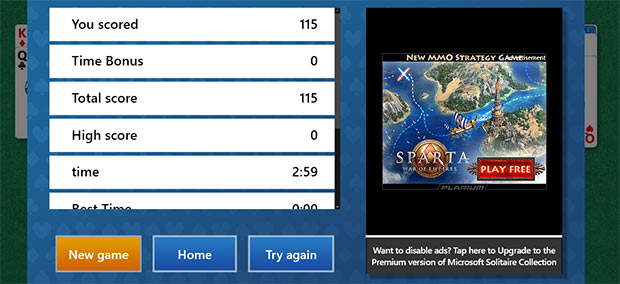
The new version of Solitaire also features ads (see above) unless you pay to unlock them, which is a particularly heartbreaking sign of the times, and that’s one example of somewhere this is likely to weave its dark spell. Essentially, you might wind up clicking on more ads than you otherwise would, because they’re tailored to your interests. Some people may not mind that, others will find it to be profoundly sinister.
Conceptually it’s another story entirely: a large corporation is gathering and storing vast amounts of data on your computing habits, and not simply what you do in a browser.
The other issue here is that Microsoft simply aren’t making it clear enough that they’re doing this, how it might affect you and how to opt out – despite chest-thumping, we’re-all-chums-here talk about how “real transparency starts with straightforward terms and policies that people can clearly understand.”


There is no world in which 45 pages of policy documents and opt-out settings split across 13 different Settings screens and an external website constitutes “real transparency.”

How to opt out;

OK, here’s how to take control of this stuff if you’re worried about it. No, opting out is not especially simple, although if you take an absolutist approach it doesn’t take at all long to set everything to ‘no.’ If you’re yet to install Windows 10 and are concerned about all this stuff, you can head most of it off at the pass by declining Express settings and choosing options yourself, refusing any request to let the OS or apps access your location and turning the Cortana search assistant off. If you missed the boat there, you’ll need to do any and all of the following. Even if you were super-cautious during setup, be sure to follow step 3 below if you’re concerned.
1. Go to Settings – Privacy and go through the 13 different screens there and turn anything which concerns you to off. The biggest, most universal settings are under ‘General’, while the other screens let you choose which apps can and can’t access your calendar, messages, camera, mic, etcetera. There may well be stuff you want to leave on – for instance, I do actually want Windows’ Calendar app to access my calendar data (obv), I just don’t want it to sell that data on because I don’t want to be bombarded with flower ads when it’s my mum’s birthday.
2. Depending on whether you’ve been finding it useful or not, you may want to go to Cortana’s settings and turn off everything there. It’s just working as a basic file search for me now, as I didn’t want its ‘suggestions’, I didn’t want it to lock me into Bing and I didn’t want a tiny part of my processor to be forever dedicated to listening out for voice commands I will never use.
3. This is the crucial one, and so fundamental to Windows 10’s tracking that Microsoft have stuck the setting on an external website, which they say is so that it’s on one easy dashboard, but I find it hard not to wonder if it’s in the hope that we don’t easily stumble across it while browsing Windows 10’s own Privacy menus. Said website is colorful and cheerful and can play a video at you talking about how wonderful targeted advertising is. Ignore the bumf and instead go directly here and set both options to Off. It’s the innocuous-sounding “Personalised ads wherever I use my Microsoft account” which is the likely root of all this, because having that on means Windows 10 itself becomes a hub for targeted ads. You’ll probably have set up Windows 10 with a Microsoft account, because it heavily encourages you to do so with talk of synchronised files and settings and a OneDrive cloud account during installation, but this means the OS is signed into that account all the time. As a result, Windows 10 itself has it spyglasses on, not just apps or pages that you’re signed into with your MS account.

I notice that every time I go back to that page, the “Personalized ads in this browser” setting has silently turned itself back on again. This is concerning, but I’m not yet sure if it’s a bug or if it’s exploiting sessions as an excuse to reset regularly. Judicious ad and cookie control with your plugins and browser options of choice can change this, however. Again, do remember that many websites are dependent on advertising revenue to survive, but opting out of targeted advertising – and having that opt out be respected – is another matter entirely.

4. You may also wish to remove your Microsoft account from Windows 10 and use a local account instead. This will double-down on restricting what’s harvested, though you’ll lose out on features such as settings synchronisation across all your PCs and will suffer more nagging from stuff like the Windows Store and OneDrive. Probably not a big deal for many people, I suspect. Go to Settings – Accounts – Your Account within Windows 10 (or just type ‘Accounts’ into haha Cortana) to get to the relevant options.
If you have multiple PCs already running Windows 10 you’ll need to do all of this on each of them, although your Microsoft account opt-out should be universal.
None of these options mean you’ll see fewer ads, but they do mean that not quite so much information about you will be gathered and sold, and also that the ads you do see won’t be ‘relevant’ to what algorithms have decided your interests are. It is worth noting that some folk find the latter to be preferable to entirely irrelevant ads, and in some cases even useful – but certainly not everyone. Hopefully you can use the information here to make an informed choice about what happens. Again, in many respects it’s not wildly different from what already happens on your smart phone or your browser, but it’s important that you should know about it, and that Windows now has something of an ulterior motive.
More options, or clearer options, may become available in time, depending on how much of the world frowns at Microsoft about this. I’ll let you know if I hear of anything else that needs doing in order to have Windows 10 respect your privacy.

:ball2h ya Windows 10 is all shiny and new and you just love playing with it..:clap:

And surely you've wondered why MS is giving 10 away for FREE ???
Why? Because YOU HAVE JUST BECOME THE PRODUCT !!!
:vampire:

So my question to everyone is this... WHY USE 10...Why submit all your privacy and data to their servers per their 45 page EULA ?

Honestly, what does Windows 10 bring to the table in new features that don't require you to turn over your soul (and maybe your first born) to Microsoft in order to use???

As for me and my family, our privacy, our security, our data, and our network...I'll pass and stay with 7...:thumbdown:
:beee:

Ultima modifica di Energia.S : 31-07-2015 alle 18:57.
Energia.S è offline   Rispondi citando il messaggio o parte di esso
Old 31-07-2015, 19:06   #96
psychok9
Senior Member
 
L'Avatar di psychok9
 
Iscritto dal: Jul 1999
Città: Palermo
Messaggi: 7342
La smania irrazionale di provare tutto ciò che è "nuovo"... mi ha fatto installare Windows 10.
A livello estetico mi sembra peggio di Windows 8/8.1, soprattutto le cornici delle finestre, sembrano molto approssimative, inoltre ora non seguono lo schema dei colori
Quindi grigio smunto, o bianco...
__________________
Intel I9 13900K, Corsair iCUE H150i RGB ELITE, ASUS Prime Z790-A WIFI, 64GB DDR5 @6400MHz e ASUS TUF Gaming RTX 3080 OC
psychok9 è offline   Rispondi citando il messaggio o parte di esso
Old 31-07-2015, 19:43   #97
Lithium_2.0
Senior Member
 
L'Avatar di Lithium_2.0
 
Iscritto dal: May 2008
Città: PN
Messaggi: 2131
Quote:
Originariamente inviato da Energia.S Guarda i messaggi
trovato su forum straniero:
ci sono un po' troppe spunte che si consiglia di togliere:

https://jonathan.porta.codes/2015/07...vacy-defaults/

https://www.reddit.com/r/Windows10/c...ogging_in_w10/

piu' che altro mi chiedo se abbia senso fare l'upgrade a W10, ho letto sul thread ufficiale di persone che hanno disabilitato tutto il possibile ed immaginabile, usano account locale e magari pure Start8... cosa resta, non si stava prima a tenere W7?
Lithium_2.0 è offline   Rispondi citando il messaggio o parte di esso
Old 01-08-2015, 01:46   #98
MaxFabio93
Senior Member
 
L'Avatar di MaxFabio93
 
Iscritto dal: Aug 2012
Città: Sardegna
Messaggi: 2797
Sinceramente io mi aspettavo molto di più da questo nuovo Windows, la fluidità c'è tutta, sembra non ci siano molti errori o bug ed il sistema è abbastanza accessibile però su alcuni fronti hanno peggiorato alla grande, scelte sbagliatissime secondo me, tre principali:

Prima di tutto gli aggiornamenti, perchè cavolo togliere all'utente la libertà di scelta? Io gli installo su Windows 8 ma quando voglio io e quando vengo avvisato, quando non sto utilizzando la banda della mia connessione faccio partire e so che non mi disturbano, adesso cosa succede con Windows 10 se mentre lavoro o mi svago al PC mi partono random gli aggiornamenti? E succede con tutte le versioni, tranne la Enterprise. Diventa un casino, purtroppo non ho la fibra con 100Mb!

Le icone, molti diranno che non sono il punto più importante del sistema ma seriamente? Hanno aggiornato alcune icone lasciandone altre vecchie? Perchè non aggiornarle tutte assieme? Si nota moltissimo la differenza! L'interfaccia in generale è buona anche se le finestre non sono il massimo...

Impostazioni, impostazioni dappertutto, sembra che ci sia più di un pannello di controllo e non si capisce bene dove si deve andare, sarà anche questione di pratica e di abitudine ma poteva essere più chiara la cosa, sta di fatto che ho installato Windows 10 in un portatile ma tornerò molto probabilmente al buon "vecchio" 8.1 finchè non cambieranno Windows Update.
__________________
FTTH TIM 1 Gigabit Down 300 Megabit Up - Forum: Banda Ultra Larga VDSL in Sardegna > MAPPA
Fondatore ed amministratore di SARDEGNA DIGITAL il primo portale web sul mondo della tecnologia e del digitale in Sardegna.

Ultima modifica di MaxFabio93 : 01-08-2015 alle 01:49.
MaxFabio93 è offline   Rispondi citando il messaggio o parte di esso
Old 01-08-2015, 01:56   #99
MiKeLezZ
Senior Member
 
L'Avatar di MiKeLezZ
 
Iscritto dal: Jul 2003
Messaggi: 26791
Quote:
Originariamente inviato da giovanni69 Guarda i messaggi
Quindi perchè il sistema operativo da un lato è gratis e dall'altro forzerebbe gli aggiornamenti tranne che nel settore Enterprise?

Mi viene da pensare che una delle ragioni sia che all'interno di Win 10 ci sia un bell'engine di tipo Bing (ma concettualmente come Google Analytics)in grado di raccogliere tutta l'attività dell'utente e quindi spremere al massimo il valore dell'utente: la sua vita digitale, nè più e nè meno della direzione degli smartphone. E gli aggiornamenti continui non solo per la sicurezza ma anche per le 'features' avrebbero lo scopo di costruire tale ragnatela in background, implementando il Big Data planetario.

Poi la parte dello Store per gli sviluppatori sarebbe un'altra revenue da cui far soldi.

La parte Enterprise forse presenta maggiori difficoltà: appropriarsi di 'abitudini' aziendali potrebbe far inca***re qualcuno troppo presto... ed alienarsi l'upgrade. Ma intanto a livello retail, evvai con il Grande Fratello.

E' un'idea fuori testa la mia?
Ma che idea, la verità: da un lato data collection (l'uso di Cortana ti salva qualsiasi cosa, visto che funziona da remoto), dall'altro blindatura estrema (ti scarichi il programma "x", con un aggiornamento te lo bloccano e non puoi esimerti da scaricare l'aggiornamento).
In pratica ci toccherà "jailbreakare" anche Windows.
Poi, che "ultima versione" d'Egitto: semplicemente si sono spostati a upgrade in stile Apple OS, dove te non vedi il numerino che c'è dietro e te li installi uno sopra l'altro.
Dovremo pagare il "dazio" ogni 2 anni in virtù di "importanti aggiornamenti" stile DX, UI, etc...

Quote:
Originariamente inviato da Lithium_2.0 Guarda i messaggi
piu' che altro mi chiedo se abbia senso fare l'upgrade a W10, ho letto sul thread ufficiale di persone che hanno disabilitato tutto il possibile ed immaginabile, usano account locale e magari pure Start8... cosa resta, non si stava prima a tenere W7?
In effetti è quello che farei io :|
MiKeLezZ è offline   Rispondi citando il messaggio o parte di esso
Old 01-08-2015, 08:44   #100
El Tazar
Senior Member
 
L'Avatar di El Tazar
 
Iscritto dal: Dec 2006
Messaggi: 997
Quote:
Originariamente inviato da MiKeLezZ Guarda i messaggi
Ma che idea, la verità: da un lato data collection (l'uso di Cortana ti salva qualsiasi cosa, visto che funziona da remoto), dall'altro blindatura estrema (ti scarichi il programma "x", con un aggiornamento te lo bloccano e non puoi esimerti da scaricare l'aggiornamento).
In pratica ci toccherà "jailbreakare" anche Windows.
Poi, che "ultima versione" d'Egitto: semplicemente si sono spostati a upgrade in stile Apple OS, dove te non vedi il numerino che c'è dietro e te li installi uno sopra l'altro.
Dovremo pagare il "dazio" ogni 2 anni in virtù di "importanti aggiornamenti" stile DX, UI, etc...

In effetti è quello che farei io :|
Concordo.
Da buon smanettone ho aggiornato al day one anche se avevo più volte detto che non lo avrei fatto perchè la piega presa da Microsoft non mi piaceva ma tant'è, quando uno è "smanettone" dentro poi si comporta come un bambino di 5 anni davanti ai regali di Natale

Passata la novità e usato il sistema per un paio di giorni torno sui miei passi: appena ho un attimo libero vado di downgrade della licenza e mi rimetto Windows 7

Troppi piccoli bug in primis ma oi anche a livello grafico non mi entusiasma:uso 7 al lavoro eccheccazzo mi sembra quello il prodotto nuovo!
Poi tutta la parte di advertising che non mi appartiene, specialmente in un prodotto che è in realtà a pagamento. Google quantomento mi spara pubblicità mirata ma non ha la faccia tosta di chiedermi pure dei soldi.

Pagare per pagare a questo punto viene da puntare più verso Apple.

Microsoft ha ragione su un punto però...questo sarà l'ultimo Windows.

Torno a 7 che, come diceva qualcun'altro qui sul forum, è l'ultimo vero Windows desktop.

P.S: @mikelezz tieniti stretto il tuo avatare perchè al prossimo giro per farlo devi pagare l'abbonamento

Ultima modifica di El Tazar : 01-08-2015 alle 08:46.
El Tazar è offline   Rispondi citando il messaggio o parte di esso
 Rispondi


Le novità MSI del 2026 per i videogiocatori Le novità MSI del 2026 per i videogiocato...
I nuovi schermi QD-OLED di quinta generazione di MSI, per i gamers I nuovi schermi QD-OLED di quinta generazione di...
Recensione vivo X300 Pro: è ancora lui il re della fotografia mobile, peccato per la batteria Recensione vivo X300 Pro: è ancora lui il...
Lenovo Legion Go 2: Ryzen Z2 Extreme e OLED 8,8'' per spingere gli handheld gaming PC al massimo Lenovo Legion Go 2: Ryzen Z2 Extreme e OLED 8,8'...
AWS re:Invent 2025: inizia l'era dell'AI-as-a-Service con al centro gli agenti AWS re:Invent 2025: inizia l'era dell'AI-as-a-Se...
HP Digital Passport, integrazione Copilo...
HP EliteBook X G2 ed EliteBoard G1a uffi...
Tutti possono avere un Alienware: al CES...
La gamma XPS di Dell si rinnova completa...
HyperX OMEN: ufficiali 3 nuovi laptop, 4...
HP presenta al CES 2026 la nuova gamma d...
Nuova Audi A2 e-tron: la compatta elettr...
Anche a Roma arriva la Zona 30: limite d...
Motorola sfida il mercato premium: in ar...
Snapdragon X2 Elite Extreme: Qualcomm ut...
Il pedaggio in autostrada ora costa di p...
ARC Raiders: svelati alcuni dettagli sul...
Assassin's Creed Codename Hexe affidato ...
A volte ritornano: al CES 2026 il nuovo ...
ricarica 67 W e 8 GB di RAM: questo real...
Chromium
GPU-Z
OCCT
LibreOffice Portable
Opera One Portable
Opera One 106
CCleaner Portable
CCleaner Standard
Cpu-Z
Driver NVIDIA GeForce 546.65 WHQL
SmartFTP
Trillian
Google Chrome Portable
Google Chrome 120
VirtualBox
Tutti gli articoli Tutte le news Tutti i download

Strumenti

Regole
Non Puoi aprire nuove discussioni
Non Puoi rispondere ai messaggi
Non Puoi allegare file
Non Puoi modificare i tuoi messaggi

Il codice vB è On
Le Faccine sono On
Il codice [IMG] è On
Il codice HTML è Off
Vai al Forum


Tutti gli orari sono GMT +1. Ora sono le: 07:10.


Powered by vBulletin® Version 3.6.4
Copyright ©2000 - 2026, Jelsoft Enterprises Ltd.
Served by www3v
1