


|
|||||||


|


|
|
 |
|
|
Strumenti |
 18-04-2024, 16:09
|
#1 |
|
Senior Member

Iscritto dal: Jun 2005
Messaggi: 23678
|
Windows Defender: non si aggiorna eppure...si 'aggiorna': è dunque aggiornato?
Salve a tutti,
Ho un'installazione di Windows 10 in cui Windows Defender non aggiorna manualmente e nemmeno automaticamente le firme. Pertanto le definizioni virus e spyware appaiono come: 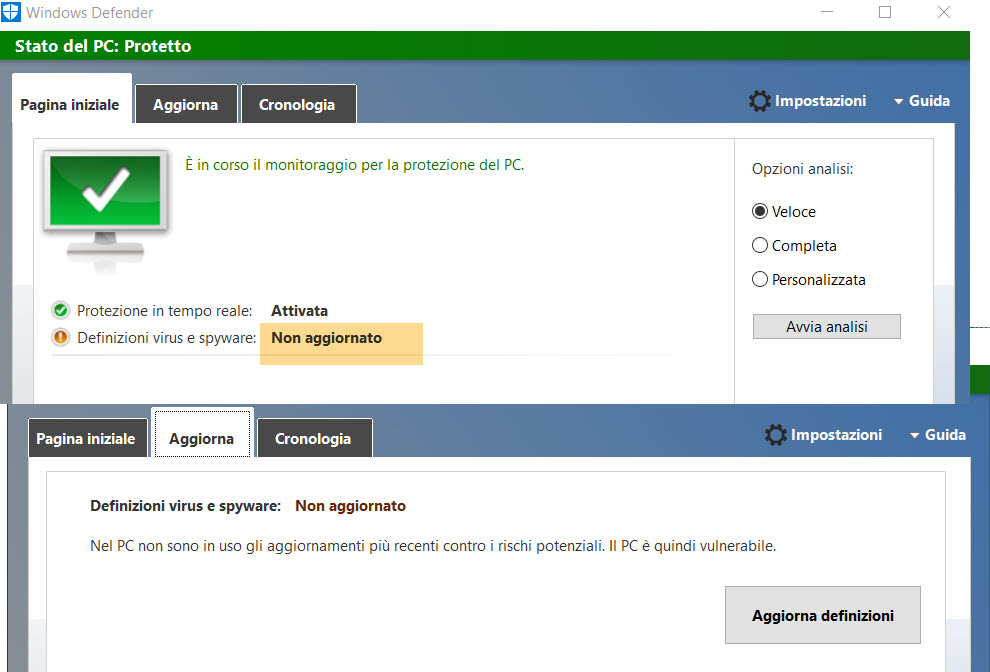 Se effettuo la ricerca manuale: 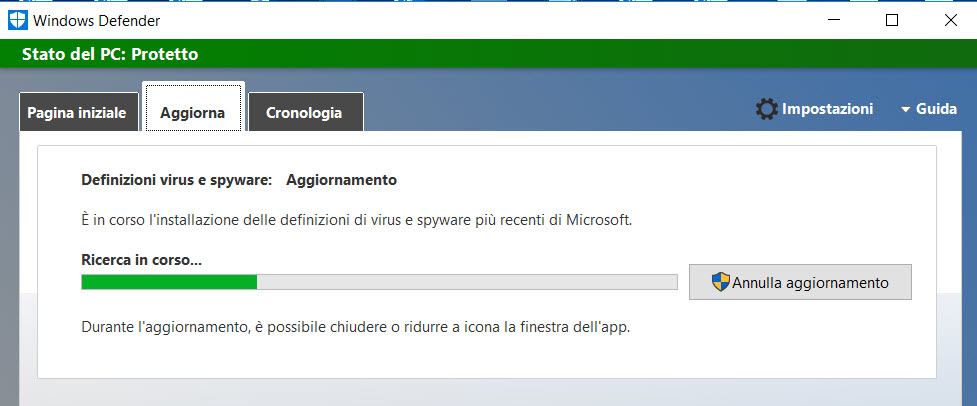 comunque non conclude positivamente, lasciando il medesimo status della prima immagine. Per cercare di ovviare al problema, scarico ed installo con diritti di Adminn manualmente, l'eseguibile mpam-fe.exe dall'apposito sito Microsoft "Security intelligence updates for Microsoft Defender Antivirus and other Microsoft antimalware ": 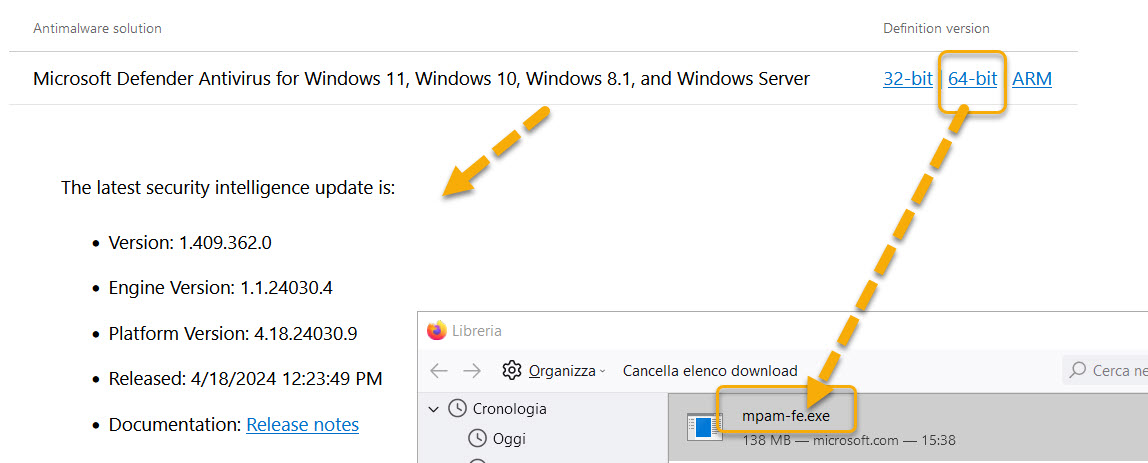 Il risultato di ciò è quanto si vede poi nelle impostazioni del Defender con la 'Info versione': 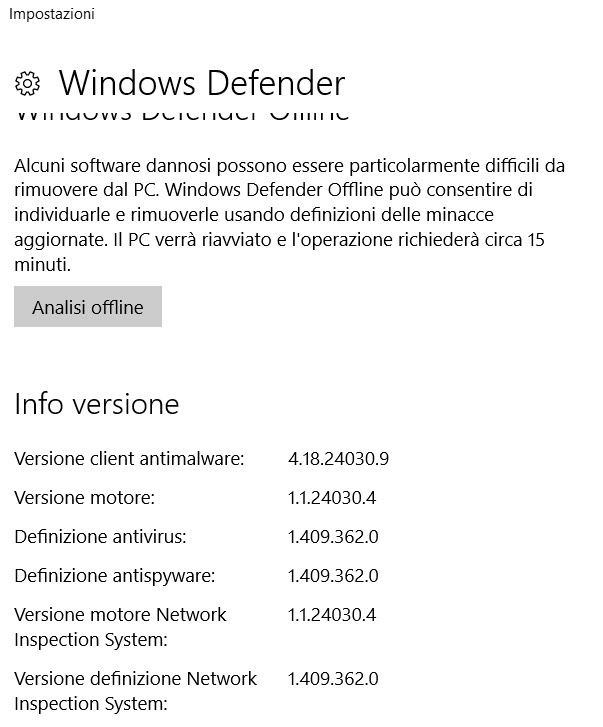 che coincide con quella visibile da un'altra identica installazione di Windows che si aggiorna senza problemi e che mostra invece regolarmente: 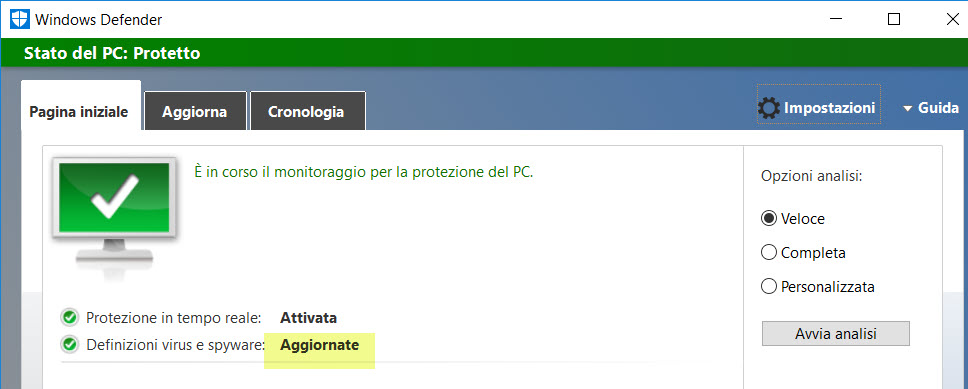 Una eventuale scansione veloce con il Defender problematico, viene completata regolarmente. : 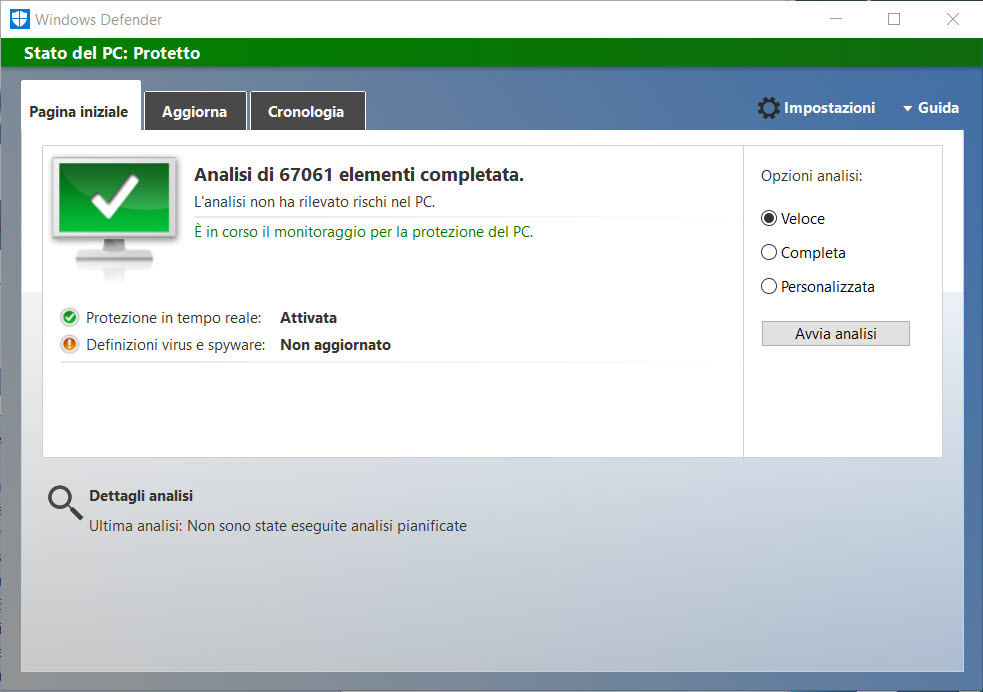 (Per sicurezza comunque effettuo scansioni manuali con Emsisoft Emergency Kit -EEK). La domanda è: visto che in modo o nell'altro riesco ad aggiornare le definizioni e le scansioni avvengono senza intoppi, posso stare tranquillo? La protezione in tempo reale è normalmente attiva.
__________________
Stampanti multifunzione [Thread ufficiale - consigli per gli acquisti] Ultima modifica di giovanni69 : 19-04-2024 alle 18:35. |

|

|
|
18-04-2024, 18:14
|
#2 | |
|
Senior Member

Iscritto dal: Mar 2008
Messaggi: 20638
|
Quote:
Ma sei sicuro sicuro che è una installazione di Windows 10 quella? Direi più probabile Windows 8, io Defender in 10 non lo ricordo mai così, neanche nove anni fa per dire. |
|
|
|
|

|
19-04-2024, 16:28
|
#4 |
|
Junior Member
Iscritto dal: Feb 2024
Messaggi: 23
|
Non mi pare il defender di Win10 quello!

|
|
|
|
|
19-04-2024, 18:11
|
#5 | |
|
Senior Member
Iscritto dal: Jun 2005
Messaggi: 23678
|
E' proprio Windows 10 di qualche tempo fa...
Quote:
 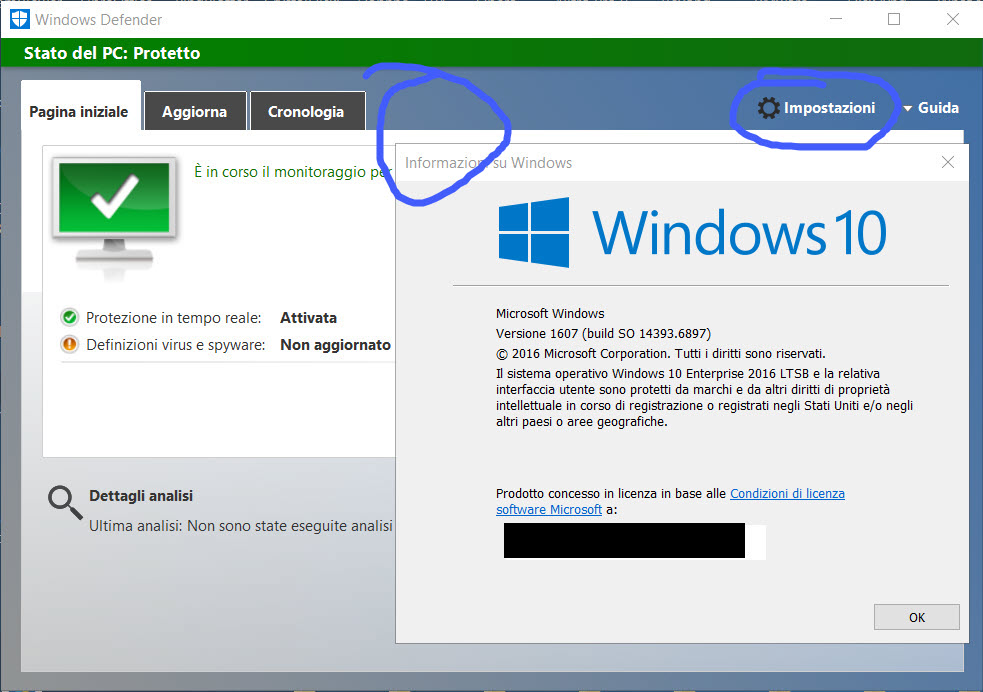 Questo invece è 8.1: 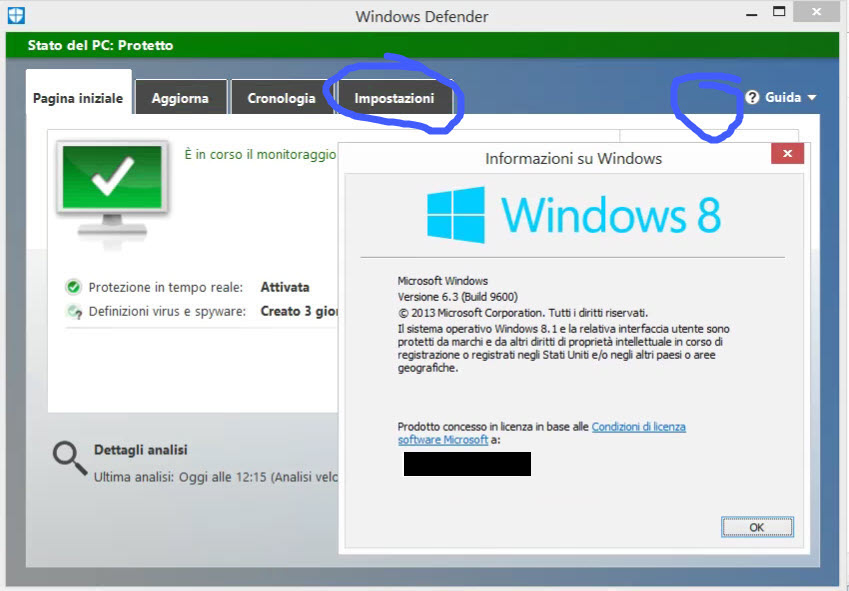 L'icona/ linguetta delle Impostazioni è diversa Dunque.... che ne pensate del quesito iniziale?
__________________
Stampanti multifunzione [Thread ufficiale - consigli per gli acquisti] Ultima modifica di giovanni69 : 19-04-2024 alle 18:33. |
|
|
|
|
|
23-04-2024, 14:01
|
#6 |
|
Senior Member
Iscritto dal: Jun 2005
Messaggi: 23678
|
UP!
__________________
Stampanti multifunzione [Thread ufficiale - consigli per gli acquisti] |
|
|
|
|
26-04-2024, 13:13
|
#7 |
|
Senior Member
Iscritto dal: Jun 2005
Messaggi: 23678
|
Problema troppo difficile?....

__________________
Stampanti multifunzione [Thread ufficiale - consigli per gli acquisti] |
|
|
|
|
26-04-2024, 14:56
|
#8 |
|
Senior Member

Iscritto dal: Oct 2008
Messaggi: 6594
|
ma scusa chi ha windows 10 aggiornato ha questo
https://snipboard.io/0d1yPX.jpg tu da dove tiri fuori quella vecchia interfaccia? |
|
|
|
|
26-04-2024, 15:03
|
#9 | |
|
Senior Member
Iscritto dal: Mar 2008
Messaggi: 20638
|
Quote:
è Windows 10 ltsb, una versione di windows 10 basata sulla 1607, roba di otto anni fa. Ancora supportata da MS.Io non l'avevo capito forse perché all'epoca anche sulla ltsb installavo Avira, per cui non consideravo per niente defender, quasi come non esistesse. |
|
|
|
|
|
26-04-2024, 19:39
|
#10 | |
|
Senior Member
Iscritto dal: Jun 2005
Messaggi: 23678
|
Quote:
__________________
Stampanti multifunzione [Thread ufficiale - consigli per gli acquisti] |
|
|
|
|
|
27-04-2024, 10:04
|
#11 | |
|
Senior Member
Iscritto dal: Jun 2005
Messaggi: 23678
|
Tralasciando le questioni di GUI di Defender, che ne pensate della problematica?
Quote:
L'aggiornamento mediante Powershell sembra fallire. Non appare questa sequenza di %: 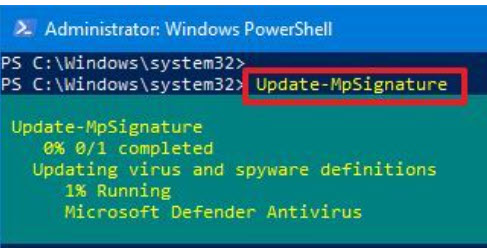 ma invece é questa dopo pochi secondi:  Con il comando Get-MpPreference: Codice:
Windows PowerShell
Copyright (C) 2016 Microsoft Corporation. Tutti i diritti sono riservati.

PS C:\Windows\system32> Get-MpPreference


AllowDatagramProcessingOnWinServer                    : False
AllowNetworkProtectionDownLevel                       : False
AllowNetworkProtectionOnWinServer                     : False
AllowSwitchToAsyncInspection                          : False
ApplyDisableNetworkScanningToIOAV                     : False
AttackSurfaceReductionOnlyExclusions                  :
AttackSurfaceReductionRules_Actions                   :
AttackSurfaceReductionRules_Ids                       :
AttackSurfaceReductionRules_RuleSpecificExclusions    :
AttackSurfaceReductionRules_RuleSpecificExclusions_Id :
BruteForceProtectionAggressiveness                    : 0
BruteForceProtectionConfiguredState                   : 0
BruteForceProtectionExclusions                        :
BruteForceProtectionMaxBlockTime                      : 0
CheckForSignaturesBeforeRunningScan                   : False
CloudBlockLevel                                       : 0
CloudExtendedTimeout                                  : 0
ComputerID                                            : CXXXXX-6XXXX-4XXX-AXXX-9XXXXXXXXXX
ControlledFolderAccessAllowedApplications             :
ControlledFolderAccessProtectedFolders                :
DefinitionUpdatesChannel                              : 0
DisableArchiveScanning                                : False
DisableAutoExclusions                                 : False
DisableBehaviorMonitoring                             : False
DisableBlockAtFirstSeen                               : False
DisableCacheMaintenance                               : False
DisableCatchupFullScan                                : True
DisableCatchupQuickScan                               : True
DisableCoreServiceECSIntegration                      : False
DisableCoreServiceTelemetry                           : False
DisableCpuThrottleOnIdleScans                         : True
DisableDatagramProcessing                             : False
DisableDnsOverTcpParsing                              : False
DisableDnsParsing                                     : False
DisableEmailScanning                                  : True
DisableFtpParsing                                     : False
DisableGradualRelease                                 : False
DisableHttpParsing                                    : False
DisableInboundConnectionFiltering                     : False
DisableIOAVProtection                                 : False
DisableNetworkProtectionPerfTelemetry                 : False
DisablePrivacyMode                                    : False
DisableQuicParsing                                    : False
DisableRdpParsing                                     : False
DisableRealtimeMonitoring                             : False
DisableRemovableDriveScanning                         : True
DisableRestorePoint                                   : True
DisableScanningMappedNetworkDrivesForFullScan         : True
DisableScanningNetworkFiles                           : False
DisableScriptScanning                                 : False
DisableSmtpParsing                                    : False
DisableSshParsing                                     : False
DisableTamperProtection                               : True
DisableTlsParsing                                     : False
EnableControlledFolderAccess                          : 0
EnableConvertWarnToBlock                              : False
EnableDnsSinkhole                                     : True
EnableFileHashComputation                             : False
EnableFullScanOnBatteryPower                          : False
EnableLowCpuPriority                                  : False
EnableNetworkProtection                               : 0
EnableUdpReceiveOffload                               : False
EnableUdpSegmentationOffload                          : False
EngineUpdatesChannel                                  : 0
ExclusionExtension                                    :
ExclusionIpAddress                                    :
ExclusionPath                                         : {C:\Program Files (x86)\ecc ecc
ExclusionProcess                                      : {eccecc.exe}
ForceUseProxyOnly                                     : False
HideExclusionsFromLocalUsers                          : True
HighThreatDefaultAction                               : 0
IntelTDTEnabled                                       :
LowThreatDefaultAction                                : 0
MAPSReporting                                         : 0
MeteredConnectionUpdates                              : False
ModerateThreatDefaultAction                           : 0
NetworkProtectionReputationMode                       : 0
OobeEnableRtpAndSigUpdate                             : False
PerformanceModeStatus                                 : 1
PlatformUpdatesChannel                                : 0
ProxyBypass                                           :
ProxyPacUrl                                           :
ProxyServer                                           :
PUAProtection                                         : 0
QuarantinePurgeItemsAfterDelay                        : 90
QuickScanIncludeExclusions                            : 0
RandomizeScheduleTaskTimes                            : True
RealTimeScanDirection                                 : 0
RemediationScheduleDay                                : 0
RemediationScheduleTime                               : 02:00:00
RemoteEncryptionProtectionAggressiveness              : 0
RemoteEncryptionProtectionConfiguredState             : 0
RemoteEncryptionProtectionExclusions                  :
RemoteEncryptionProtectionMaxBlockTime                : 0
RemoveScanningThreadPoolCap                           : False
ReportDynamicSignatureDroppedEvent                    : False
ReportingAdditionalActionTimeOut                      : 10080
ReportingCriticalFailureTimeOut                       : 10080
ReportingNonCriticalTimeOut                           : 1440
ScanAvgCPULoadFactor                                  : 50
ScanOnlyIfIdleEnabled                                 : True
ScanParameters                                        : 1
ScanPurgeItemsAfterDelay                              : 15
ScanScheduleDay                                       : 0
ScanScheduleOffset                                    : 120
ScanScheduleQuickScanTime                             : 00:00:00
ScanScheduleTime                                      : 02:00:00
SchedulerRandomizationTime                            : 4
ServiceHealthReportInterval                           : 60
SevereThreatDefaultAction                             : 0
SharedSignaturesPath                                  :
SharedSignaturesPathUpdateAtScheduledTimeOnly         : False
SignatureAuGracePeriod                                : 0
SignatureBlobFileSharesSources                        :
SignatureBlobUpdateInterval                           : 60
SignatureDefinitionUpdateFileSharesSources            :
SignatureDisableUpdateOnStartupWithoutEngine          : False
SignatureFallbackOrder                                : MicrosoftUpdateServer|MMPC
SignatureFirstAuGracePeriod                           : 120
SignatureScheduleDay                                  : 8
SignatureScheduleTime                                 : 01:45:00
SignatureUpdateCatchupInterval                        : 1
SignatureUpdateInterval                               : 0
SubmitSamplesConsent                                  : 0
ThreatIDDefaultAction_Actions                         :
ThreatIDDefaultAction_Ids                             :
ThrottleForScheduledScanOnly                          : True
TrustLabelProtectionStatus                            : 0
UILockdown                                            : False
UnknownThreatDefaultAction                            : 0
PSComputerName                                        :


PS C:\Windows\system32>
Questo è il controllo mediante powershell di engines e firme: Codice:
PS C:\Windows\system32> Get-MpComputerStatus AMEngineVersion : 1.1.24030.4 AMProductVersion : 4.18.24030.9 AMRunningMode : Normal AMServiceEnabled : True AMServiceVersion : 4.18.24030.9 AntispywareEnabled : True AntispywareSignatureAge : 0 AntispywareSignatureLastUpdated : 27/04/2024 00:38:29 AntispywareSignatureVersion : 1.409.546.0 AntivirusEnabled : True AntivirusSignatureAge : 0 AntivirusSignatureLastUpdated : 27/04/2024 00:38:28 AntivirusSignatureVersion : 1.409.546.0 BehaviorMonitorEnabled : True ComputerID : CXXXX-6XXX-4XXX-AX-9XXXXXXXX ComputerState : 0 DefenderSignaturesOutOfDate : False DeviceControlDefaultEnforcement : DeviceControlPoliciesLastUpdated : 27/03/2023 11:08:49 DeviceControlState : Disabled FullScanAge : 4294967295 FullScanEndTime : FullScanOverdue : False FullScanRequired : False FullScanSignatureVersion : FullScanStartTime : InitializationProgress : ServiceStartedSuccessfully IoavProtectionEnabled : True IsTamperProtected : False IsVirtualMachine : False LastFullScanSource : 0 LastQuickScanSource : 1 NISEnabled : True NISEngineVersion : 1.1.24030.4 NISSignatureAge : 0 NISSignatureLastUpdated : 27/04/2024 00:38:28 NISSignatureVersion : 1.409.546.0 OnAccessProtectionEnabled : True ProductStatus : 524288 QuickScanAge : 0 QuickScanEndTime : 27/04/2024 10:18:05 QuickScanOverdue : False QuickScanSignatureVersion : 1.409.546.0 QuickScanStartTime : 27/04/2024 10:15:12 RealTimeProtectionEnabled : True RealTimeScanDirection : 0 RebootRequired : False SmartAppControlExpiration : SmartAppControlState : Off TamperProtectionSource : N/A TDTCapable : N/A TDTMode : N/A TDTSiloType : N/A TDTStatus : N/A TDTTelemetry : N/A TroubleShootingDailyMaxQuota : TroubleShootingDailyQuotaLeft : TroubleShootingEndTime : TroubleShootingExpirationLeft : TroubleShootingMode : TroubleShootingModeSource : TroubleShootingQuotaResetTime : TroubleShootingStartTime : PSComputerName : PS C:\Windows\system32> Riporto qui l'estratto che appare rilevante: PS C:\Windows\system32> Get-MpComputerStatus AMEngineVersion : 1.1.24030.4 AMProductVersion : 4.18.24030.9 AMRunningMode : Normal AMServiceEnabled : True AMServiceVersion : 4.18.24030.9 AntispywareEnabled : True AntispywareSignatureAge : 0 AntispywareSignatureLastUpdated : 27/04/2024 00:38:29 AntispywareSignatureVersion : 1.409.546.0 AntivirusEnabled : True AntivirusSignatureAge : 0 AntivirusSignatureLastUpdated : 27/04/2024 00:38:28 AntivirusSignatureVersion : 1.409.546.0
__________________
Stampanti multifunzione [Thread ufficiale - consigli per gli acquisti] Ultima modifica di giovanni69 : 27-04-2024 alle 10:31. |
|
|
|
|
|
27-04-2024, 10:58
|
#12 |
|
Senior Member
Iscritto dal: Oct 2008
Messaggi: 6594
|
nella LTSB non c'è la possibilità di installare la versione più recente di defender?
magari tramite winget |
|
|
|
|
27-04-2024, 14:58
|
#13 | |
|
Member
Iscritto dal: Feb 2024
Messaggi: 135
|
Quote:
Antimalware Client Version: 4.18.24040.1 Engine Version: 1.1.24040.1 Antivirus Version: 1.409.550.0 Antispyware Version: 1.409.550.0 |
|
|
|
|
|
27-04-2024, 17:01
|
#14 | ||
|
Senior Member
Iscritto dal: Jun 2005
Messaggi: 23678
|
Quote:
Da dove capisci che sto usando una versione obsoleta, a parte la GUI? Se vado sul Microsoft Store alla ricerca del Defender da 'scaricare' mi ritrovo: "Disponibile su: PC Sistema operativo: Windows 11 versione 22000.0 o successiva" e quindi non potrei. e comunque dovrei prima installare il modulo Store.... per installare le 'app'. Quote:
In effetti adesso ho effettuato una nuova installazione manuale dell'ultimo mpam-fe.exe ed ora mi ritrovo con: AMEngineVersion : 1.1.24030.4 AMProductVersion : 4.18.24030.9 AMRunningMode : Normal AMServiceEnabled : True AMServiceVersion : 4.18.24030.9 AntispywareEnabled : True AntispywareSignatureAge : 0 AntispywareSignatureLastUpdated : 27/04/2024 08:03:26 AntispywareSignatureVersion : 1.409.552.0 AntivirusEnabled : True AntivirusSignatureAge : 0 AntivirusSignatureLastUpdated : 27/04/2024 08:03:25 AntivirusSignatureVersion : 1.409.552.0 il che è perfettamente coerente con: Latest security intelligence update The latest security intelligence update is: Version: 1.409.552.0 Engine Version: 1.1.24030.4 Platform Version: 4.18.24030.9 Released: 4/27/2024 12:54:10 PM Documentation: Release notes della pagina Microsoft. Grazie 
__________________
Stampanti multifunzione [Thread ufficiale - consigli per gli acquisti] Ultima modifica di giovanni69 : 27-04-2024 alle 17:12. |
||
|
|
|
|
|


| Strumenti | |


|
|

Tutti gli orari sono GMT +1. Ora sono le: 19:14.





