Torna indietro   Hardware Upgrade Forum > Giochi > Console & Giochi per Console

Recensione vivo X300 Pro: è ancora lui il re della fotografia mobile, peccato per la batteria
vivo X300 Pro rappresenta un'evoluzione misurata della serie fotografica del produttore cinese, con un sistema di fotocamere migliorato, chipset Dimensity 9500 di ultima generazione e l'arrivo dell'interfaccia OriginOS 6 anche sui modelli internazionali. La scelta di limitare la batteria a 5.440mAh nel mercato europeo, rispetto ai 6.510mAh disponibili altrove, fa storcere un po' il naso
Lenovo Legion Go 2: Ryzen Z2 Extreme e OLED 8,8'' per spingere gli handheld gaming PC al massimo
Lenovo Legion Go 2 è la nuova handheld PC gaming con processore AMD Ryzen Z2 Extreme (8 core Zen 5/5c, GPU RDNA 3.5 16 CU) e schermo OLED 8,8" 1920x1200 144Hz. È dotata anche di controller rimovibili TrueStrike con joystick Hall effect e una batteria da 74Wh. Rispetto al dispositivo che l'ha preceduta, migliora ergonomia e prestazioni a basse risoluzioni, ma pesa 920g e costa 1.299€ nella configurazione con 32GB RAM/1TB SSD e Z2 Extreme
AWS re:Invent 2025: inizia l'era dell'AI-as-a-Service con al centro gli agenti
A re:Invent 2025, AWS mostra un’evoluzione profonda della propria strategia: l’IA diventa una piattaforma di servizi sempre più pronta all’uso, con agenti e modelli preconfigurati che accelerano lo sviluppo, mentre il cloud resta la base imprescindibile per governare dati, complessità e lock-in in uno scenario sempre più orientato all’hybrid cloud
Tutti gli articoli Tutte le news

Vai al Forum
Rispondi
 
Strumenti
Old 15-09-2005, 00:48   #1
NaNu Gurthu
Member
 
Iscritto dal: Dec 2001
Messaggi: 22
gamecube usa-jap switch mi date informazioni sulla modifica?

sapreste darmi fonti internet su come si fa la modifica switch per passare il cubo da jap a usa e viceversa?
passo in questi giorni da console pal a una ntsc (più comoda per diversi motivi), e vorrei informarmi su questa possibilità.
grazie!!
cia
NaNu Gurthu è offline   Rispondi citando il messaggio o parte di esso
Old 16-09-2005, 02:01   #2
unlocked
Member
 
Iscritto dal: Mar 2004
Messaggi: 188
meglio modificare la pal e renderla universale..fine..
unlocked è offline   Rispondi citando il messaggio o parte di esso
Old 16-09-2005, 09:52   #3
NaNu Gurthu
Member
 
Iscritto dal: Dec 2001
Messaggi: 22
no,è che la ntsc mi serve per via dell'uscita S-video, che le PAL non hanno. inoltre non mi interessava propriamente renderla universale, quanto poter rendere facilmente (ed ECONOMICAMENTE...che le modifiche con chip non sono) una ntsc jap in USA, visto che dopo userei giochi usa.
aspetto risposte , grazie!
ciao
NaNu Gurthu è offline   Rispondi citando il messaggio o parte di esso
Old 16-09-2005, 10:23   #4
RedSky
Senior Member
 
L'Avatar di RedSky
 
Iscritto dal: Sep 2004
Città: SkyNet
Messaggi: 7850
Switch JAP to USA


Quote:
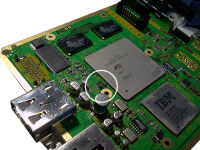
This is the main board, as seen from the video port side. Locate the ATI graphics chip, and the row of three jumpers as shown.


Quote:
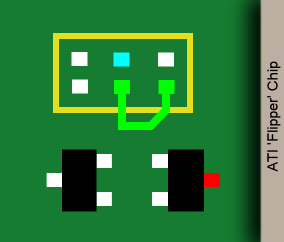
Here's a closeup of the jumpers you need to work with. These jumpers are very, very tiny, and this mod shouldn't be attempted by a soldering novice. There are three jumpers. Ignore the one on the left, and remove any jumpers on the center or right pair. Connect either of the two points joined by the green U-shaped trace to one leg of your switch, and the other to the blue or red point, depending on your GameCube model.

North American GC: use Red
Japanese GC: use Blue


Quote:
North American GC

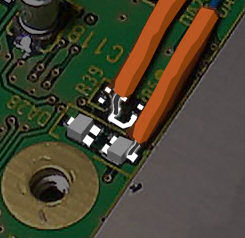
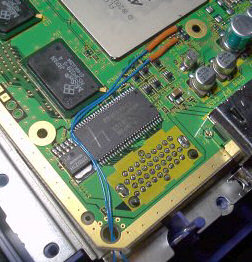
This pic shows the two wires connected to the appropriate points. To make the left wire easier to attach I scraped the green coating off the U-shaped trace. Use very thin wire (I used single-strand copper for this mod) and BE CAREFUL not to pull the wire after it's attached, you can peel the circuit off the board! Attach one wire to the U, and another to the transistor as shown.

Quote:
Japanese GC

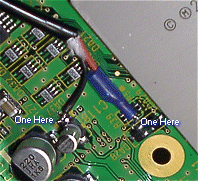
This pic shows the two wires connected to the appropriate points. To make the lower jumper pad more accessible, I scraped the PCB trace attached to it until the copper was revealed, and heaped some solder on it. Attach one wire to it, and another to the capacitor as shown.


Quote:
Here you can see how I routed the wire. There's a convenient hole in the corner nearest the jumpers, and you can see the wire coming out through another convenient hole in the side. From there, run it around the front and through yet another convenient hole underneath the connector for the control panel.

note! Be sure to leave lots of extra wire! It's easy to make it shorter later, but you can't make it longer if you guess the wrong length!


Quote:
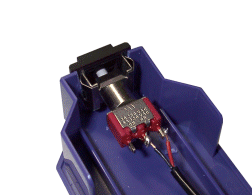
Using all the skill you can muster (And a dremel, if you've got one) cut or drill a hole for your switch in the end of this Serial Port cover. The advantage to putting it here should be obvious: you're not going to cause serious damage to the shell if you screw it up. Also, in the unlikely event Nintendo actually releases a modem or other device for this port, you can simply move the switch. I suppose that second point is a con, rather than a pro... Ah well.


Quote:

The Nintendo GameCube

Here it is - not the RGB mod we were hoping for but the next best thing - an import mod so we can all play the plethora of US released games on our Japanese cubes. Thanks to Planet GameCube for posting this. Don't forget the other GC stuff - the ring around the center of the disc, a review of the system itself over on AtariLabs, and the GameCube Guts page, which should come in handy when you're disassembling the unit.

Please discuss this page here.

This is the main board, as seen from the video port side. Locate the ATI graphics chip, and the row of three jumpers as shown.
Here's a closeup of the jumpers you need to work with. These jumpers are very, very tiny, and this mod shouldn't be attempted by a soldering novice. There are three jumpers. Ignore the one on the left, and remove any jumpers on the center or right pair. Connect either of the two points joined by the green U-shaped trace to one leg of your switch, and the other to the blue or red point, depending on your GameCube model.

North American GC: use Red
Japanese GC: use Blue

North American GC

This pic shows the two wires connected to the appropriate points. To make the left wire easier to attach I scraped the green coating off the U-shaped trace. Use very thin wire (I used single-strand copper for this mod) and BE CAREFUL not to pull the wire after it's attached, you can peel the circuit off the board! Attach one wire to the U, and another to the transistor as shown.

Japanese GC

This pic shows the two wires connected to the appropriate points. To make the lower jumper pad more accessible, I scraped the PCB trace attached to it until the copper was revealed, and heaped some solder on it. Attach one wire to it, and another to the capacitor as shown.
Here you can see how I routed the wire. There's a convenient hole in the corner nearest the jumpers, and you can see the wire coming out through another convenient hole in the side. From there, run it around the front and through yet another convenient hole underneath the connector for the control panel.

note! Be sure to leave lots of extra wire! It's easy to make it shorter later, but you can't make it longer if you guess the wrong length!
Using all the skill you can muster (And a dremel, if you've got one) cut or drill a hole for your switch in the end of this Serial Port cover. The advantage to putting it here should be obvious: you're not going to cause serious damage to the shell if you screw it up. Also, in the unlikely event Nintendo actually releases a modem or other device for this port, you can simply move the switch. I suppose that second point is a con, rather than a pro... Ah well.
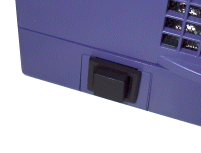
The finished product. Here's the switch in all its glory. Be sure to leave some extra wire length inside, in case you need to move the switch later, or want to open the unit up again.
questa fà per te

la sezione console abbonda di esperti in materia, sicuramente ti aiuteranno

ti lascio anche il link diretto del sito QUI
__________________
Consolelab on Youtube Scappato da WIND Fttc il 03/04: saturazione indecente per 7 mesi. Non aspettate mesi per andarvene. QUI e QUI le mie differenze documentate fra Wind FTTC Vula e TIM - Non fatevi abbagliare dai pochi € di risparmio di Wind - 🚀 TIM Fttc speedtest 200mbit @ TIM FTTH speedtest 🚀
RedSky è offline   Rispondi citando il messaggio o parte di esso
 Rispondi


Recensione vivo X300 Pro: è ancora lui il re della fotografia mobile, peccato per la batteria Recensione vivo X300 Pro: è ancora lui il...
Lenovo Legion Go 2: Ryzen Z2 Extreme e OLED 8,8'' per spingere gli handheld gaming PC al massimo Lenovo Legion Go 2: Ryzen Z2 Extreme e OLED 8,8'...
AWS re:Invent 2025: inizia l'era dell'AI-as-a-Service con al centro gli agenti AWS re:Invent 2025: inizia l'era dell'AI-as-a-Se...
Cos'è la bolla dell'IA e perché se ne parla Cos'è la bolla dell'IA e perché se...
BOOX Palma 2 Pro in prova: l'e-reader diventa a colori, e davvero tascabile BOOX Palma 2 Pro in prova: l'e-reader diventa a ...
La capsula SpaceX Dragon CRS-33 ha acces...
La NASA è sempre più vicin...
Crisi delle memorie: ASUS torna al passa...
Le console next-generation potrebbero es...
Gemini cresce ancora: la quota di mercat...
Samsung sfida TSMC: la capacità produtti...
Iliad alza il prezzo della fibra ottica ...
Il prossimo low cost di POCO sarà il più...
The Elder Scrolls VI: ecco le ultime sul...
Ecco i saldi di fine anno Amazon, 34 off...
iPhone Fold: scorte limitate al lancio m...
OpenAI porterà la pubblicità in ChatGPT ...
TSMC aumenterà ancora i prezzi: nel 2026...
Marvel pubblica anche il secondo teaser ...
Nuovo accordo tra xAI e il Pentagono: l'...
Chromium
GPU-Z
OCCT
LibreOffice Portable
Opera One Portable
Opera One 106
CCleaner Portable
CCleaner Standard
Cpu-Z
Driver NVIDIA GeForce 546.65 WHQL
SmartFTP
Trillian
Google Chrome Portable
Google Chrome 120
VirtualBox
Tutti gli articoli Tutte le news Tutti i download

Strumenti

Regole
Non Puoi aprire nuove discussioni
Non Puoi rispondere ai messaggi
Non Puoi allegare file
Non Puoi modificare i tuoi messaggi

Il codice vB è On
Le Faccine sono On
Il codice [IMG] è On
Il codice HTML è Off
Vai al Forum


Tutti gli orari sono GMT +1. Ora sono le: 12:00.


Powered by vBulletin® Version 3.6.4
Copyright ©2000 - 2026, Jelsoft Enterprises Ltd.
Served by www3v