


|
|||||||


|


|
|
 |
|
|
Strumenti |
 29-10-2024, 09:08
|
#1 |
|
Senior Member

Iscritto dal: Dec 2009
Città: Camunia Valley
Messaggi: 509
|
RICHIESTA DI UN COMANDO PER POWERSHELL
Ciao a tutti ho un quesito: siccome ho circa 4/5cento di GB di musica vorrei sistemarla, avrei bisogno di un COMANDO per powershell che scansioni la cartella dove tengo la musica e mi permetta di: prendere tutte le cartelle che contengono i file .mp3 spostandole in un’ altra cartella eliminando i file .mp3 al suo interno ma mantenendo nome e “albero” delle sopracartelle, cioè : se ad esempio la cartella che contiene i file .mp3 si chiama CD2 contenuta all’interno di MUSICA>nome artista>titolo album>CD2, il risultato finale sarà una cartella chiamata MUSICA1 con all’interno tutte le sotto cartelle vuote. E’ possibile? Grazie
__________________
 !!!!!!!!!!!Alegher Alegher che 'l bùs del cùl le negher!!!!!!!!!! Alcuni Miei Desktop !!!!!!!!!!!Alegher Alegher che 'l bùs del cùl le negher!!!!!!!!!! Alcuni Miei DesktopQuanta NLCB 16" Intel(R) Core(TM) i7-10875H CPU @ 2.30GHz 16GB DDR4 1330MHz Intel UHD Graphics (Comet Lake-H GT2) [R1] [Quanta Computer] + NVIDIA GeForce RTX2070 8GB GDDR6 1410 SSD Enmotus F200-1600(1,6TB) Windows 11 Home x64 24H2 |

|

|
|
29-10-2024, 09:22
|
#2 | |
|
Senior Member

Iscritto dal: Oct 2002
Città: Vicino a un ponte
Messaggi: 1293
|
Quote:
NOTA BENE ho scritto il codice "al volo" e non l'ho testato, quindi prima di metterlo "in produzione" creati due cartelle di "origine" e "destinazione" e fai una prova. (non voglio averti sulla coscenza)  P.S. modifica "al bisogno" i percorsi di source e destination delle prime due righe. Aggiornami se funziona / va bene cosi / dobbiamo fare delle modifiche... Codice:
$sourcePath = "C:\percorso\alla\tuacartella\musica"
$destinationPath = "C:\percorso\alla\nuovacartella\MUSICA1"

# Ottieni tutte le cartelle che contengono file .mp3
$foldersWithMp3 = Get-ChildItem -Path $sourcePath -Recurse -Directory | Where-Object {
    Get-ChildItem -Path $_.FullName -Filter *.mp3 -File | Measure-Object | Select-Object -ExpandProperty Count -eq 0
}

# Sposta le cartelle nella nuova posizione e elimina i file .mp3
foreach ($folder in $foldersWithMp3) {
    $newFolderPath = Join-Path -Path $destinationPath -ChildPath $folder.FullName.Substring($sourcePath.Length)
    New-Item -ItemType Directory -Path $newFolderPath -Force
    Remove-Item -Path (Join-Path -Path $folder.FullName -ChildPath "*.mp3") -Force
}
__________________
ASUS PRIME Z490-P | Intel® i7 10700K | Asus GeForce GTX 4060 OC | CORSAIR Vengeance LPX DDR4 3000 -32Gb- | Samsung 970 PRO M.2 512 Gb | Samsung SSD 840 PRO 256 Gb | 2x Samsung 970 EVO PLUS M.2 1 Tb Ultima modifica di pps : 29-10-2024 alle 09:24. |
|
|
|
|

|
29-10-2024, 10:49
|
#3 |
|
Member
Iscritto dal: Feb 2024
Messaggi: 147
|
Dovrebbe funzionare anche qualcosa di più semplice come:
Codice:
$sourcePath = "C:\percorso\alla\tuacartella\musica" $destinationPath = "C:\percorso\alla\nuovacartella\MUSICA1" Copy-Item $sourcePath $destinationPath -Recurse -Exclude "*.mp3" Nei test rapidi che ho fatto, il codice funziona come previsto, ma resta valido il consiglio di fare prima qualche prova con qualche tua "cartella cavia". |
|
|
|
|
29-10-2024, 14:17
|
#4 |
|
Senior Member
Iscritto dal: Dec 2009
Città: Camunia Valley
Messaggi: 509
|
Risposta al primo codice @pps
Codice:
Microsoft Windows [Versione 10.0.26100.2161]
(c) Microsoft Corporation. Tutti i diritti riservati.

C:\Users\umber>$sourcePath = "C:\Users\umber\Music\1-da sistemare"
"$sourcePath" non è riconosciuto come comando interno o esterno,
 un programma eseguibile o un file batch.

C:\Users\umber>$destinationPath = "C:\Users\umber\Music\MUSICA1"
"$destinationPath" non è riconosciuto come comando interno o esterno,
 un programma eseguibile o un file batch.

C:\Users\umber># Ottieni tutte le cartelle che contengono file .mp3
"#" non è riconosciuto come comando interno o esterno,
 un programma eseguibile o un file batch.

C:\Users\umber>$foldersWithMp3 = Get-ChildItem -Path $sourcePath -Recurse -Directory | Where-Object {Get-ChildItem -Path $_.FullName -Filter *.mp3 -File | Measure-Object | Select-Object -ExpandProperty Count -eq 0}
"$foldersWithMp3" non è riconosciuto come comando interno o esterno,
 un programma eseguibile o un file batch.

C:\Users\umber># Sposta le cartelle nella nuova posizione e elimina i file .mp3
"#" non è riconosciuto come comando interno o esterno,
 un programma eseguibile o un file batch.

C:\Users\umber>foreach ($folder in $foldersWithMp3) {
"foreach" non è riconosciuto come comando interno o esterno,
 un programma eseguibile o un file batch.

C:\Users\umber>    $newFolderPath = Join-Path -Path $destinationPath -ChildPath $folder.FullName.Substring($sourcePath.Length)
"$newFolderPath" non è riconosciuto come comando interno o esterno,
 un programma eseguibile o un file batch.

C:\Users\umber>    New-Item -ItemType Directory -Path $newFolderPath -Force
"New-Item" non è riconosciuto come comando interno o esterno,
 un programma eseguibile o un file batch.

C:\Users\umber>    Remove-Item -Path (Join-Path -Path $folder.FullName -ChildPath "*.mp3") -Force}
"Remove-Item" non è riconosciuto come comando interno o esterno,
 un programma eseguibile o un file batch.
Codice:
Microsoft Windows [Versione 10.0.26100.2161]
(c) Microsoft Corporation. Tutti i diritti riservati.

C:\Users\umber>$sourcePath = "C:\Users\umber\Music\1-da sistemare"
"$sourcePath" non è riconosciuto come comando interno o esterno,
 un programma eseguibile o un file batch.

C:\Users\umber>$destinationPath = "C:\Users\umber\Music\MUSICA1"
"$destinationPath" non è riconosciuto come comando interno o esterno,
 un programma eseguibile o un file batch.

C:\Users\umber>Copy-Item $sourcePath $destinationPath -Recurse -Exclude "*.mp3"
"Copy-Item" non è riconosciuto come comando interno o esterno,
 un programma eseguibile o un file batch.
__________________
!!!!!!!!!!!Alegher Alegher che 'l bùs del cùl le negher!!!!!!!!!! Alcuni Miei DesktopQuanta NLCB 16" Intel(R) Core(TM) i7-10875H CPU @ 2.30GHz 16GB DDR4 1330MHz Intel UHD Graphics (Comet Lake-H GT2) [R1] [Quanta Computer] + NVIDIA GeForce RTX2070 8GB GDDR6 1410 SSD Enmotus F200-1600(1,6TB) Windows 11 Home x64 24H2 Ultima modifica di pistorius08 : 29-10-2024 alle 14:23. |
|
|
|
|
29-10-2024, 14:22
|
#5 |
|
Senior Member

Iscritto dal: Mar 2008
Messaggi: 21020
|
Stai operando dal prompt dei comandi non da Power Shell, o sbaglio?

|

|
|
|
29-10-2024, 15:12
|
#6 |
|
Member
Iscritto dal: Feb 2024
Messaggi: 147
|
Se vuoi usarlo come codice direttamente dal terminale, quindi senza fare copia-codice/incolla-su-file-di-testo/salva-come-PS1 (come suggerito da pps), allora devi avviare PowerShell (tasto destro su menu start / Windows PowerShell), incollare questo codice e poi modificare i percorsi prima di premere invio:
Codice:
$sourcePath = "C:\percorso\alla\tuacartella\musica" ; $destinationPath = "C:\percorso\alla\nuovacartella\MUSICA1" ; Copy-Item $sourcePath $destinationPath -Recurse -Exclude "*.mp3" 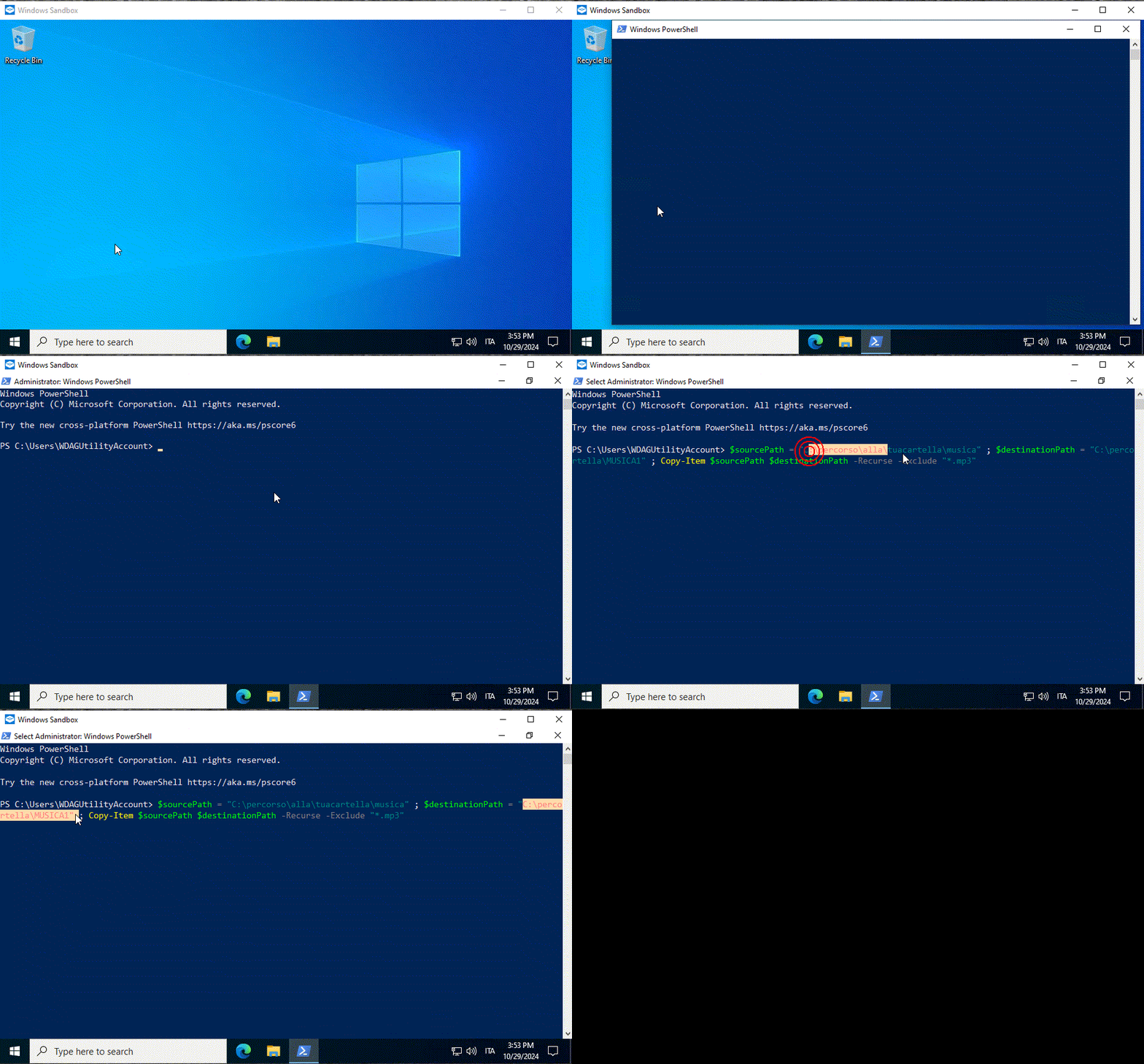 Con Windows 11 la procedura è la medesima. |
|
|
|
|
29-10-2024, 15:14
|
#7 |
|
Senior Member
Iscritto dal: Dec 2009
Città: Camunia Valley
Messaggi: 509
|
Ops hai ragione pensavo fosse la stessa cosa

__________________
!!!!!!!!!!!Alegher Alegher che 'l bùs del cùl le negher!!!!!!!!!! Alcuni Miei DesktopQuanta NLCB 16" Intel(R) Core(TM) i7-10875H CPU @ 2.30GHz 16GB DDR4 1330MHz Intel UHD Graphics (Comet Lake-H GT2) [R1] [Quanta Computer] + NVIDIA GeForce RTX2070 8GB GDDR6 1410 SSD Enmotus F200-1600(1,6TB) Windows 11 Home x64 24H2 |
|
|
|
|
29-10-2024, 15:21
|
#8 | |
|
Senior Member
Iscritto dal: Dec 2009
Città: Camunia Valley
Messaggi: 509
|
Quote:
__________________
!!!!!!!!!!!Alegher Alegher che 'l bùs del cùl le negher!!!!!!!!!! Alcuni Miei DesktopQuanta NLCB 16" Intel(R) Core(TM) i7-10875H CPU @ 2.30GHz 16GB DDR4 1330MHz Intel UHD Graphics (Comet Lake-H GT2) [R1] [Quanta Computer] + NVIDIA GeForce RTX2070 8GB GDDR6 1410 SSD Enmotus F200-1600(1,6TB) Windows 11 Home x64 24H2 |
|
|
|
|
|
29-10-2024, 15:34
|
#9 |
|
Senior Member
Iscritto dal: Dec 2009
Città: Camunia Valley
Messaggi: 509
|
@pps
[QUOTE Codice:
$sourcePath = "C:\percorso\alla\tuacartella\musica"
$destinationPath = "C:\percorso\alla\nuovacartella\MUSICA1"

# Ottieni tutte le cartelle che contengono file .mp3
$foldersWithMp3 = Get-ChildItem -Path $sourcePath -Recurse -Directory | Where-Object {
    Get-ChildItem -Path $_.FullName -Filter *.mp3 -File | Measure-Object | Select-Object -ExpandProperty Count -eq 0
}

# Sposta le cartelle nella nuova posizione e elimina i file .mp3
foreach ($folder in $foldersWithMp3) {
    $newFolderPath = Join-Path -Path $destinationPath -ChildPath $folder.FullName.Substring($sourcePath.Length)
    New-Item -ItemType Directory -Path $newFolderPath -Force
    Remove-Item -Path (Join-Path -Path $folder.FullName -ChildPath "*.mp3") -Force
}
Codice:
PowerShell 7.4.6

Do you want to run software from this untrusted publisher?
File C:\users\umber\0-portable\powershell-7.4.6-win-x64\Modules\PSReadLine\PSReadLine.format.ps1xml is published by
CN=Microsoft Corporation, O=Microsoft Corporation, L=Redmond, S=Washington, C=US and is not trusted on your system.
Only run scripts from trusted publishers.
[V] Never run  [D] Do not run  [R] Run once  [A] Always run  [?] Help (default is "D"): d
Cannot load PSReadline module.  Console is running without PSReadline.
PS C:\Users\umber\0-PORTABLE\PowerShell-7.4.6-win-x64> $sourcePath = "C:\Users\umber\Music\1-da sistemare"
PS C:\Users\umber\0-PORTABLE\PowerShell-7.4.6-win-x64> $destinationPath = "C:\Users\umber\Music\MUSICA1"
PS C:\Users\umber\0-PORTABLE\PowerShell-7.4.6-win-x64> # Ottieni tutte le cartelle che contengono file .mp3
PS C:\Users\umber\0-PORTABLE\PowerShell-7.4.6-win-x64> $foldersWithMp3 = Get-ChildItem -Path $sourcePath -Recurse -Directory | Where-Object {Get-ChildItem -Path $_.FullName -Filter *.mp3 -File | Measure-Object | Select-Object -ExpandProperty Count -eq 0}
Select-Object: A parameter cannot be found that matches parameter name 'eq'.
Select-Object: A parameter cannot be found that matches parameter name 'eq'.
Select-Object: A parameter cannot be found that matches parameter name 'eq'.
Select-Object: A parameter cannot be found that matches parameter name 'eq'.
Select-Object: A parameter cannot be found that matches parameter name 'eq'.
Select-Object: A parameter cannot be found that matches parameter name 'eq'.
Select-Object: A parameter cannot be found that matches parameter name 'eq'.
Select-Object: A parameter cannot be found that matches parameter name 'eq'.
Select-Object: A parameter cannot be found that matches parameter name 'eq'.
Select-Object: A parameter cannot be found that matches parameter name 'eq'.
Select-Object: A parameter cannot be found that matches parameter name 'eq'.
Select-Object: A parameter cannot be found that matches parameter name 'eq'.
Select-Object: A parameter cannot be found that matches parameter name 'eq'.
Select-Object: A parameter cannot be found that matches parameter name 'eq'.
Select-Object: A parameter cannot be found that matches parameter name 'eq'.
Select-Object: A parameter cannot be found that matches parameter name 'eq'.
Select-Object: A parameter cannot be found that matches parameter name 'eq'.
Select-Object: A parameter cannot be found that matches parameter name 'eq'.
Select-Object: A parameter cannot be found that matches parameter name 'eq'.
Select-Object: A parameter cannot be found that matches parameter name 'eq'.
Select-Object: A parameter cannot be found that matches parameter name 'eq'.
Select-Object: A parameter cannot be found that matches parameter name 'eq'.
Select-Object: A parameter cannot be found that matches parameter name 'eq'.
Select-Object: A parameter cannot be found that matches parameter name 'eq'.
Select-Object: A parameter cannot be found that matches parameter name 'eq'.
Select-Object: A parameter cannot be found that matches parameter name 'eq'.
Select-Object: A parameter cannot be found that matches parameter name 'eq'.
Select-Object: A parameter cannot be found that matches parameter name 'eq'.
Select-Object: A parameter cannot be found that matches parameter name 'eq'.
Select-Object: A parameter cannot be found that matches parameter name 'eq'.
Select-Object: A parameter cannot be found that matches parameter name 'eq'.
Select-Object: A parameter cannot be found that matches parameter name 'eq'.
Select-Object: A parameter cannot be found that matches parameter name 'eq'.
Select-Object: A parameter cannot be found that matches parameter name 'eq'.
Select-Object: A parameter cannot be found that matches parameter name 'eq'.
Select-Object: A parameter cannot be found that matches parameter name 'eq'.
Select-Object: A parameter cannot be found that matches parameter name 'eq'.
Select-Object: A parameter cannot be found that matches parameter name 'eq'.
Select-Object: A parameter cannot be found that matches parameter name 'eq'.
Select-Object: A parameter cannot be found that matches parameter name 'eq'.
Select-Object: A parameter cannot be found that matches parameter name 'eq'.
Select-Object: A parameter cannot be found that matches parameter name 'eq'.
Select-Object: A parameter cannot be found that matches parameter name 'eq'.
Select-Object: A parameter cannot be found that matches parameter name 'eq'.
Select-Object: A parameter cannot be found that matches parameter name 'eq'.
Select-Object: A parameter cannot be found that matches parameter name 'eq'.
Select-Object: A parameter cannot be found that matches parameter name 'eq'.
Select-Object: A parameter cannot be found that matches parameter name 'eq'.
Select-Object: A parameter cannot be found that matches parameter name 'eq'.
Select-Object: A parameter cannot be found that matches parameter name 'eq'.
Select-Object: A parameter cannot be found that matches parameter name 'eq'.
Select-Object: A parameter cannot be found that matches parameter name 'eq'.
Select-Object: A parameter cannot be found that matches parameter name 'eq'.
Select-Object: A parameter cannot be found that matches parameter name 'eq'.
Select-Object: A parameter cannot be found that matches parameter name 'eq'.
Select-Object: A parameter cannot be found that matches parameter name 'eq'.
Select-Object: A parameter cannot be found that matches parameter name 'eq'.
Select-Object: A parameter cannot be found that matches parameter name 'eq'.
Select-Object: A parameter cannot be found that matches parameter name 'eq'.
Select-Object: A parameter cannot be found that matches parameter name 'eq'.
Select-Object: A parameter cannot be found that matches parameter name 'eq'.
Select-Object: A parameter cannot be found that matches parameter name 'eq'.
Select-Object: A parameter cannot be found that matches parameter name 'eq'.
Select-Object: A parameter cannot be found that matches parameter name 'eq'.
Select-Object: A parameter cannot be found that matches parameter name 'eq'.
Select-Object: A parameter cannot be found that matches parameter name 'eq'.
Select-Object: A parameter cannot be found that matches parameter name 'eq'.
Select-Object: A parameter cannot be found that matches parameter name 'eq'.
Select-Object: A parameter cannot be found that matches parameter name 'eq'.
Select-Object: A parameter cannot be found that matches parameter name 'eq'.
Select-Object: A parameter cannot be found that matches parameter name 'eq'.
Select-Object: A parameter cannot be found that matches parameter name 'eq'.
Select-Object: A parameter cannot be found that matches parameter name 'eq'.
Select-Object: A parameter cannot be found that matches parameter name 'eq'.
Select-Object: A parameter cannot be found that matches parameter name 'eq'.
Select-Object: A parameter cannot be found that matches parameter name 'eq'.
Select-Object: A parameter cannot be found that matches parameter name 'eq'.
Select-Object: A parameter cannot be found that matches parameter name 'eq'.
Select-Object: A parameter cannot be found that matches parameter name 'eq'.
Select-Object: A parameter cannot be found that matches parameter name 'eq'.
Select-Object: A parameter cannot be found that matches parameter name 'eq'.
Select-Object: A parameter cannot be found that matches parameter name 'eq'.
Select-Object: A parameter cannot be found that matches parameter name 'eq'.
Select-Object: A parameter cannot be found that matches parameter name 'eq'.
Select-Object: A parameter cannot be found that matches parameter name 'eq'.
Select-Object: A parameter cannot be found that matches parameter name 'eq'.
Select-Object: A parameter cannot be found that matches parameter name 'eq'.
Select-Object: A parameter cannot be found that matches parameter name 'eq'.
Select-Object: A parameter cannot be found that matches parameter name 'eq'.
Select-Object: A parameter cannot be found that matches parameter name 'eq'.
Select-Object: A parameter cannot be found that matches parameter name 'eq'.
Select-Object: A parameter cannot be found that matches parameter name 'eq'.
Select-Object: A parameter cannot be found that matches parameter name 'eq'.
Select-Object: A parameter cannot be found that matches parameter name 'eq'.
PS C:\Users\umber\0-PORTABLE\PowerShell-7.4.6-win-x64> # Sposta le cartelle nella nuova posizione e elimina i file .mp3
PS C:\Users\umber\0-PORTABLE\PowerShell-7.4.6-win-x64> foreach ($folder in $foldersWithMp3) {
>>     $newFolderPath = Join-Path -Path $destinationPath -ChildPath $folder.FullName.Substring($sourcePath.Length)
>>     New-Item -ItemType Directory -Path $newFolderPath -Force
>>     Remove-Item -Path (Join-Path -Path $folder.FullName -ChildPath "*.mp3") -Force}
__________________
!!!!!!!!!!!Alegher Alegher che 'l bùs del cùl le negher!!!!!!!!!! Alcuni Miei DesktopQuanta NLCB 16" Intel(R) Core(TM) i7-10875H CPU @ 2.30GHz 16GB DDR4 1330MHz Intel UHD Graphics (Comet Lake-H GT2) [R1] [Quanta Computer] + NVIDIA GeForce RTX2070 8GB GDDR6 1410 SSD Enmotus F200-1600(1,6TB) Windows 11 Home x64 24H2 Ultima modifica di pistorius08 : 29-10-2024 alle 15:38. |
|
|
|
|
29-10-2024, 15:51
|
#10 | |
|
Member
Iscritto dal: Feb 2024
Messaggi: 147
|
Quote:
Codice:
-Exclude "*.mp3","*.flac" Codice:
-Exclude "*.*" |
|
|
|
|
|
29-10-2024, 16:34
|
#11 |
|
Senior Member
Iscritto dal: Dec 2009
Città: Camunia Valley
Messaggi: 509
|
@SysLack
il tuo comando funziona quasi alla perfezione, ho provato con un album che sapevo contenesse mp3, il risultato è la nuova cartella senza gli mp3 con all'interno le 3 cartelle originali, CD1 CD2 contenenti le immagini di artist front back disc, la terza cartella cover con all'interno le vari immagini e il pdf dell'album fino qua tutto bene, ma non ha eliminato/spostato la cartella sorgente che è rimasta immutata, in conclusione: il tuo comando copia tutte le cartelle della sorgente contenenti mp3 e FLAC svuotando gli mp3 nella destinazione , mentre a me occorrerebbe che le cartelle dei FLAC non vengano copiate mentre quelle degli mp3 vengano svuotate dagli mp3 e tagliate/incollate nella cartella di destinazione, penso proprio che se la cosa si possa fare di sicuro tu troverai la soluzione GRAZIE GRAZIE GRAZIE P.S. Sono migliaia di cartelle non mi ricordo quali siano quelle contenenti gli mp3......e non voglio copiare nulla perchè non avrei abbastanza spazio visto che sono 4/500 GB di "roba" se poi le copia tutte il nr raddoppia....e le cartelle che contengono gli mp3 restano immutate al loro posto, e io vorrei che queto non succedesse. Scusami tanto se ti stò facendo tribulare. Umberto
__________________
!!!!!!!!!!!Alegher Alegher che 'l bùs del cùl le negher!!!!!!!!!! Alcuni Miei DesktopQuanta NLCB 16" Intel(R) Core(TM) i7-10875H CPU @ 2.30GHz 16GB DDR4 1330MHz Intel UHD Graphics (Comet Lake-H GT2) [R1] [Quanta Computer] + NVIDIA GeForce RTX2070 8GB GDDR6 1410 SSD Enmotus F200-1600(1,6TB) Windows 11 Home x64 24H2 Ultima modifica di pistorius08 : 29-10-2024 alle 16:55. |
|
|
|
|
29-10-2024, 19:51
|
#12 | ||
|
Senior Member
Iscritto dal: Dec 2009
Città: Camunia Valley
Messaggi: 509
|
Quote:
Quote:
__________________
!!!!!!!!!!!Alegher Alegher che 'l bùs del cùl le negher!!!!!!!!!! Alcuni Miei DesktopQuanta NLCB 16" Intel(R) Core(TM) i7-10875H CPU @ 2.30GHz 16GB DDR4 1330MHz Intel UHD Graphics (Comet Lake-H GT2) [R1] [Quanta Computer] + NVIDIA GeForce RTX2070 8GB GDDR6 1410 SSD Enmotus F200-1600(1,6TB) Windows 11 Home x64 24H2 |
||
|
|
|
|
29-10-2024, 21:35
|
#13 | |
|
Senior Member
Iscritto dal: Dec 2009
Città: Camunia Valley
Messaggi: 509
|
Quote:
Codice:
PowerShell 7.3.8 PS C:\Users\umber\Music\prova mp3.1> $sourcePath = "C:\Users\umber\Music\prova mp3.1\MUSICA" PS C:\Users\umber\Music\prova mp3.1> $destinationPath = "C:\Users\umber\Music\prova mp3.1\MUSICA1" PS C:\Users\umber\Music\prova mp3.1> Copy-Item $sourcePath $destinationPath -Recurse -Exclude "*.mp3" 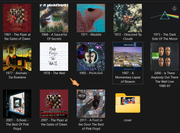 Mi sembra un po come il cane che si morde la coda, sto pensando di abbandonare la mia malsana idea  anche se la speranza è l'ultima a morire. Grazie Mille per il tempo dedicatomi anche se la speranza è l'ultima a morire. Grazie Mille per il tempo dedicatomi
__________________
!!!!!!!!!!!Alegher Alegher che 'l bùs del cùl le negher!!!!!!!!!! Alcuni Miei DesktopQuanta NLCB 16" Intel(R) Core(TM) i7-10875H CPU @ 2.30GHz 16GB DDR4 1330MHz Intel UHD Graphics (Comet Lake-H GT2) [R1] [Quanta Computer] + NVIDIA GeForce RTX2070 8GB GDDR6 1410 SSD Enmotus F200-1600(1,6TB) Windows 11 Home x64 24H2 Ultima modifica di pistorius08 : 29-10-2024 alle 21:41. |
|
|
|
|
|
30-10-2024, 08:44
|
#14 | |
|
Senior Member
Iscritto dal: Oct 2002
Città: Vicino a un ponte
Messaggi: 1293
|
Quote:
__________________
ASUS PRIME Z490-P | Intel® i7 10700K | Asus GeForce GTX 4060 OC | CORSAIR Vengeance LPX DDR4 3000 -32Gb- | Samsung 970 PRO M.2 512 Gb | Samsung SSD 840 PRO 256 Gb | 2x Samsung 970 EVO PLUS M.2 1 Tb |
|
|
|
|
|
30-10-2024, 10:47
|
#15 | |
|
Member
Iscritto dal: Feb 2024
Messaggi: 147
|
Quote:
Codice:
powershell.exe -ep bypass C:\percorso file.PS1 Fai dei test con una copia di alcune cartelle che vuoi spostare, così se qualcosa va storto, non perdi nulla. Considera inoltre che lo script cancellerà tutte le cartelle vuote che trova nella cartella sorgente. Chiaramente valuta bene se è il caso di lanciare uno script che sposta e cancella file che non potrai più recuperare; ho fatto delle prove e sembra funzionare come desideri, ma onestamente non lo userei su file importanti di cui non ho il backup o che non posso recuperare in altro modo. Codice:
# Funzione per gestire percorso sottocartelle nella destinazione
function SubPath {
    param (
        [string]$BasePath,
        [string]$FullPath
    )
    $BasePath = (Resolve-Path $BasePath).Path
    $FullPath = (Resolve-Path $FullPath).Path
    if (-not $BasePath.EndsWith('\')) {
        $BasePath += '\'
    }
    if ($FullPath.StartsWith($BasePath)) {
        return $FullPath.Substring($BasePath.Length)
    } else {
        return $FullPath
    }
}


# Percorso cartelle DA MODIFICARE
$Sorgente = "C:\sorgente..."
$Destinazione = "C:\destinazione..."

# Estensione da rimuovere
$Estensione = "*.mp3"

# Individuazione sottocartelle
$SubFolders = Get-ChildItem -Path $Sorgente -Directory -Recurse

# Spostamento cartelle e rimozione MP3
foreach ($Folder in $SubFolders) {
    # Individuazione cartelle da processare
    if (Get-ChildItem -Path $Folder.FullName -Filter $Estensione -File -Recurse) {
        # Creazione nuove cartelle nella destinazione
        $DiffName = SubPath -BasePath $Sorgente -FullPath $Folder.FullName
        New-Item -ItemType Directory "$(Join-Path -Path $Destinazione -ChildPath $DiffName)"
        # Spostamento cartelle contenenti MP3
        $NewPath = "$(Join-Path -Path $Destinazione -ChildPath $DiffName)"
        Move-Item -Path "$($Folder.FullName)\*.*" -Destination $NewPath
        # Rimozione MP3
        Get-ChildItem -Path $NewPath -Filter $Estensione -File | Remove-Item -Force
    }
}

# Cancellazione cartelle vuote nella sorgente
foreach ($DirEmpty in (Get-ChildItem $Sorgente -Recurse -Exclude *.*)) {
    if ((Get-ChildItem $DirEmpty) -eq $null) {
        Remove-Item $DirEmpty -Force
    }
}
|
|
|
|
|
|
30-10-2024, 13:51
|
#16 | |
|
Senior Member
Iscritto dal: Dec 2009
Città: Camunia Valley
Messaggi: 509
|
Quote:
ORIGINE (SITUAZIONE ORIGINE) DESTINAZIONE cartella solo mp3 (cartella eliminata) cartella vuota cartella mp3+immagini (cartella eliminata) cartella solo immagini cartella mp3+immagini+cartella (cartella con cartella) cartella solo immagini cartella mp3+FLAC+immagini+cartella (cartella con cartella) cartella FLAC+immagini cartella cartelle (mp3+immagini)-- (cartella vuota) cartella cartelle (immagini)-- cartella cartelle (mp3)-- (cartella vuota) cartella cartelle (vuote) cartella solo FLAC (cartella solo FLAC) inesistente Se non è abbastanza chiaro forse qui lo è https://drive.google.com/file/d/1DM5...usp=drive_link sembra funzionare anche se c'è da lavorare (io) ancora un pò: per spulciare il tutto eliminare. spostare le cartelle ma è già un'OTTIMO risultato  Un' IMMENNSO GRAZIE Syslcak sei un  
__________________
!!!!!!!!!!!Alegher Alegher che 'l bùs del cùl le negher!!!!!!!!!! Alcuni Miei DesktopQuanta NLCB 16" Intel(R) Core(TM) i7-10875H CPU @ 2.30GHz 16GB DDR4 1330MHz Intel UHD Graphics (Comet Lake-H GT2) [R1] [Quanta Computer] + NVIDIA GeForce RTX2070 8GB GDDR6 1410 SSD Enmotus F200-1600(1,6TB) Windows 11 Home x64 24H2 |
|
|
|
|
|
30-10-2024, 15:50
|
#17 |
|
Member
Iscritto dal: Feb 2024
Messaggi: 147
|
Bene, mi sembra di capire che lo script funzioni adeguatamente (il link google non è pubblico, non si apre senza account, ma mi fido del tuo verdetto). Se ci sono altre esigenze, si può provare anche a perfezionare il codice o aggiungere altre funzioni (se non sono faccende troppo complesse per me).
|
|
|
|
|
30-10-2024, 17:44
|
#18 | |
|
Member
Iscritto dal: Feb 2024
Messaggi: 147
|
Quote:
Codice:
... # Spostamento cartelle contenenti MP3 $NewPath = "$(Join-Path -Path $Destinazione -ChildPath $DiffName)" Move-Item -Path "$($Folder.FullName)\*.*" -Exclude "*.flac" -Destination $NewPath -ErrorAction Ignore # Preservazione file FLAC # Rimozione MP3 Get-ChildItem -Path $NewPath -Filter $Estensione -File | Remove-Item -Force ... Codice:
# Cancellazione cartelle vuote nella destinazione
foreach ($DirEmpty2 in (Get-ChildItem $Destinazione -Recurse -Exclude *.*)) {
    if ((Get-ChildItem $DirEmpty2) -eq $null) {
        Remove-Item $DirEmpty2 -Force
    }
}
|
|
|
|
|
|
30-10-2024, 19:24
|
#19 |
|
Senior Member
Iscritto dal: Dec 2009
Città: Camunia Valley
Messaggi: 509
|
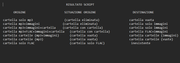 Quello dei FLAC + mp3 è l'unica cartella che avevo... era il brano "IL MARINAIO" (già recuperato in FLAC). ascoltalo https://www.youtube.com/watch?v=W_96mcW9qtI ma non scandalizzarti LOL. della Vanoni inserito da me nella cartella (album) "ORNELLA &...." esatto era L'UNICO. NON voglio eliminare le cartella vuote in destinazione perchè è la lista degli album che devo recuperare in FLAC. Per me va bene cosi perchè posso dargli in "pasto", alllo SCRIPT tutta la Cartella MUSICA senza avere problemi di "spazio", perchè l'mp3 ha un peso irrisorio: calcola che un brano in mp3 di media è 3 MB mentre in FLAC potrebbe arrivare senza problemi a una 40ina di MB e di album in mp3 ne ho relativamete pochi SysLack SEI UN MITO  GRAZIE GRAZIE GRAZIE Umberto GRAZIE GRAZIE GRAZIE Umberto
__________________
!!!!!!!!!!!Alegher Alegher che 'l bùs del cùl le negher!!!!!!!!!! Alcuni Miei DesktopQuanta NLCB 16" Intel(R) Core(TM) i7-10875H CPU @ 2.30GHz 16GB DDR4 1330MHz Intel UHD Graphics (Comet Lake-H GT2) [R1] [Quanta Computer] + NVIDIA GeForce RTX2070 8GB GDDR6 1410 SSD Enmotus F200-1600(1,6TB) Windows 11 Home x64 24H2 |
|
|
|
|
30-10-2024, 20:47
|
#20 |
|
Member
Iscritto dal: Feb 2024
Messaggi: 147
|
Grazie a te per il riscontro; l'importante è aver raggiunto l'obiettivo (e aver ripassato un po' di PowerShell); chissà che un domani lo script non serva anche ad altri.
|
|
|
|
|
|


| Strumenti | |


|
|

Tutti gli orari sono GMT +1. Ora sono le: 14:11.





