|
|||||||


|


|
|
 |
|
|
Strumenti |
 28-06-2011, 11:00
|
#4381 | |
|
Bannato

Iscritto dal: Feb 2001
Città: Pescara
Messaggi: 10542
|
Quote:
 andate a lavorare al posto di criticare l'ottimo lavoro degli uomini che portano avanti la tecnologia del pianeta.   crytek è la prima a far cantare la tessellation in maniera fantasmagorica senza distruggere il framerate, tanto di cappello. Ultima modifica di sblantipodi : 28-06-2011 alle 11:02. |
|

|

|

|
28-06-2011, 11:01
|
#4382 | |
|
Messaggi: n/a
|
Quote:
 hehe,mi è piaciuta la tua risposta. hehe,mi è piaciuta la tua risposta.
|
|
|
|
|
28-06-2011, 11:06
|
#4383 | |
|
Senior Member

Iscritto dal: Jun 2010
Città: Lecce
Messaggi: 2251
|
Quote:

__________________
Asus TUF Gaming Ryzen 7, 32 GB RAM DDR5, RTX 4060 laptop - Xiaomi 13 Pro -TRATTATIVE: troppe per essere scritte. .
|
|
|
|
|
|
28-06-2011, 11:06
|
#4384 |
|
Bannato
Iscritto dal: Feb 2001
Città: Pescara
Messaggi: 10542
|
Posto due risultati del bench integrato di Crysis 2 visto che nessuno lo ha ancora fatto.
Il benchmark 1 si riferisce al gioco DX9, il benchmark 2 al gioco DX11. Tutto a palla a 1920x1200, singola GTX580: 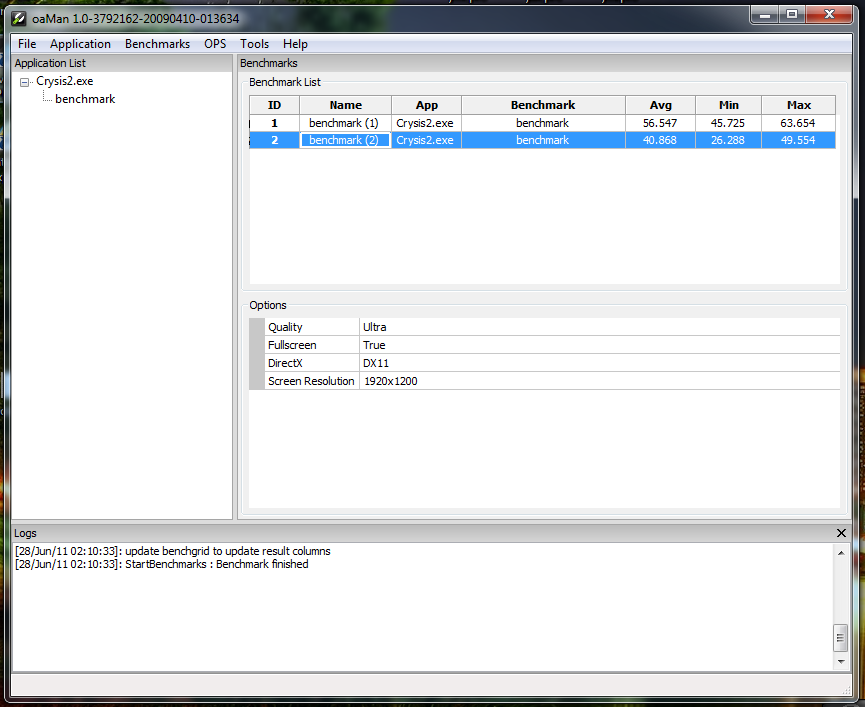 Tutto a palla a 1920x1200, GTX580 SLI: 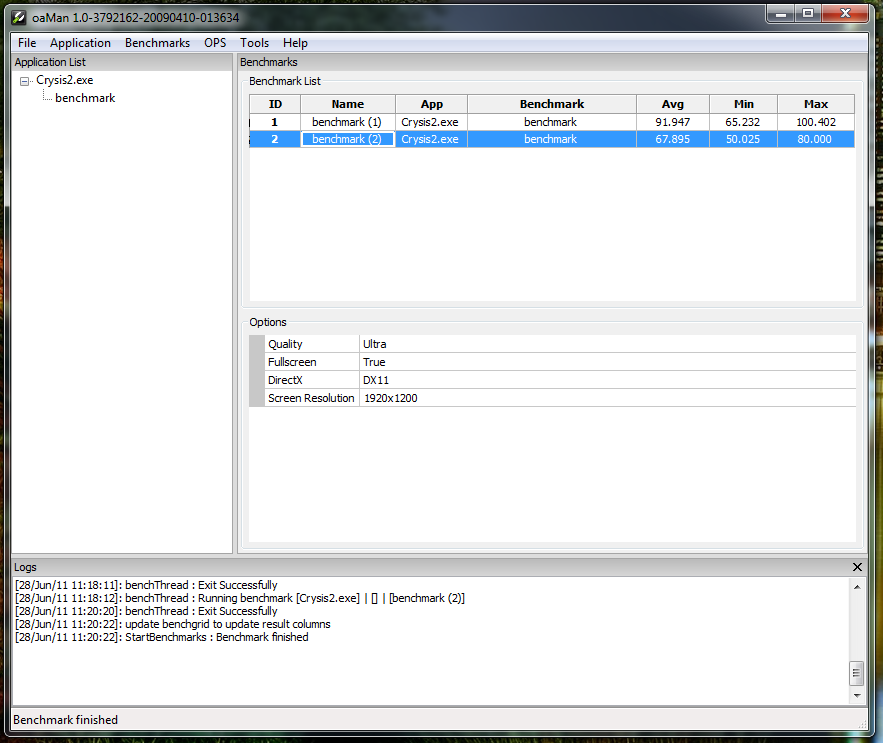
Ultima modifica di sblantipodi : 28-06-2011 alle 11:37. |
|
|
|
|
28-06-2011, 11:09
|
#4385 | |
|
Senior Member

Iscritto dal: Oct 2005
Messaggi: 3671
|
Quote:
Effettivamente hai colto uno dei punti peggiori sembra mancare il displacement mapping in questo punto....inoltre ho trovato altri dove mancava il POM, probabilmente per la fretta di rilasciare l'upgrade hanno mancato alcuni parti...  La tesselation come già evidenziata non ricordo da chi non è applicata a tutti i muri etc. (per avere meno hit prestazionale bastava usare IL Parallax mapping) cmq. il miglioramento c'è e si vede. Per l' HD texture pack avendo provato la versione di MalDO devo dire che preferisco quest'ultimo aspettiamo che aggiorni il tutto cosi sarà ancora meglio. P.s: qualcuno ha provato il texture pack di MAldo con l'ultimo aggiornamento si riesce ad usare attualmente o no ?
|
|
|
|
|


|
28-06-2011, 11:12
|
#4386 | |
|
Bannato
Iscritto dal: Feb 2001
Città: Pescara
Messaggi: 10542
|
Quote:
 
|
|
|
|
|
|
28-06-2011, 11:18
|
#4387 | |
|
Senior Member

Iscritto dal: Jul 2007
Città: Cesena
Messaggi: 365
|
Quote:
PS: come hai fatto a lanciare il bench?
__________________
THE BLACK COSMOS Liquid Cooled By YbrisHW: P6T Deluxe; core i7 920 @ 3,6Ghz; 3x2gb Corsair Dominator XSM3; 2xGTX560 SLI @ 1Ghz; SSD Samsung 830 256gb; PSU Silverstone Decathlon DA800; Cooler Master Cosmos S MODDED. |
|
|
|
|


|
28-06-2011, 11:19
|
#4388 | |
|
Bannato

Iscritto dal: Jan 2003
Città: Lucca
Messaggi: 9119
|
Quote:
|
|
|
|
|
|
28-06-2011, 11:21
|
#4389 | ||
|
Bannato
Iscritto dal: Feb 2001
Città: Pescara
Messaggi: 10542
|
Quote:
Quote:
|
||
|
|
|
|
28-06-2011, 11:23
|
#4390 | |
|
Senior Member
Iscritto dal: Oct 2005
Messaggi: 3671
|
Quote:
|
|
|
|
|
|
28-06-2011, 11:24
|
#4391 | |
|
Bannato
Iscritto dal: Feb 2001
Città: Pescara
Messaggi: 10542
|
Quote:

|
|
|
|
|
|
28-06-2011, 11:27
|
#4392 |
|
Senior Member

Iscritto dal: May 2003
Messaggi: 3625
|
ma giocarci senza farsi tante seghe mentali,tipo cali di frame sparando a 1 cm dal muro, no eh? se ci mettessimo a cercare il pelo nell uovo in tutti i giochi,state certi che tutti avrebbero i loro bug e i loro problemi
godetevi crysis 2 in dx11 e basta! speriamo solo ora mandino fuori dei driver video aggiornati x supportare correttamente le dx11
|
|
|
|
|
28-06-2011, 11:29
|
#4393 | |
|
Senior Member
Iscritto dal: Jul 2007
Città: Cesena
Messaggi: 365
|
Quote:
__________________
THE BLACK COSMOS Liquid Cooled By YbrisHW: P6T Deluxe; core i7 920 @ 3,6Ghz; 3x2gb Corsair Dominator XSM3; 2xGTX560 SLI @ 1Ghz; SSD Samsung 830 256gb; PSU Silverstone Decathlon DA800; Cooler Master Cosmos S MODDED. |
|
|
|
|
|
28-06-2011, 11:32
|
#4394 | |
|
Bannato
Iscritto dal: Jan 2003
Città: Lucca
Messaggi: 9119
|
Quote:
Hai la possibilità di copiare/incollare il contenuto? |
|
|
|
|
|
28-06-2011, 11:34
|
#4395 | |
|
Bannato
Iscritto dal: Jan 2003
Città: Lucca
Messaggi: 9119
|
Quote:
se clicchi sulle immagini che hai postato, non accade una mazza. A meno dunque di non avere sotto mano 1 microscopio a scansione elettronica, sarà dura per gli altri capire che tipo di dati hai postato... |
|
|
|
|
|
28-06-2011, 11:36
|
#4396 | |
|
Senior Member
Iscritto dal: Oct 2005
Messaggi: 3671
|
Quote:

|
|
|
|
|
|
28-06-2011, 11:40
|
#4397 | ||
|
Bannato
Iscritto dal: Feb 2001
Città: Pescara
Messaggi: 10542
|
Posto due risultati del bench integrato di Crysis 2 visto che nessuno lo ha ancora fatto.
Il benchmark 1 si riferisce al gioco DX9, il benchmark 2 al gioco DX11. Tutto a palla a 1920x1200, singola GTX580: Tutto a palla a 1920x1200, GTX580 SLI: Quote:
Quote:
======================================================================================================= Crysis(R) 2 NVidia oaMan Benchmark ReadMe File - June, 2011 ======================================================================================================= This readme file will explain how to setup and run a Crysis 2 benchmark by using NVidia's oaMan tool. ======================================================================================================= System Requirements ======================================================================================================= • Crysis 2 installation • Crysis updated to patch 1.9 (download from http://www.mycrysis.com) ======================================================================================================= Important Notes ======================================================================================================= • To get the tool running properly Crysis 2 MUST be installed into a path and directory without any spaces (e.g. “\My Games – 1\Crysis 2” does NOT work, “\Games\Crysis2” does work) • To use the benchmark tool please rename the Crysis 2 folder to Crysis2 and change it back to the original name afterwards if needed ======================================================================================================= Installation Instructions ======================================================================================================= 01. Download oaMan from: http://developer.nvidia.com/content/oaman-ui-tool 02. Extract the oaman.zip file into a directory on your HDD 03. Start the oaman.exe 04. Click on Application > Add OA Application 05. Navigate to the Crysis2.exe which is located inside \Bin32 of your Crysis 2 installation 06. Leave the “Command Line arguments” window empty and click “OK” 07. oaMan output in the Log should be: GetOaAppInfo : Getting benchmark information of application [Crysis2.exe] getInfoThread : Start getting application information 08. Crysis 2 should start and close itself again and the log should say: getInfoThread : Benchmark [] | [benchmark.cfg] found Add benchmark [benchmark] to application list getInfoThread : Exit Successfully GetOaAppInfo : Successfully get benchmark information 09. Right click on Crysis2.exe in the Application List and select “Add to benchmark list” 10. Make your custom settings for the benchmark via the available options for Crysis2.exe and the respective benchmark 11. The game should now appear in the Benchmark List on the right side 12. To start the benchmark click on Benchmarks menu point > Run benchmarks > Run all benchmarks 13. The benchmark will now start 14. Once the benchmark is done you can save your results by clicking on the menu point Benchmarks > Save results 15. You will also see the Avg (Average), Min (Minimum) and Max (Maximum) FPS (Frames Per Second) in the Benchmark List next to the benchmark you have just run ======================================================================================================= Tipps & Tricks ======================================================================================================= You can have multiple benchmarks for Crysis 2 added to the Benchmark list – just repeat step 9 and customize the benchmark setting afterwards. It is also possible to run any set of benchmarks by multi-selecting them from the list. ======================================================================================================= End of ReadMe File. ======================================================================================================= |
||
|
|
|
|
28-06-2011, 11:42
|
#4398 | |
|
Senior Member

Iscritto dal: Aug 2009
Città: palermo
Messaggi: 5623
|
Quote:

|
|
|
|
|

|
28-06-2011, 11:45
|
#4399 | |
|
Bannato
Iscritto dal: Feb 2001
Città: Pescara
Messaggi: 10542
|
Quote:
|
|
|
|
|
|
28-06-2011, 11:49
|
#4400 | |
|
Senior Member
Iscritto dal: Aug 2009
Città: palermo
Messaggi: 5623
|
Quote:
|
|
|
|
|
|
|


| Strumenti | |


|
|

Tutti gli orari sono GMT +1. Ora sono le: 22:14.