


|
|||||||


|


|
|
 |
|
|
Strumenti |
 02-08-2020, 12:37
|
#1 |
|
Member
Iscritto dal: Sep 2014
Messaggi: 55
|
Opzioni di avvio avanzate: come disattivarle?
buongiorno forum,
mesi fa feci in modo che le "opzioni di avvio avanzate" comparissero ad ogni accensione/riavvio del pc Win10. Lo feci per prevenire un problema che credevo mi sarebbe capitato (che poi non avvenne mai per fortuna ma ok). Ora, a distanza di tempo, vorrei capire come fare in modo che questo Avvio Avanzato scomparisse, ed accendere/riavviare il sistema senza dover scegliere ogni volta le voci: alla 1° schermata "windows 10", alla 2° schermata "avvia il PC normalmente" tra le varie disponibili. Suggerimenti? Sottolineo che questa condizione dell'OS non mi crea problemi hardware, è semplicemente una piccola seccatura mia. Non so come fare per disattivarle, tutto quì. Non ricordo minimamente cosa possa aver modificato... Ultima modifica di ReDiCorvetti : 02-08-2020 alle 12:51. |

|

|
|
02-08-2020, 14:17
|
#2 |
|
Senior Member

Iscritto dal: Jan 2009
Città: Bannata tempora currunt
Messaggi: 10357
|
Ciao, avvia il prompt dei comandi ed esegui il seguente:
Codice:
bcdedit /set {bootmgr} displaybootmenu no
|
|
|
|
|
02-08-2020, 17:56
|
#3 |
|
Member
Iscritto dal: Sep 2014
Messaggi: 55
|
ha funzionato a metà.
La 1° schermata in cui si sceglie l'OS da avviare è sparita (anche se quì è installato solo Windows). La 2° schermata con le varie opzioni -ripristina il pc- -modalità provvisorie (3)- e altro, invece resta sempre presente. |
|
|
|
|
02-08-2020, 22:34
|
#4 |
|
Senior Member
Iscritto dal: Jan 2009
Città: Bannata tempora currunt
Messaggi: 10357
|
Apri il prompt dei comandi come amministratore e dai il comando
Codice:
bcdedit C:\WINDOWS\system32>bcdedit Windows Boot Manager -------------------- identificatore {bootmgr} device partition=\Device\HarddiskVolume2 path \EFI\Microsoft\Boot\bootmgfw.efi description Windows Boot Manager locale it-IT inherit {globalsettings} default {current} resumeobject {f1f43e7d-d350-11ea-b06e-2c600c8de223} displayorder {current} toolsdisplayorder {memdiag} timeout 30 Caricatore di avvio di Windows ------------------- identificatore {current} device partition=C: path \WINDOWS\system32\winload.efi description Windows 10 locale it-IT inherit {bootloadersettings} recoverysequence {f1f43e80-d350-11ea-b06e-2c600c8de223} displaymessageoverride Recovery recoveryenabled Yes isolatedcontext Yes allowedinmemorysettings 0x15000075 osdevice partition=C: systemroot \WINDOWS resumeobject {f1f43e7d-d350-11ea-b06e-2c600c8de223} nx OptIn bootmenupolicy Standard C:\WINDOWS\system32> |
|
|
|
|
03-08-2020, 02:19
|
#5 |
|
Member
Iscritto dal: Sep 2014
Messaggi: 55
|
C:\WINDOWS\system32>bcdedit
Windows Boot Manager -------------------- identificatore {bootmgr} device partition=\Device\HarddiskVolume1 path \EFI\Microsoft\Boot\bootmgfw.efi description Windows Boot Manager locale it-IT inherit {globalsettings} default {current} resumeobject {2b23f620-b9ff-11e9-b2db-1062e569eec1} displayorder {current} toolsdisplayorder {memdiag} timeout 30 displaybootmenu No Caricatore di avvio di Windows ------------------- identificatore {current} device partition=C: path \WINDOWS\system32\winload.efi description Windows 10 locale it-IT inherit {bootloadersettings} recoverysequence {2b23f623-b9ff-11e9-b2db-1062e569eec1} displaymessageoverride SystemRestore recoveryenabled Yes isolatedcontext Yes allowedinmemorysettings 0x15000075 osdevice partition=C: systemroot \WINDOWS resumeobject {2b23f620-b9ff-11e9-b2db-1062e569eec1} nx OptOut bootmenupolicy Legacy C:\WINDOWS\system32> |
|
|
|
|
03-08-2020, 07:08
|
#6 |
|
Senior Member
Iscritto dal: Jan 2009
Città: Bannata tempora currunt
Messaggi: 10357
|
Avvia il prompt dei comandi come amministratore ed esegui il seguente comando:
Codice:
bcdedit /set {current} bootmenupolicy Standard
|
|
|
|
|
03-08-2020, 10:03
|
#7 |
|
Member
Iscritto dal: Sep 2014
Messaggi: 55
|
Ora appare una schermata con sfondo azzurro e scritte bianche, ma fondamentalmente è la stessa di prima:
Premere un num. per scegliere una delle opzioni seguenti: -utilizzare i tasti numerici o i tasti funzione F1-F9- 1) abilita debug 2) abilita registraz. video 3) abilita video a bassa risoluz. 4) 5) 6) varie modalità provvisorie ecc. ecc. |
|
|
|
|
03-08-2020, 12:47
|
#8 |
|
Senior Member
Iscritto dal: Jan 2009
Città: Bannata tempora currunt
Messaggi: 10357
|
Nella barra di ricerca vicina allo start scrivi msconfig, apri la Configurazione di sistema e nella scheda Opzioni di avvio controlla la configurazione delle opzioni, la standard è così:
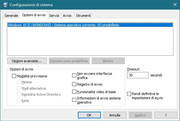 Tu hai qualche opzione attivata? |
|
|
|
|
03-08-2020, 13:27
|
#9 |
|
Member
Iscritto dal: Sep 2014
Messaggi: 55
|
no, niente di attivo. E' esattamente come la tua immagine.
|
|
|
|
|
03-08-2020, 13:30
|
#10 |
|
Senior Member

Iscritto dal: May 2005
Messaggi: 8699
|
CMD come amministratore
Codice:
bcdedit /set {globalsettings} advancedoptions false
__________________
. Thread Ufficiali: EasyCrypt ~ Old Files Manager ~ OSD Clock The real me is no match for the legend . Ultima modifica di x_Master_x : 03-08-2020 alle 13:32. |
|
|
|
|
03-08-2020, 14:04
|
#11 | |
|
Member
Iscritto dal: Sep 2014
Messaggi: 55
|
Quote:
Pensate che fosse presente qualche problema? Son state fatte varie prove, dopotutto, per risolvere. Grazie mille davvero, sia a te che a Styb per il tempo e disponibilità dimostrata. |
|
|
|
|

|
03-08-2020, 14:09
|
#12 |
|
Senior Member
Iscritto dal: Jan 2009
Città: Bannata tempora currunt
Messaggi: 10357
|
Finalmente.
 Potresti ripostare come risulta adesso la schermata del comando bcdedit? |
|
|
|
|
03-08-2020, 18:13
|
#13 | |
|
Member
Iscritto dal: Sep 2014
Messaggi: 55
|
Quote:
(c) 2019 Microsoft Corporation. Tutti i diritti sono riservati. C:\WINDOWS\system32>bcdedit Windows Boot Manager -------------------- identificatore {bootmgr} device partition=\Device\HarddiskVolume1 path \EFI\Microsoft\Boot\bootmgfw.efi description Windows Boot Manager locale it-IT inherit {globalsettings} default {current} resumeobject {2b23f620-b9ff-11e9-b2db-1062e569eec1} displayorder {current} toolsdisplayorder {memdiag} timeout 30 displaybootmenu No Caricatore di avvio di Windows ------------------- identificatore {current} device partition=C: path \WINDOWS\system32\winload.efi description Windows 10 locale it-IT inherit {bootloadersettings} recoverysequence {2b23f623-b9ff-11e9-b2db-1062e569eec1} displaymessageoverride SystemRestore recoveryenabled Yes isolatedcontext Yes allowedinmemorysettings 0x15000075 osdevice partition=C: systemroot \WINDOWS resumeobject {2b23f620-b9ff-11e9-b2db-1062e569eec1} nx OptOut bootmenupolicy Standard C:\WINDOWS\system32> |
|
|
|
|
|
|


| Strumenti | |


|
|

Tutti gli orari sono GMT +1. Ora sono le: 00:46.


