|
|||||||


|



|
|
 |
|
|
Strumenti |
 23-10-2019, 08:42
|
#39581 |
|
Senior Member

Iscritto dal: Jan 2001
Città: Monasterace Marina (RC)
Messaggi: 8171
|
Hai provato il DAC su un PC diverso?
__________________
Case: Lian Li PC-60FNW | Ali: Enermax Revolution D.F. 650 W | CPU: Intel Core i7-9700K 3,6 Ghz | Dissi: Noctua NH-U12P | MoBo: MSI MAG Z390 TOMAHAWK | RAM: HyperX FURY 4x8GB DDR4 2666 Mhz | VGA: Asus GeForce GTX 1050 | SSD: Samsung 970 EVO 500 GB | HDD: Seagate Barracuda 7200.10 250 GB - 7200.11 1,5 TB | Monitor: Dell U2412M | Keyboard: Cooler Master Quick Fire XTi | UPS: APC BR1200GI. |

|

|
|
23-10-2019, 09:01
|
#39582 | |
|
Senior Member

Iscritto dal: May 2005
Città: Messina
Messaggi: 15654
|
Quote:
Ho anche provato diverse porte USB sul PC fisso per escludere qualche problema ad una di esse. C'è da dire, che credo che il DAC funzioni correttamente perché, una volta rilevato, funziona ininterrottamente anche per una decina di ore 
__________________
CASE: Antec 900 - ALI: Enermax Pro82+ 525W - MOBO: Asus Z97I-Plus - CPU: i7 4770k @ 4.4 Ghz 1.22v - DISSI: Noctua U-14S - RAM: 2x8GB Corsair Vengeance LP @ 1866 Mhz - VGA: GTX 1070 ARMOR 8G OC - Monitor: Acer XF270HU - SSD: Samsung 850 EVO 500 GB MacBook Pro Retina 15" 2018 - i7 6 core, Radeon Pro 560X, 512 GB SSD
|
|
|
|
|

|
23-10-2019, 09:06
|
#39583 |
|
Senior Member
Iscritto dal: Jan 2001
Città: Monasterace Marina (RC)
Messaggi: 8171
|
Sul PC fisso il comportamento è identico su tutte le porte?
__________________
Case: Lian Li PC-60FNW | Ali: Enermax Revolution D.F. 650 W | CPU: Intel Core i7-9700K 3,6 Ghz | Dissi: Noctua NH-U12P | MoBo: MSI MAG Z390 TOMAHAWK | RAM: HyperX FURY 4x8GB DDR4 2666 Mhz | VGA: Asus GeForce GTX 1050 | SSD: Samsung 970 EVO 500 GB | HDD: Seagate Barracuda 7200.10 250 GB - 7200.11 1,5 TB | Monitor: Dell U2412M | Keyboard: Cooler Master Quick Fire XTi | UPS: APC BR1200GI. |
|
|
|
|
23-10-2019, 09:26
|
#39584 | |
|
Senior Member
Iscritto dal: May 2005
Città: Messina
Messaggi: 15654
|
Quote:
__________________
CASE: Antec 900 - ALI: Enermax Pro82+ 525W - MOBO: Asus Z97I-Plus - CPU: i7 4770k @ 4.4 Ghz 1.22v - DISSI: Noctua U-14S - RAM: 2x8GB Corsair Vengeance LP @ 1866 Mhz - VGA: GTX 1070 ARMOR 8G OC - Monitor: Acer XF270HU - SSD: Samsung 850 EVO 500 GB MacBook Pro Retina 15" 2018 - i7 6 core, Radeon Pro 560X, 512 GB SSD
|
|
|
|
|
|
23-10-2019, 17:50
|
#39585 |
|
Senior Member
Iscritto dal: Jan 2001
Città: Monasterace Marina (RC)
Messaggi: 8171
|
Fra qualche giorno dovrei montare il nuovo PC e come disco principale userò un Samsung NVMe: vorrei sapere se posso procedere come per i normali dischi SATA, creando inoltre durante il setup una seconda partizione per una successiva installazione di Slackware.
Posso piazzare il disco fin da subito nel secondo slot M.2? Chiedo perché è quello provvisto di dissipatore. Se avete altri consigli sono ben accetti. Grazie.
__________________
Case: Lian Li PC-60FNW | Ali: Enermax Revolution D.F. 650 W | CPU: Intel Core i7-9700K 3,6 Ghz | Dissi: Noctua NH-U12P | MoBo: MSI MAG Z390 TOMAHAWK | RAM: HyperX FURY 4x8GB DDR4 2666 Mhz | VGA: Asus GeForce GTX 1050 | SSD: Samsung 970 EVO 500 GB | HDD: Seagate Barracuda 7200.10 250 GB - 7200.11 1,5 TB | Monitor: Dell U2412M | Keyboard: Cooler Master Quick Fire XTi | UPS: APC BR1200GI. Ultima modifica di Trotto@81 : 23-10-2019 alle 19:13. |
|
|
|
|
23-10-2019, 18:01
|
#39586 |
|
Senior Member

Iscritto dal: Sep 2003
Messaggi: 9434
|
ragazzi, non so se è la discussione adatta, spero di non sbagliare.
Vorrei chiedervi, ma con Win10 si è più monitorati rispetto alle versioni precedenti di win. Mi riferisco a ciò che si installa sull'hd, alla navigazione effettuata con il browser. Avete fatto qualche impostazione particolare per limitare il vostro "tracciamento"? avete disattivato cortana? non so
__________________
1)P4 2.4-Asrock p4i65- Sapphire Hd3450 512mb agp- 2GB ddr400-Hd 80gb WD- Thermaltake Litepower 450W 2)Amd 3200-Msi K8n Neo4 Platinum - 2*512 MB pc3200-Asus N6600gt- HD WD 160GB-enermax noisetacker 370. |
|
|
|
|
23-10-2019, 19:12
|
#39587 |
|
Senior Member

Iscritto dal: Jun 2005
Messaggi: 24196
|
C'è un vecchio thread
https://www.hwupgrade.it/forum/showthread.php?t=2726751 che ha perso smalto nella partecipazione da tempo ma è sempre un buon inizio. Poi ci sono diverse utility che cercano di intervenire. googla windows 10 privacy tool Ultima modifica di giovanni69 : 23-10-2019 alle 19:16. |
|
|
|
|
23-10-2019, 20:00
|
#39588 | |
|
Senior Member

Iscritto dal: Dec 2001
Città: Trento
Messaggi: 3329
|
Quote:
e anche qeusta app ti puo aiutare è fatta apposta https://www.oo-software.com/en/shutup10 |
|
|
|
|
|
24-10-2019, 08:08
|
#39589 | |
|
Senior Member

Iscritto dal: Feb 2009
Messaggi: 50674
|
Quote:
__________________
Aomei in Prog. & Utility - Lic OEM - Q di Merc Ott '22 - W10 Spot Images Seasons from '20 to Summer 2022 - DailyPic dalle Eccezioni alle Unique Images + Rec > DailyPic Unique Images Novembre 2022 |
|
|
|
|
|
24-10-2019, 08:42
|
#39590 |
|
Senior Member

Iscritto dal: Sep 2010
Messaggi: 762
|
Account Famiglia primo Accesso
Ciao ragazzi, volevo sottoporvi un problemino di Win10 che spero abbiate già avuto.
In pratica sul mio portatile ho aggiunto oltre al mio account un 'Account Famiglia' per mia moglie. Ho creato l'account inserendo la sua email microsoft (con cui accede sul suo portatile, anche se è un account gmail!). Lei riceve l'invito, accetta e infatti io dal mio account sul sito Microsoft la vedo che fa parte della mia famiglia. Vado nella schermata di login per fare il primo accesso. Inserisco la password e sembra procedere, poi compare la schermata di creazione di un PIN per l'accesso (a mia moglie da fastidio, ma clicco ugualmente avanti pensando di impostargli qualcosa di semplice per poi rimuoverlo dopo) e mi esce un errore tipo "Impossibile creare un PIN adesso. Se vuoi puoi ritentare o ignorare questo passaggio per adesso". Quindi ci stanno i due tasti "Riprova" e "Ignora". Se clicco riprova mi da sempre la stessa schermata di errore, se clicco "Ignora" invece di saltare il passaggio e proseguire, mi butta fuori e mi ritrovo di nuovo al login, senza la possibilità di completare il primo accesso dell'account  ! !Che posso fare ? Idee (a parte farle un account locale, ovviamente!)?
__________________
 Soddisfatto possessore di: Soddisfatto possessore di:ROG Strix G16 (2023) G614 ~ CPU 14 Core Intel Core i7-13650HX, 4.9 GHz ~ RAM 16 Gb ~ GPU NVIDIA GeForce RTX 4050 Laptop (6 GB) ~ SSD NVME Micron 2400 500 Gb +  Motorola Edge 20 Pro Motorola Edge 20 Pro
|
|
|
|
|
24-10-2019, 09:56
|
#39591 |
|
Senior Member
Iscritto dal: May 2006
Messaggi: 3126
|
Ciao a tutti, lo chiedo qui perche magari sapete aiutarmi meglio.. Esiste un programma che impedisca ai popup di mandarmi in finestra un gioco? Parlo nello specifico di fifa, sono stufo di perdere partire per disconnessione perché ricevo popup, siano essi di aggiornamento di software (vedi iTunes, Java ecc.) o di riavvio per aggiornamenti o di altro tipo. La modalità solo sveglie di windows non blocca tutte queste casistiche, quindi anche impostando correttamente i popup continuano a causare problemi. C'è un altro modo? Grazie!
__________________
Case: Fractal Define R5 | PSU: Corsair RM850X 850W | MoBo: MSI Z490-A PRO | CPU: Intel i7 10700KF @5GHZ | Ram: Corsair Vengeance 4x8GB 3600Mhz | Scheda Video: Radeon 6900XT 16GB | Monitor: LG 27GL850 | |
|
|
|
|
24-10-2019, 10:11
|
#39592 |
|
Senior Member

Iscritto dal: Oct 2008
Città: Monza
Messaggi: 35303
|
Cerca di fare tutti gli aggiornamenti possibili almeno periodicamente cosi è meno probabile che capiti
 E' l'unica soluzione che mi viene in mente, a meno che non si possa silenziare o disattivare completamente tutte le notifiche e popup, ma ci hai già provato dicevi 
__________________
Pr0ject 0rigin - Pr0ject_0rigin83 - Pr0ject_0rigin - pr0ject0rigin
Xbox Series X - PlayStation 5 - Switch Oled - Deck Oled Samsung 43 Q60B - Asus TUF F15 |
|
|
|
|
24-10-2019, 10:38
|
#39593 | |||
|
Senior Member
Iscritto dal: Sep 2003
Messaggi: 9434
|
ciao a tutti ragazzi, grazie per gli interventi
Quote:
Quote:
Solo che la realtà la trovo diversa e disabilitando qualcosa che non dovevo può creare fastdi/danni Quote:

__________________
1)P4 2.4-Asrock p4i65- Sapphire Hd3450 512mb agp- 2GB ddr400-Hd 80gb WD- Thermaltake Litepower 450W 2)Amd 3200-Msi K8n Neo4 Platinum - 2*512 MB pc3200-Asus N6600gt- HD WD 160GB-enermax noisetacker 370. |
|||
|
|
|
|
24-10-2019, 14:20
|
#39594 |
|
Senior Member

Iscritto dal: Feb 2002
Messaggi: 3716
|
Una domanda di cui, forse , in passato si è dibattuto.
Se volessi dissociare la mia attuale licenza Windows 10 dalla mia MB e spostarla su una nuova MB, come dovrei/potrei fare? Ho programmini che mi dicono il seriale con cui è attivo il mio Windows e , forse, potrei utilizzare quelli per attivare su una piattaforma nuova, ma non risulterebbe attivata su 2 PC? Tra l'altro ho un account Microsoft associato . Grazie a chi mi risponderà.
__________________
MY PC: CASE COOLERMASTER CM690, MB GIGABYTE X570 AORUS ELITE, CPU RYZEN 5 5600X, CPU FAN THERMALRIGHT HR02-MACHO REV.A, RAM 32GB CRUCIAL DDR4 3600 CL16,PSU COOLER MASTER GX750, HDD:SSD SAMSUNG 850 EVO 256GB - WD BLACK 1TB -WD BLUE 1TB, VGA Gigabyte RTX3070 Aorus master [email protected], MONITOR LCD ACER B243HA, MOUSE LOGITECH G502, TASTIERA CORSAIR STRAFE RGB MX RED, OS WIN11 PRO x64 |
|
|
|
|
24-10-2019, 14:23
|
#39595 | |
|
Senior Member
Iscritto dal: Oct 2008
Città: Monza
Messaggi: 35303
|
Quote:

__________________
Pr0ject 0rigin - Pr0ject_0rigin83 - Pr0ject_0rigin - pr0ject0rigin
Xbox Series X - PlayStation 5 - Switch Oled - Deck Oled Samsung 43 Q60B - Asus TUF F15 |
|
|
|
|
|
24-10-2019, 14:32
|
#39596 | |
|
Senior Member

Iscritto dal: Feb 2008
Messaggi: 2828
|
Quote:

|
|
|
|
|
|
24-10-2019, 16:02
|
#39597 | |
|
Senior Member
Iscritto dal: Jun 2005
Messaggi: 24196
|
Quote:
|
|
|
|
|
|
24-10-2019, 18:13
|
#39598 |
|
Bannato
Iscritto dal: Feb 2019
Messaggi: 301
|
nel frattempo,
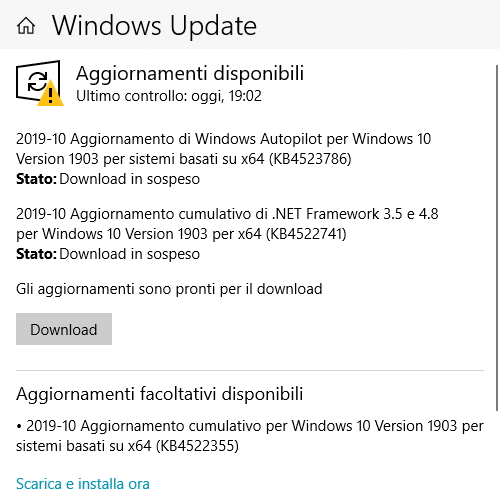 PS_Windows Autopilot?? |
|
|
|
|
24-10-2019, 18:14
|
#39599 |
|
Senior Member

Iscritto dal: Oct 2007
Città: Roma
Messaggi: 9809
|
October 24, 2019—KB4522355 (OS Build 18362.449)
Highlights Updates an issue that prevents Microsoft Narrator from working in certain touch mode scenarios. Updates an issue that starts assistive technology (AT) (such as Microsoft Narrator, Magnifier, or NVDA) after signing in when you've configured it to start before signing in. Updates an issue that causes Magnifier to stop working in certain scenarios, and you have to restart it manually. Updates an issue that causes Microsoft Narrator to stop working in the middle of a session in certain scenarios. Updates an issue that might prevent a scroll bar from being selected. Updates an issue that allows a device to go to Sleep (S3) even if you configure the device to never sleep. Updates an issue that prevents you from shrinking a window in some cases. Updates an issue that prevents you from connecting to a virtual private network (VPN). Updates an issue that causes screen flickering or is slow to display the screen when you show application thumbnails on a monitor that has high dots per inch (DPI). Updates an issue that causes the tile for the Photos app to appear larger than expected in the Start menu under certain conditions. Updates an issue that causes the system to stop responding at the sign-in screen. Updates an issue that might cause a black screen to appear the first time you sign in after installing a feature or quality update. Updates an issue that causes the Start menu, the Cortana Search bar, Tray icons, or Microsoft Edge to stop responding in certain scenarios after installing a monthly update. Improvements and fixes This non-security update includes quality improvements. Key changes include: Addresses an issue with the behavior of the Origin HTTP header when you use Internet Explorer to make cross-origin resource sharing (CORS) requests to redirect resources in internal subnets. Addresses an issue that prevents Microsoft Narrator from working in certain touch mode scenarios. Addresses an issue with syncing settings from the Accounts page when the "Continue experiences on this device" Group Policy is disabled. Addresses an issue that starts assistive technology (AT) (such as Microsoft Narrator, Magnifier, or NVDA) after signing in when the Ease of Access Center setting requires AT to start before signing in. Addresses an error message that appears when you open an app after enabling NT Virtual DOS Machine (NTVDM) and the legacy console mode. The error message is, "OACClearArry: Cannot connect to Trace32 OLE Automation server. Error code: -2147483645." Addresses an issue that causes Magnifier to stop working in certain scenarios, and the user must restart it manually. Updates time zone information for Norfolk Island, Australia. Updates time zone information for the Fiji Islands. Addresses an issue that causes Microsoft Narrator to stop working in the middle of a user session in certain scenarios. Addresses an issue that fails to set the default Command Prompt window color when you use the color command without a parameter. Addresses an issue that causes the Microsoft Windows Search Indexer (searchindexer.exe) to add or repair required access control lists (ACLs) without checking if ACLs exist. Addresses an issue in which controls in Win32 applications intermittently fail to render correctly when started from a logoff script using the "Run shutdown scripts visible" policy. Addresses an issue in which installing many fonts in the system causes applications to stop responding. Addresses an issue with high CPU usage in Desktop Window Manager (dwm.exe) when you disconnect from a Remote Desktop Protocol (RDP) session. Addresses an issue that might prevent a scroll bar from being selected when an ActiveX control implements the CScrollView class. This occurs if you move the Internet Explorer window, which then moves the scroll bar to the left. Addresses an issue that allows the system to go to Sleep (S3) after two minutes of inactivity even if you configure the sleep timer to never sleep. Addresses an issue that prevents users from reducing the size of a window in some cases. Addresses an issue that causes Microsoft SharePoint file names to appear incorrectly in the Quick access and Recent items folders. Addresses an issue that prevents you from establishing virtual private network (VPN) connections. Addresses an issue that causes screen flickering or is slow to display the screen when you show application thumbnails on high dots per inch (DPI) monitors. Addresses an issue with incorrect permissions on a user’s class registry keys that prevents users from opening files, links, and applications. Addresses an issue that causes the tile for the Photos app to appear larger than expected in the Start menu under certain conditions. Addresses an issue that causes the system to stop responding at the sign-in screen. Addresses an issue with the multifactor unlock policy of Windows Hello for Business, which fails to show the default sign-in option on Windows 10 devices. Addresses an issue that causes Windows Search to close unexpectedly when a Group Policy applies sub-groups to the Start menu layout. Addresses an issue that prevents you from retrieving the correct Dynamic Host Configuration Protocol (DHCP) information by setting the DHCP LeaseTerminatesTime and LeaseObatinedTime parameters to the correct format. Addresses an issue with diagnostic data processing when a device has the Diagnostic data setting enabled and set to Basic. Addresses an issue that prevents Internet Explorer from opening when Microsoft User Experience Virtualization (UE-V) is being used to roam many favorites. Addresses an issue that improves the reliability of the UE-V AppMonitor. Addresses an issue in which Microsoft AppLocker might prevent an application from running or log a false positive error instead of running the application. Addresses an issue that prevents netdom.exe from displaying the new ticket-granting ticket (TGT) delegation bit for the display or query mode. Addresses an issue that might cause Direct Access servers to use a large amount of non-paged pool memory (pooltag: NDnd). Addresses an issue with AppContainer firewall rules that leak when guest users or mandatory user profile users sign in and sign out from Windows Server. Addresses an issue that prevents the Unified Write Filter (UWF) servicing mode of Windows Update from working with the Windows Server Update Services (WSUS) server. Addresses an issue that causes all Transmission Control Protocol (TCP) dynamic ports to be consumed. As a result, network communications will fail for any protocol or operation using dynamic ports. Addresses an issue with applications and scripts that call the NetQueryDisplayInformation API or the WinNT provider equivalent. They might fail to return results after the first page of data, often 50 or 100 entries. When requesting additional pages, you might receive the error, “1359: an internal error occurred.” Addresses an issue that disrupts window ordering after tooltips appear in the RemoteApp window. Improves an access control list (ACL) check for Known Folders to prevent a black screen that appears the first time a user signs in after installing a feature or quality update. Addresses an issue with evaluating the compatibility status of the Windows ecosystem to help ensure application and device compatibility for all updates to Windows. Addresses issue with Autopilot self-deploying mode and White glove deployments. Addresses an issue in which the pszTargetName parameter was set incorrectly in the InitializeSecurityContext() API. Addresses an issue that causes the Start menu, the Cortana Search bar, Tray icons, or Microsoft Edge to stop responding in certain scenarios after installing a monthly update. |
|
|
|
|
24-10-2019, 18:33
|
#39600 |
|
Senior Member

Iscritto dal: Nov 2005
Città: Припять
Messaggi: 4676
|
oookay appena si sa qualcosa dei nuovi bug introdotti installo pure io
|
|
|
|

|
|


| Strumenti | |


|
|

Tutti gli orari sono GMT +1. Ora sono le: 20:04.