


|
|||||||


|


|
|
 |
|
|
Strumenti |
 26-11-2011, 18:38 |
#1 |
|
Senior Member

Iscritto dal: Feb 2006
Città: Roma
Messaggi: 414
|
Riavvio PC con giochi e programmi 3D
Ieri mi si è presentato questo problema, ingame il computer dopo pochi minuti si riavvia da solo, nessuna schermata blu, semplice reboot.
Le temperature sono tutte ok, entrambe le vga sotto i 70° e cpu a 35°. Ho testato la cpu con Prime95 per 10 test, tutto liscio. Ho testato le vga con Kombustor e dopo poco, il pc si è riavviato, temperature però sempre sotto i 70°. Io credo sia partito l'alimentatore, voi che dite? La config è quella in firma: CPU 2500k + H70 MB Sabertooth P67 VGA 2xGTX560 Ti AMP! RAM 2x4GB G.Skill 1600Mhz CASE Xpredator Black ALI Tagan BZ1100 LCD Samsung 245B + T260HD KEY/M Logitech G15 + G5 OS Win7 Ultimate x64 PS ho ri-testato le vga con Kombustor, stavolta con l'sli disabilitato, nessun riavvio però dopo circa 30 secondi si è chiuso, la risoluzione è cambiata ed è uscito quest'avviso 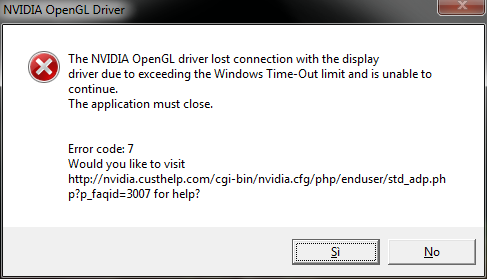 http://nvidia.custhelp.com/app/answers/detail/a_id/3007 ieri ho anche aggiornato i driver (con l'ultima versione beta, quella certificata più recente già ce l'avevo) 
Ultima modifica di ^Klaudio^ : 26-11-2011 alle 18:41. |

|

|
|
27-11-2011, 08:56
|
#2 |
|
Senior Member

Iscritto dal: Sep 2009
Messaggi: 3181
|
Le gtx sono occate?
__________________
cpu core i7 2600 4,2ghz Zalman extreme 11 | 16gb ram ddr3 corsair vengeance 1600|mobo asrock z77 extreme 6|asus nvidia gtx680 1200/7000|ali.coolermaster silent pro m 850w|case coolermaster haf xb|ssd corsair force gt 90gb|wd hdd caviar blue 500gb|Itek scorpion deep sea + win.10 pro |
|
|
|
|
27-11-2011, 13:11
|
#3 | |
|
Senior Member
Iscritto dal: Feb 2006
Città: Roma
Messaggi: 414
|
Quote:
comunque aggiornamento, dopo aver formattato il problema persiste, pochi minuti di gioco e crash del computer, stavolta però al riavvio è uscito l'avviso del bluescreen Firma problema: Nome evento problema: BlueScreen Versione SO: 6.1.7600.2.0.0.256.1 ID impostazioni locali: 1040 Ulteriori informazioni sul problema: BCCode: 116 BCP1: FFFFFA800AB804E0 BCP2: FFFFF88010A66AE4 BCP3: FFFFFFFFC000009A BCP4: 0000000000000004 OS Version: 6_1_7600 Service Pack: 0_0 Product: 256_1 File che contribuiscono alla descrizione del problema: C:\Windows\Minidump\112711-22963-01.dmp C:\Windows\Temp\WER-31668-0.sysdata.xml Leggere l'informativa sulla privacy online: http://go.microsoft.com/fwlink/?link...8&clcid=0x0410 Se l'informativa sulla privacy online non è disponibile, leggere quella offline: C:\Windows\system32\it-IT\erofflps.txt |
|
|
|
|

|
27-11-2011, 14:10
|
#4 |
|
Senior Member
Iscritto dal: Feb 2006
Città: Roma
Messaggi: 414
|
ho fatto un controllo con WHOCRASHED
Crash Dump Analysis -------------------------------------------------------------------------------- Crash dump directory: C:\Windows\Minidump Crash dumps are enabled on your computer. On Sun 27/11/2011 12:53:27 GMT your computer crashed crash dump file: C:\Windows\Minidump\112711-23368-01.dmp This was probably caused by the following module: nvlddmkm.sys (nvlddmkm+0xC3BAE4) Bugcheck code: 0x116 (0xFFFFFA80076D44E0, 0xFFFFF88010A4FAE4, 0xFFFFFFFFC000009A, 0x4) Error: VIDEO_TDR_ERROR file path: C:\Windows\system32\drivers\nvlddmkm.sys product: NVIDIA Windows Kernel Mode Driver, Version 285.62 company: NVIDIA Corporation description: NVIDIA Windows Kernel Mode Driver, Version 285.62 Bug check description: This indicates that an attempt to reset the display driver and recover from a timeout failed. A third party driver was identified as the probable root cause of this system error. It is suggested you look for an update for the following driver: nvlddmkm.sys (NVIDIA Windows Kernel Mode Driver, Version 285.62 , NVIDIA Corporation). Google query: nvlddmkm.sys NVIDIA Corporation VIDEO_TDR_ERROR On Sun 27/11/2011 12:53:27 GMT your computer crashed crash dump file: C:\Windows\memory.dmp This was probably caused by the following module: dxgkrnl.sys (dxgkrnl!TdrResetFromTimeout+0x214) Bugcheck code: 0x116 (0xFFFFFA80076D44E0, 0xFFFFF88010A4FAE4, 0xFFFFFFFFC000009A, 0x4) Error: VIDEO_TDR_ERROR file path: C:\Windows\system32\drivers\dxgkrnl.sys product: Microsoft® Windows® Operating System company: Microsoft Corporation description: DirectX Graphics Kernel Bug check description: This indicates that an attempt to reset the display driver and recover from a timeout failed. The crash took place in a standard Microsoft module. Your system configuration may be incorrect. Possibly this problem is caused by another driver on your system which cannot be identified at this time. On Sun 27/11/2011 12:44:55 GMT your computer crashed crash dump file: C:\Windows\Minidump\112711-23852-02.dmp This was probably caused by the following module: nvlddmkm.sys (nvlddmkm+0xC3BAE4) Bugcheck code: 0x116 (0xFFFFFA800AD3E4E0, 0xFFFFF88010A4AAE4, 0xFFFFFFFFC000009A, 0x4) Error: VIDEO_TDR_ERROR file path: C:\Windows\system32\drivers\nvlddmkm.sys product: NVIDIA Windows Kernel Mode Driver, Version 285.62 company: NVIDIA Corporation description: NVIDIA Windows Kernel Mode Driver, Version 285.62 Bug check description: This indicates that an attempt to reset the display driver and recover from a timeout failed. A third party driver was identified as the probable root cause of this system error. It is suggested you look for an update for the following driver: nvlddmkm.sys (NVIDIA Windows Kernel Mode Driver, Version 285.62 , NVIDIA Corporation). Google query: nvlddmkm.sys NVIDIA Corporation VIDEO_TDR_ERROR On Sun 27/11/2011 12:41:00 GMT your computer crashed crash dump file: C:\Windows\Minidump\112711-23836-01.dmp This was probably caused by the following module: nvlddmkm.sys (nvlddmkm+0xC3BAE4) Bugcheck code: 0x116 (0xFFFFFA80082114E0, 0xFFFFF88010A65AE4, 0xFFFFFFFFC000009A, 0x4) Error: VIDEO_TDR_ERROR file path: C:\Windows\system32\drivers\nvlddmkm.sys product: NVIDIA Windows Kernel Mode Driver, Version 285.62 company: NVIDIA Corporation description: NVIDIA Windows Kernel Mode Driver, Version 285.62 Bug check description: This indicates that an attempt to reset the display driver and recover from a timeout failed. A third party driver was identified as the probable root cause of this system error. It is suggested you look for an update for the following driver: nvlddmkm.sys (NVIDIA Windows Kernel Mode Driver, Version 285.62 , NVIDIA Corporation). Google query: nvlddmkm.sys NVIDIA Corporation VIDEO_TDR_ERROR On Sun 27/11/2011 12:21:48 GMT your computer crashed crash dump file: C:\Windows\Minidump\112711-18844-01.dmp This was probably caused by the following module: nvlddmkm.sys (nvlddmkm+0xC3BAE4) Bugcheck code: 0x116 (0xFFFFFA80070444E0, 0xFFFFF88010A3CAE4, 0xFFFFFFFFC000009A, 0x4) Error: VIDEO_TDR_ERROR file path: C:\Windows\system32\drivers\nvlddmkm.sys product: NVIDIA Windows Kernel Mode Driver, Version 285.62 company: NVIDIA Corporation description: NVIDIA Windows Kernel Mode Driver, Version 285.62 Bug check description: This indicates that an attempt to reset the display driver and recover from a timeout failed. A third party driver was identified as the probable root cause of this system error. It is suggested you look for an update for the following driver: nvlddmkm.sys (NVIDIA Windows Kernel Mode Driver, Version 285.62 , NVIDIA Corporation). Google query: nvlddmkm.sys NVIDIA Corporation VIDEO_TDR_ERROR On Sun 27/11/2011 12:01:07 GMT your computer crashed crash dump file: C:\Windows\Minidump\112711-22963-01.dmp This was probably caused by the following module: nvlddmkm.sys (nvlddmkm+0xC3BAE4) Bugcheck code: 0x116 (0xFFFFFA800AB804E0, 0xFFFFF88010A66AE4, 0xFFFFFFFFC000009A, 0x4) Error: VIDEO_TDR_ERROR file path: C:\Windows\system32\drivers\nvlddmkm.sys product: NVIDIA Windows Kernel Mode Driver, Version 285.62 company: NVIDIA Corporation description: NVIDIA Windows Kernel Mode Driver, Version 285.62 Bug check description: This indicates that an attempt to reset the display driver and recover from a timeout failed. A third party driver was identified as the probable root cause of this system error. It is suggested you look for an update for the following driver: nvlddmkm.sys (NVIDIA Windows Kernel Mode Driver, Version 285.62 , NVIDIA Corporation). Google query: nvlddmkm.sys NVIDIA Corporation VIDEO_TDR_ERROR -------------------------------------------------------------------------------- Conclusion -------------------------------------------------------------------------------- 6 crash dumps have been found and analyzed. A third party driver has been identified to be causing system crashes on your computer. It is strongly suggested that you check for updates for these drivers on their company websites. Click on the links below to search with Google for updates for these drivers: nvlddmkm.sys (NVIDIA Windows Kernel Mode Driver, Version 285.62 , NVIDIA Corporation) If no updates for these drivers are available, try searching with Google on the names of these drivers in combination the errors that have been reported for these drivers and include the brand and model name of your computer as well in the query. This often yields interesting results from discussions from users who have been experiencing similar problems. Read the topic general suggestions for troubleshooting system crashes for more information. Note that it's not always possible to state with certainty whether a reported driver is actually responsible for crashing your system or that the root cause is in another module. Nonetheless it's suggested you look for updates for the products that these drivers belong to and regularly visit Windows update or enable automatic updates for Windows. In case a piece of malfunctioning hardware is causing trouble, a search with Google on the bug check errors together with the model name and brand of your computer may help you investigate this further. |
|
|
|
|
27-11-2011, 15:09
|
#5 |
|
Senior Member
Iscritto dal: Feb 2006
Città: Roma
Messaggi: 414
|
adesso con l'sli disabilitato sono riuscito a giocare per mezz'ora senza nessun problema

|
|
|
|
|
27-11-2011, 17:56
|
#6 |
|
Senior Member
Iscritto dal: Sep 2009
Messaggi: 3181
|
Da quello che hai postato,direi che si tratta di errori dei driver nella gestione dello sli,forse non compatibile al 100%con la tua mobo...comunque ora do' un occhiata in giro e cerco di tenerti informato!
__________________
cpu core i7 2600 4,2ghz Zalman extreme 11 | 16gb ram ddr3 corsair vengeance 1600|mobo asrock z77 extreme 6|asus nvidia gtx680 1200/7000|ali.coolermaster silent pro m 850w|case coolermaster haf xb|ssd corsair force gt 90gb|wd hdd caviar blue 500gb|Itek scorpion deep sea + win.10 pro |
|
|
|
|
27-11-2011, 18:01
|
#7 |
|
Senior Member
Iscritto dal: Sep 2009
Messaggi: 3181
|
http://www.tomshardware.co.uk/forum/...sus-sabertooth
Qui ci sono persone che lamentano problemi con la medesima mobo e con gtx560ti,ma da quello che ho letto consiglierebbero di aggiornare il bios! Magari provaci e vediamo se risolvi!fammi sapere!
__________________
cpu core i7 2600 4,2ghz Zalman extreme 11 | 16gb ram ddr3 corsair vengeance 1600|mobo asrock z77 extreme 6|asus nvidia gtx680 1200/7000|ali.coolermaster silent pro m 850w|case coolermaster haf xb|ssd corsair force gt 90gb|wd hdd caviar blue 500gb|Itek scorpion deep sea + win.10 pro |
|
|
|
|
27-11-2011, 18:27
|
#8 |
|
Senior Member
Iscritto dal: Feb 2006
Città: Roma
Messaggi: 414
|
purtroppo il bios l'ho aggiornato tempo fa, la mia versione è ancora la più recente
grazie comunque dell'interessamento clou  ps ho fatto una prova, cambiato posto alle schede, pare una sciocchezza però... intanto con l'sli abilitato sono riuscito a completare tutto il test di Kombustor in dx11, ora testo ingame.. |
|
|
|
|
27-11-2011, 18:43
|
#9 |
|
Senior Member
Iscritto dal: Sep 2009
Messaggi: 3181
|
ok fammi sapere fast se riesci appena finisce i test ingame!
__________________
cpu core i7 2600 4,2ghz Zalman extreme 11 | 16gb ram ddr3 corsair vengeance 1600|mobo asrock z77 extreme 6|asus nvidia gtx680 1200/7000|ali.coolermaster silent pro m 850w|case coolermaster haf xb|ssd corsair force gt 90gb|wd hdd caviar blue 500gb|Itek scorpion deep sea + win.10 pro |
|
|
|
|
28-11-2011, 11:47
|
#10 |
|
Senior Member
Iscritto dal: Feb 2006
Città: Roma
Messaggi: 414
|
a quanto pare ho risolto, dopo aver formattato senza successo, ho cambiato posto alle vga, ora sembra andare tutto bene..
come driver ho rimesso gli stessi che avevo all'inizio, 285.62 
|
|
|
|
|
|


| Strumenti | |


|
|

Tutti gli orari sono GMT +1. Ora sono le: 03:20.


