Torna indietro   Hardware Upgrade Forum > Software > Microsoft Windows > Microsoft Windows 11

Le soluzioni FSP per il 2026: potenza e IA al centro
In occasione del Tech Tour 2025 della European Hardware Association abbiamo incontrato a Taiwan FSP, azienda impegnata nella produzione di alimentatori, chassis e soluzioni di raffreddamento tanto per clienti OEM come a proprio marchio. Potenze sempre più elevate negli alimentatori per far fronte alle necessità delle elaborazioni di intelligenza artificiale.
AWS annuncia European Sovereign Cloud, il cloud sovrano per convincere l'Europa
AWS è il principale operatore di servizi cloud al mondo e da tempo parla delle misure che mette in atto per garantire una maggiore sovranità alle organizzazioni europee. L'azienda ha ora lanciato AWS European Sovereign Cloud, una soluzione specificamente progettata per essere separata e distinta dal cloud "normale" e offrire maggiori tutele e garanzie di sovranità
Redmi Note 15 Pro+ 5G: autonomia monstre e display luminoso, ma il prezzo è alto
Xiaomi ha portato sul mercato internazionale la nuova serie Redmi Note, che rappresenta spesso una delle migliori scelte per chi non vuole spendere molto. Il modello 15 Pro+ punta tutto su una batteria capiente e su un ampio display luminoso, sacrificando qualcosa in termini di potenza bruta e velocità di ricarica
Tutti gli articoli Tutte le news

Vai al Forum
Rispondi
 
Strumenti
Old 28-02-2023, 19:33   #7421
NiKKlaus
Senior Member
 
L'Avatar di NiKKlaus
 
Iscritto dal: Aug 2019
Città: Quarrata (PT)
Messaggi: 1807
Quote:
Originariamente inviato da yeppala Guarda i messaggi
Fiondatevi tutti quanti su Windows Update...

Build 22621.1344
  • New! This update improves the search box experience on the taskbar. As you type in the search box, search results now appear in the search flyout box. You can also change the search experience you want for your taskbar by going to Settings > Personalization > Taskbar. For commercial customers, this update adds a new policy for IT administrators to manage how the search box on the taskbar appears in your organization. For more information, see Customizing search on the Windows 11 taskbar.
  • New! You can now access Windows Studio effects directly from quick settings on the taskbar for devices that have a supported neural processing unit (NPU). This makes it quick and easy to turn on and configure camera effects. These effects include Background blur, Eye contact, Automatic framing, and Audio effects (Voice focus). You can still access these effects in the Settings pages.
  • New! This update makes it easier to get help if you are having PC issues. You can now find Quick Assist in the Start menu’s All apps list.
  • New! This update introduces a touch-optimized taskbar for 2-in-1 devices that you can use as a tablet. There are two states of this taskbar: collapsed and expanded. To switch between the two states, swipe up and down on the bottom of your screen. When collapsed in tablet mode, the taskbar recedes to give you more screen space and keeps you from accidentally opening the taskbar. When expanded in tablet mode, the taskbar is optimized to be easier to use with touch. Your taskbar will automatically change to this optimized version when you disconnect or fold back the keyboard.
    This feature only works on devices that can be used as tablets and is on by default. To change that, go to Settings > Personalization > Taskbar > Taskbar behaviors. The setting is called “Optimize taskbar for touch interactions when this device is used as a tablet.” If your company manages Windows updates for your device, this feature will be off by default. Administrators can turn it on using the new commercial control for continuous innovation.
  • New! This update provides enhanced support for braille devices. They will continue working while you switch between Microsoft Narrator and third-party screen readers. Narrator will automatically change braille drivers. For more information, see Chapter 8: Using Narrator with braille.
  • New! This update also adds support for new braille displays and new braille input and output languages in Narrator. Some of the new braille displays include the APH Chameleon, the APH Mantis Q40, the NLS eReader, and many more. For more information, see Chapter 8: Using Narrator with braille.
  • New! Windows now provides energy recommendations. If you use them, they can help to improve the energy efficiency of your PC and reduce your carbon footprint. Go to Settings > System > Power & Battery > Energy Recommendations.
  • New! For devices that are joined to Azure Active Directory (AAD), Windows now provides AI-powered recommended content on your Start menu. On the Start menu, you will find content to help you to prepare for meetings, quickly access files you're collaborating on, and more.
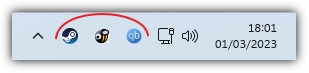
  • New! This update enhances the system tray. All icons will have a rounded focus and hover treatment in the lower right, including the “Show hidden icons” flyout menu. You can move icons to rearrange them in the “Show hidden icons” flyout menu or move icons to the taskbar.
  • New! This update makes voice access more flexible and supports interaction with more user interface (UI) controls. For example, voice now interacts with controls that contain:
    - Names that have numbers, such as “Click 5”
    - Names without whitespaces between them, such as “click PivotTable” or “click PivotChart”
    - Names that have special characters, such as Bluetooth & devices (“click Bluetooth and devices”) or Dial – up (“click dial hyphen up”)
  • New! Voice now supports spin controls, thumb controls, and split buttons. You interact with these controls by using the “click” command or number overlays. This update also addresses issues that affect snapping commands that snap a window left or right. Commands that move the cursor in a text box now run instantly.
  • New! This update also provides voice scrolling enhancements. You can use voice to scroll to the extreme left and right on a page. You can also use continuous scrolling to the left or right like what is already present for vertical scrolling. For more information about the new voice access commands, see Voice access command list.
  • New! This update makes enhancements to Task Manager. These include:
    - Filtering—You can now filter processes using the binary name, PID, or publisher name. The filter also applies when you switch between pages. The keyboard shortcut is ALT+F.
    - More theme options—You can now choose a theme for Task Manager that is different from the Windows theme. Also, all dialogs, except for Run new task and the Properties dialog, now support themes. The dialogs will use app-specific themes or the Windows theme.
    - Efficiency mode—You can now opt out of confirmation dialogs when you turn on Efficiency mode.
  • This update addresses an issue that affects the Color filters setting. When you select Inverted, the system sets it to Grayscale instead.
  • This update addresses an issue that affects IE mode. The text on the status bar is not always visible.
  • This update addresses an issue that displays a blue screen during video playback. This occurs after you set high dynamic range (HDR) on your display.
  • This update addresses an issue that might affect the touch keyboard and the PIN entry keyboard. You might not be able to use them to enter text when you sign in to your device.
  • This update addresses an issue that affects which folders appear in the Browse for Folder picker.
  • This update addresses an issue that affects File Explorer. When you use Shift+Tab or Shift+F6, the input focus does not move.
  • This update addresses an issue that affects the user interface (UI). The volume up and volume down commands from a Bluetooth keyboard do not display.
  • This update addresses an issue that affects Xbox subscribers. If you purchased an Xbox subscription using the "Redeem code" option, you cannot see the Xbox subscription card on the Settings Accounts page. This occurs when recurring billing is off.
Istallato stamani
NiKKlaus è offline   Rispondi citando il messaggio o parte di esso
Old 28-02-2023, 20:32   #7422
FiorDiLatte
Senior Member
 
L'Avatar di FiorDiLatte
 
Iscritto dal: May 2002
Città: Toscana
Messaggi: 3481
Ciao,

un cliente con Win11 ha preso un malware presumo che gli ha resettato le varie associazioni ai file di sistema .exe, ecc. ecc. ecc. , ho trovato questa utility (ce n'era un'altra storica ma l'ho persa di vista anni fa):

https://www.carifred.com/exefixer/

Sicuramente su MajorGeek si troverà qualcosa di equivalente.


bye
__________________
ASUS TUF GAMING Z790-PRO WIFI (bios 1820) + Intel i7@14700K+ Dissy CoolerMaster MasterAir MA410M + 32GB RAM DDR5 6000MT/s CL32 Kingston FURY Renegade XMP Profile 2 + ALI Enermax Revolution DF12 ATX 3.1 850 Watt+ SSD M2 990 PRO 1 TB + SSD M2 980 Pro 500GB + n°2 SSD 860 EVO 500GB + WD Blue 2 TB + PNY GeForce RTX™ 5080 16GB OC + Scheda Audio Asus Xonar Phoebus Solo 7.1 + case
NZXT H7 Flow White
FiorDiLatte è offline   Rispondi citando il messaggio o parte di esso
Old 28-02-2023, 21:14   #7423
guant4namo
Senior Member
 
L'Avatar di guant4namo
 
Iscritto dal: Sep 2012
Messaggi: 23855
Quote:
Originariamente inviato da FiorDiLatte Guarda i messaggi
Ciao,

un cliente con Win11 ha preso un malware presumo che gli ha resettato le varie associazioni ai file di sistema .exe, ecc. ecc. ecc. , ho trovato questa utility (ce n'era un'altra storica ma l'ho persa di vista anni fa):

https://www.carifred.com/exefixer/

Sicuramente su MajorGeek si troverà qualcosa di equivalente.


bye

Spero che il malware lo hai tolto altrimenti mi sa che sei punto e a capo.
__________________
Lian-Li PC-O11 Dynamic Seasonic Prime TX-850 AMD Ryzen 5900X ARCTIC Liquid Freezer II 360 MSI X570S UNIFY-X MAX Crucial Ballistix 3600 MHz (2x16GB) EVGA GeForce RTX 2080 SUPER XC ULTRA Samsung 980 Pro 500GB Sabrent Rocket 4.0 1TB LG 27GP850
guant4namo è offline   Rispondi citando il messaggio o parte di esso
Old 28-02-2023, 21:30   #7424
davido
Senior Member
 
L'Avatar di davido
 
Iscritto dal: May 2008
Messaggi: 1190
Quote:
Originariamente inviato da LL1 Guarda i messaggi
manca una bella fetta di informazioni (meglio anzi se corredi il tutto con qualche foto chiarificatrice), ad ogni modo:
si parla di cosa? (11 ramo stabile o, come credo, insider?)
Che sarebbe, infine, quella "chiave che hai provato a cancellare tramite un opzione chiamata pending non ricordo"?? (se non lo sai te, figurati noi )
Eccomi con qualche altra informazione:
w11 ramo stabile, mi sono appena fiondato su windows update ma il problema rimane

questo lo screenshot del bios

questo l'errore se clicco sulla barra delle applicazioni

questo dal menu impostazioni
Quote:
Originariamente inviato da wolverine Guarda i messaggi
Hai provato a resettare il bios? Hai l'ultima versione stabile del bios (7C35vAE)?
Si sono all'ultima stabile
provo a fare un clear cmos
scusate, questo dovrebbe essere il messaggio d'errore
edit: fatto clear cmos ma non cambia niente
__________________
Msi meg x570 unify /AMD Ryzen 7 5700x3d / 32gb G skill trident z 3600 / Radeon rx9070xt / SK hynix Platinum P41 2TB /3VGA 850 GA /Dell s2721dgf / and stuff

Ultima modifica di davido : 28-02-2023 alle 21:56.
davido è offline   Rispondi citando il messaggio o parte di esso
Old 01-03-2023, 10:06   #7425
Nicodemo Timoteo Taddeo
Senior Member
 
L'Avatar di Nicodemo Timoteo Taddeo
 
Iscritto dal: Mar 2008
Messaggi: 20653
Occhio a Moment 2:

"Aggiornamento Windows 11 di febbraio 2023 fa a pugni con le personalizzazioni grafiche ed Esplora file va in crash"

https://www.ilsoftware.it/articoli.a...in-crash_25669

"Windows 11 Moment 2 applica importanti modifiche sull'interfaccia del sistema operativo e su alcune modalità di funzionamento "scontrandosi" con applicazioni largamente utilizzate come ExplorerPatcher e StartAllBack."
Nicodemo Timoteo Taddeo è offline   Rispondi citando il messaggio o parte di esso
Old 01-03-2023, 10:24   #7426
FulValBot
Senior Member
 
L'Avatar di FulValBot
 
Iscritto dal: Oct 2007
Città: Roma
Messaggi: 9805
Non uso app non ufficiali, problema vostro e di chi le usa
FulValBot è offline   Rispondi citando il messaggio o parte di esso
Old 01-03-2023, 10:30   #7427
NiKKlaus
Senior Member
 
L'Avatar di NiKKlaus
 
Iscritto dal: Aug 2019
Città: Quarrata (PT)
Messaggi: 1807
non fanno altro che peggiorare cazz ora con ultimo aggiornamento icone accanto a orologio col drag & drop non le aggiunge, devi modificare dalle impostazioni
NiKKlaus è offline   Rispondi citando il messaggio o parte di esso
Old 01-03-2023, 11:31   #7428
DLINKO
Senior Member
 
L'Avatar di DLINKO
 
Iscritto dal: Mar 2008
Città: International Space Station
Messaggi: 5169
Quote:
Originariamente inviato da FulValBot Guarda i messaggi
Non uso app non ufficiali, problema vostro e di chi le usa

Quoto al 350 % !
DLINKO è offline   Rispondi citando il messaggio o parte di esso
Old 01-03-2023, 11:43   #7429
LL1
Senior Member
 
Iscritto dal: Jun 2015
Messaggi: 3069
Quote:
Originariamente inviato da davido Guarda i messaggi
...
hai privato

Ultima modifica di LL1 : 01-03-2023 alle 21:25.
LL1 è offline   Rispondi citando il messaggio o parte di esso
Old 01-03-2023, 11:43   #7430
Styb
Senior Member
 
L'Avatar di Styb
 
Iscritto dal: Jan 2009
Città: Bannata tempora currunt
Messaggi: 10278
Quote:
Originariamente inviato da NiKKlaus Guarda i messaggi
non fanno altro che peggiorare cazz ora con ultimo aggiornamento icone accanto a orologio col drag & drop non le aggiunge, devi modificare dalle impostazioni
In effetti... il drag&drop unidirezionale non lo si capisce mica!!

Però adesso le icone nascoste sono tutte allineate in una riga...
Styb è offline   Rispondi citando il messaggio o parte di esso
Old 01-03-2023, 12:42   #7431
DLINKO
Senior Member
 
L'Avatar di DLINKO
 
Iscritto dal: Mar 2008
Città: International Space Station
Messaggi: 5169
Quote:
Originariamente inviato da NiKKlaus Guarda i messaggi
non fanno altro che peggiorare cazz ora con ultimo aggiornamento icone accanto a orologio col drag & drop non le aggiunge, devi modificare dalle impostazioni
Lo fanno per tenerti attivo, altrimenti, ti annoieresti.
DLINKO è offline   Rispondi citando il messaggio o parte di esso
Old 01-03-2023, 12:54   #7432
FiorDiLatte
Senior Member
 
L'Avatar di FiorDiLatte
 
Iscritto dal: May 2002
Città: Toscana
Messaggi: 3481
Ciao,

altra utility carina per Win11:

https://freetimetech.com/windows-11-...l-debloat-gui/

bye
__________________
ASUS TUF GAMING Z790-PRO WIFI (bios 1820) + Intel i7@14700K+ Dissy CoolerMaster MasterAir MA410M + 32GB RAM DDR5 6000MT/s CL32 Kingston FURY Renegade XMP Profile 2 + ALI Enermax Revolution DF12 ATX 3.1 850 Watt+ SSD M2 990 PRO 1 TB + SSD M2 980 Pro 500GB + n°2 SSD 860 EVO 500GB + WD Blue 2 TB + PNY GeForce RTX™ 5080 16GB OC + Scheda Audio Asus Xonar Phoebus Solo 7.1 + case
NZXT H7 Flow White

Ultima modifica di FiorDiLatte : 01-03-2023 alle 23:49.
FiorDiLatte è offline   Rispondi citando il messaggio o parte di esso
Old 01-03-2023, 12:56   #7433
no_side_fx
Senior Member
 
L'Avatar di no_side_fx
 
Iscritto dal: Apr 2005
Messaggi: 4845
Quote:
Originariamente inviato da FiorDiLatte Guarda i messaggi
Ciao,

altra utility carina per Win11:

https://freetimetech.com/windows-11-...-debloat-gui/ù
pagina inesistente
posti gli scam?
no_side_fx è offline   Rispondi citando il messaggio o parte di esso
Old 01-03-2023, 16:30   #7434
Wikkle
Senior Member
 
L'Avatar di Wikkle
 
Iscritto dal: Jun 2005
Messaggi: 12752
Aggiornato oggi al cumulativo nuovo...
Molto ingommato, alcune cose clicco e si aprono dopo 5 o 10 secondi!
Provato a riavviare un sacco di volte, mai avuto problemi con aggiornamenti MS
__________________
★ ★ ★ ★ ★ ★ ★ ★ ★ ★ ★ ★ ★ ★ ★ ★ ★ ★ ★ ★ ★ ★ ★ ★ ★ ★ ★ ★ ★ ★ ★ ★ ★ ★ ★ ★ ★ ★ ★ ★ ★ ★ ★ ★ ★ ★ ★ ★ ★ ★ ★ ★ ★ ★ ★ ★
Asus Maximus IX Hero . i7-7700 KabyLake . 32 Gb Ram . GeForce GTX 1070 Mac Mini 2.5GHz . 16 Gb Ram . SSD 500 Gb
Google Pixel 8 pro iPhone 15 plus Canon EOS 600D Sony DSC-RX100

Wikkle è offline   Rispondi citando il messaggio o parte di esso
Old 01-03-2023, 16:49   #7435
megthebest
Senior Member
 
L'Avatar di megthebest
 
Iscritto dal: Jan 2001
Città: *****Prov.AN***** My Name's MAX
Messaggi: 24442
Quote:
Originariamente inviato da Wikkle Guarda i messaggi
Aggiornato oggi al cumulativo nuovo...
Molto ingommato, alcune cose clicco e si aprono dopo 5 o 10 secondi!
Provato a riavviare un sacco di volte, mai avuto problemi con aggiornamenti MS
Hai il computer vecchio, non supportato.. lo fanno apposta.. complotto!!!
Scherzi a parte, non l'ho ancora messo.. mi sa che aspetto per il momento..
Altri feedback?
__________________
~MSI B550-A Pro~R7 5800X~RTX2060~32Gb LPX 3600C16~Kingston PCIe 4.0 SFYRS1000G~
*Album Photo4U* NPU*500px*Flickr*My FIBER* Il Mio Realme GT7 *MaxRecensioni
megthebest è offline   Rispondi citando il messaggio o parte di esso
Old 01-03-2023, 17:33   #7436
Fatal Frame
Senior Member
 
L'Avatar di Fatal Frame
 
Iscritto dal: Oct 2008
Città: Monza
Messaggi: 35276
Quote:
Originariamente inviato da Wikkle Guarda i messaggi
Aggiornato oggi al cumulativo nuovo...
Molto ingommato, alcune cose clicco e si aprono dopo 5 o 10 secondi!
Provato a riavviare un sacco di volte, mai avuto problemi con aggiornamenti MS
E' ora di aggiornare l'hardware del pc
__________________
Pr0ject 0rigin - Pr0ject_0rigin83 - Pr0ject_0rigin - pr0ject0rigin
Xbox Series X - PlayStation 5 - Switch Oled - Deck Oled
Samsung 43 Q60B - Asus TUF F15
Fatal Frame è offline   Rispondi citando il messaggio o parte di esso
Old 01-03-2023, 17:52   #7437
LL1
Senior Member
 
Iscritto dal: Jun 2015
Messaggi: 3069
Quote:
Originariamente inviato da megthebest Guarda i messaggi
Altri feedback?
si, questo:
che se dai troppo peso (/enfasi) alle singole esperienze che leggi on line, allora tanto vale non aggiornare mai nulla perché troverai sempre qualcuno che lamenta qualcosa.

A meno che il problema emerso non sia infatti a macchia d'olio (e non è questo il caso: lo avresti letto su tutti i forum in concomitanza dell'uscita), restano rispettabili esperienze personali che testimoniano certamente l'esistenza di un problema per chi lo patisce ma non possono definirsi come collettive e sufficienti a condizionare gli altri.


Per tornare invece a "Moment 2":
non c'è niente di fantasmagorico anzi, ad essere sincero mi piace anche meno la parte della tray bar vicina all'orologio visto che spazia tra loro in maniera esagerata le icone


(c'è 1 Km tra un'icona e l'altra)..

Ultima modifica di LL1 : 01-03-2023 alle 20:01.
LL1 è offline   Rispondi citando il messaggio o parte di esso
Old 01-03-2023, 18:16   #7438
yeppala
Senior Member
 
L'Avatar di yeppala
 
Iscritto dal: Dec 2007
Messaggi: 4346
E' più touch-friendly

Ultima modifica di yeppala : 01-03-2023 alle 18:19.
yeppala è offline   Rispondi citando il messaggio o parte di esso
Old 01-03-2023, 18:32   #7439
wolverine
Senior Member
 
L'Avatar di wolverine
 
Iscritto dal: May 2001
Città: Varese
Messaggi: 20160
Piccola stranezza con il nuovo aggiornamento.

__________________
|AMD Ryzen 5 5600|Thermalright Assassin X 120 SE|MSI X470 Gaming Plus Max|Crucial Ballistix 4x8GB ddr4 3600|Sapphire RX 580 Nitro+ 8GB gddr5|WD Black SN770 1TB M2 nvme + Thermalright M2 Pro|Sharkoon SilentStorm CoolZero 850W 80Plus Gold|NZXT H510|Philips 275E2FAE 27"|Windows 11 Pro 64bit 22H2|
"You can choose to not believe I'm here, I flourish most inside your fear"
wolverine è offline   Rispondi citando il messaggio o parte di esso
Old 01-03-2023, 20:51   #7440
no_side_fx
Senior Member
 
L'Avatar di no_side_fx
 
Iscritto dal: Apr 2005
Messaggi: 4845
Quote:
Originariamente inviato da DLINKO Guarda i messaggi
P.S 2 mi ero dimenticato, ho dovuto rimuovere Option plus e rimettere Option perché improvvisamente aveva iniziato a dare il ben noto backend connection problem e che come spesso accade, tutte le soluzioni riportate in rete lasciano il tempo che trovano.
se interessa ho visto che nell'ultima versione di Plus del 27/02 è riportato questo come fix: Backend related bugs and crashes
no_side_fx è offline   Rispondi citando il messaggio o parte di esso
 Rispondi


Le soluzioni FSP per il 2026: potenza e IA al centro Le soluzioni FSP per il 2026: potenza e IA al ce...
AWS annuncia European Sovereign Cloud, il cloud sovrano per convincere l'Europa AWS annuncia European Sovereign Cloud, il cloud ...
Redmi Note 15 Pro+ 5G: autonomia monstre e display luminoso, ma il prezzo è alto Redmi Note 15 Pro+ 5G: autonomia monstre e displ...
HONOR Magic 8 Pro: ecco il primo TOP del 2026! La recensione HONOR Magic 8 Pro: ecco il primo TOP del 2026! L...
Insta360 Link 2 Pro e 2C Pro: le webcam 4K che ti seguono, anche con gimbal integrata Insta360 Link 2 Pro e 2C Pro: le webcam 4K che t...
Offerte Dell su Amazon: 4 portatili pote...
Richard Stallman spara a zero su intelli...
C'è anche un Ripetitore Wi-Fi sot...
Biostampa 3D: scienziati creano tessuto ...
Adesso puoi comprare gli occhiali smart ...
Changan CS75 Plus entra nel Guinness: sa...
Prime foto della McLaren MCL40: bellissi...
Una manna per gli allergici: torna a 79€...
Blink a prezzo minimo storico: Mini 2K+ ...
Un professore tedesco perde due anni di ...
Perché Microsoft rilascia gli aggiorname...
Leapmotor, arrivano C10 Long Range e AWD...
Finalmente un bel portatile gaming in of...
Speciale Ring su Amazon: videocitofoni e...
Clair Obscur: Expedition 33 è il ...
Chromium
GPU-Z
OCCT
LibreOffice Portable
Opera One Portable
Opera One 106
CCleaner Portable
CCleaner Standard
Cpu-Z
Driver NVIDIA GeForce 546.65 WHQL
SmartFTP
Trillian
Google Chrome Portable
Google Chrome 120
VirtualBox
Tutti gli articoli Tutte le news Tutti i download

Strumenti

Regole
Non Puoi aprire nuove discussioni
Non Puoi rispondere ai messaggi
Non Puoi allegare file
Non Puoi modificare i tuoi messaggi

Il codice vB è On
Le Faccine sono On
Il codice [IMG] è On
Il codice HTML è Off
Vai al Forum


Tutti gli orari sono GMT +1. Ora sono le: 11:28.


Powered by vBulletin® Version 3.6.4
Copyright ©2000 - 2026, Jelsoft Enterprises Ltd.
Served by www3v