Torna indietro   Hardware Upgrade Forum > Software > Microsoft Windows > Microsoft Windows 8.1 e 10

LG UltraGear evo GM9: 27 pollici, 5K, Mini LED e Dual Mode
Hyper Mini LED con 2.304 zone, DisplayPort 2.1 e Dual Mode: 5K a 165 Hz oppure QHD a 330 Hz: LG propone un monitor da gioco ma dalla buona versatilità creativa, con prestazioni interessanti e un listino di 1.220 euro. Peccato l'alimentatore ingombrante
Motorola edge 70 Fusion FIFA World Cup 26 Edition: un ottimo smartphone per i fan del calcio
Motorola edge 70 Fusion FIFA World Cup 26 Edition porta la maglia iridata su uno smartphone accessibile: display Extreme AMOLED da 6,78 pollici a 144Hz, fotocamera Sony LYTIA 710 con moto ai, Snapdragon 7s Gen 3 abbinato a 8GB di RAM, batteria da 5200 mAh con ricarica TurboPower a 68W e certificazione IP68/IP69, il tutto in una veste PANTONE Silhouette con logo dorato a 24 carati, moto buds bass incluse in confezione e contenuti software dedicati ai Mondiali 2026
Renault 5 elettrica al giudizio definitivo: solo stupore iniziale o premi meritati?
Dopo più di un anno dal primo test drive ci siamo rimessi al volante della Renault 5 E-Tech Electric, questa volta utilizzandola come prima auto per circa due settimane. Scoprite con noi se il progetto convince ancora
Tutti gli articoli Tutte le news

Risultati sondaggio: Quale funzionalità implementata in window 8 preferite di più?
nuova interfaccia Metro(the Start screen) 90 21.63%
Charms Bar 2 0.48%
WinRT 8 1.92%
File History(nuovo strumento di backup) 2 0.48%
nuovo Storage Pool 1 0.24%
Integrazione Windows Live 3 0.72%
Inserimento di account utente "non locali" live 11 2.64%
nuova funzione Refresh/reset 7 1.68%
interfaccia Explorer Ribbon 12 2.88%
Mounting ISO 25 6.01%
Nuovo file system ReFS (Resilient File System) 13 3.13%
Supporto multimonitor con estensione barra 2 0.48%
eliminazione del pulsante Start 3 0.72%
eliminazione dell'Aero 5 1.20%
Hybrid boot 7 1.68%
Windows to Go 2 0.48%
nuovo Hyper-V 5 1.20%
Gestione memoria migliorata 49 11.78%
Supporto NFC 0 0%
Secure Boot 1 0.24%
supporto UEFI 9 2.16%
Windows Store 17 4.09%
Migliore gestione del risparmio energetico 9 2.16%
migliorato supporto multi touch 1 0.24%
eliminazione dei gadget 6 1.44%
Antivirus integrato 19 4.57%
Windows Smart Screen 1 0.24%
nuovo tesk manager 27 6.49%
altro 10 2.40%
nessuna 69 16.59%
Votanti: 416. Non puoi votare in questo sondaggio

Vai al Forum
Discussione Chiusa
 
Strumenti
Old 28-04-2011, 07:20   #461
dragopippero
Bannato
 
Iscritto dal: Mar 2011
Città: Cream from Turin
Messaggi: 948
Quote:
Originariamente inviato da Nicodemo Timoteo Taddeo Guarda i messaggi
Temo che stai facendo grossa confusione tra .net e cloud computing

http://it.wikipedia.org/wiki/Microsoft_.NET

http://it.wikipedia.org/wiki/Cloud_computing


Saluti.
Infatti.. pensavo parlasse del cloud..
dragopippero è offline  
Old 28-04-2011, 08:39   #462
birmarco
Senior Member
 
L'Avatar di birmarco
 
Iscritto dal: Mar 2008
Città: Milano; 9 Vendite concluse -> Wilde; emmepi; Homerj81; cos1950; mariotanza; Benia; grigor; alekia; ARG0
Messaggi: 11160
Quote:
Originariamente inviato da alethebest90 Guarda i messaggi
ah non male
Tieni presente però che è la versione a 32bit M1 e senza neanche un driver installato

Quote:
Originariamente inviato da dragopippero Guarda i messaggi
Infatti.. pensavo parlasse del cloud..


Il cloud non piace molto neanche a me!
birmarco è offline  
Old 28-04-2011, 08:50   #463
Mr_Paulus
Senior Member
 
Iscritto dal: Nov 2007
Messaggi: 9050
Quote:
Originariamente inviato da dragopippero Guarda i messaggi
il .net darà inizio a tassazione continua, non potrai più acquistare un prodotto dovrai pagarlo per sempre.
Oltretutto sarei costretto a far viaggiare i miei documenti personali tramite terzi su internet.... e chi sono questi terzi... e chi mi garantirà che loro non se ne fanno una copia.
Hai ragione sarebbe una figata... Ma se al mondo non ci fossero i ladri.
beh solo il fatto che già oggi i tuoi soldi non stanno in una cassaforte ma in un server ben protetto dovrebbe far pensare che un sistema cloud fatto come si deve dovrebbe essere "accettabilmente" sicuro
perchè se è per questo neanche il server della banca che ha registrato quanti soldi hai nel cc è sicuro al 100%.
Mr_Paulus è offline  
Old 28-04-2011, 09:20   #464
dragopippero
Bannato
 
Iscritto dal: Mar 2011
Città: Cream from Turin
Messaggi: 948
Quote:
Originariamente inviato da Mr_Paulus Guarda i messaggi
beh solo il fatto che già oggi i tuoi soldi non stanno in una cassaforte ma in un server ben protetto dovrebbe far pensare che un sistema cloud fatto come si deve dovrebbe essere "accettabilmente" sicuro
perchè se è per questo neanche il server della banca che ha registrato quanti soldi hai nel cc è sicuro al 100%.
Se mi dovessero rubare dei soldi... me ne farei una ragione. Non riuscirei a fare altrettanto se dovessero rubarmi pezzi di vita.
E' come quando ti rubano in casa.. l'ultima cosa a cui pensi generalmente sono i soldi, prima ci sono le cose ed i ricordi personali, che non hanno prezzo.
Ma questo è soggettivo.
dragopippero è offline  
Old 28-04-2011, 11:08   #465
WarDuck
Senior Member
 
L'Avatar di WarDuck
 
Iscritto dal: May 2001
Messaggi: 13036
Quote:
Originariamente inviato da birmarco Guarda i messaggi
Mi è sfuggita qualche parola... è stato trovato il redhawk in Windows 8 M1 giusto? Ma che cos'è? è un framework integrato con l'OS? a volte il mio inglese mi lascia dei dubbi!
Quote:
Redhawk and MinSafe are two sides of the same coin. Redhawk is the codename for new managed code work being done by the Developer Division, while MinSafe is the codename for the complementary managed code initiative on the Windows side of the house.
Both projects are aimed at providing a new managed-code execution environment that will be more lightweight and (Microsoft hopes) more appealing to developers who are put off by the perceived overhead of the current Common Language Runtime (CLR) at the heart of the .Net Framework.
Redhawk deliverables may include a new back-end compiler and new runtime that would still provide type safety and garbage collection, but perhaps not the rest of the functionality that is currently part of the current .Net CLR.
Se interpreto bene RedHawk dovrebbe essere un sotto-insieme minimale dell'attuale macchina virtuale che fa girare codice .NET.

Questo sotto-insieme potrebbe costituire le basi per un SO "managed" (il runtime MinSafe per l'esecuzione di applicazioni managed), con tutti i vantaggi in termini di sicurezza che ne deriverebbero.

Chiaramente l'incognita rimangono le prestazioni, ma essendo un sotto-insieme di .NET sicuramente potranno sviluppare compilatori JIT (just-in-time) più veloci (e con i pc attuali le differenze potrebbero assottigliarsi).

Un SO managed rappresenta una sfida ingegneristica di tutto rispetto IMHO.

Ultima modifica di WarDuck : 28-04-2011 alle 11:12.
WarDuck è offline  
Old 28-04-2011, 18:18   #466
cajenna
Senior Member
 
L'Avatar di cajenna
 
Iscritto dal: Oct 1999
Città: Tivoli (RM)
Messaggi: 18335
Aggiornamento

ho trovato un HDD IDE da 20Gb e lo ho installato sul muletto e installato win8,installazione andata subito a buon fine,pensate che si è preso (in modalità compatibile) tutti i vari driver che sono solo per winXP (audio e lan).
Che dire...è più snello di xp...
__________________
Mi chiamo Silvio,molto piacere.
Il mio sito...La mia configurazione e i miei test su windows 8
I ♥ my Galaxy NoteIII 7505 NEO (JB 4.3).......vendo varie
cajenna è offline  
Old 28-04-2011, 20:40   #467
birmarco
Senior Member
 
L'Avatar di birmarco
 
Iscritto dal: Mar 2008
Città: Milano; 9 Vendite concluse -> Wilde; emmepi; Homerj81; cos1950; mariotanza; Benia; grigor; alekia; ARG0
Messaggi: 11160
Quote:
Originariamente inviato da WarDuck Guarda i messaggi
Se interpreto bene RedHawk dovrebbe essere un sotto-insieme minimale dell'attuale macchina virtuale che fa girare codice .NET.

Questo sotto-insieme potrebbe costituire le basi per un SO "managed" (il runtime MinSafe per l'esecuzione di applicazioni managed), con tutti i vantaggi in termini di sicurezza che ne deriverebbero.

Chiaramente l'incognita rimangono le prestazioni, ma essendo un sotto-insieme di .NET sicuramente potranno sviluppare compilatori JIT (just-in-time) più veloci (e con i pc attuali le differenze potrebbero assottigliarsi).

Un SO managed rappresenta una sfida ingegneristica di tutto rispetto IMHO.
Quindi mi stai dicendo che il framework è direttamente integrato nel sistema operativo e che la compilazione da .net a macchina sarà molto più veloce con incrementi prestazionali per le app .net?
E che le suddette app possono anche essere pezzi del sitema operativo...

Be se Windows diventa un po' più .net sarebbe un buon vantaggio per gli sviluppatori... il .net è decisamente più comodo del C in generale... il C è un po' per le cose a basso livello ma anche poter programmare un gadget del desktop in .net sarebbe una gran cosa!

Quote:
Originariamente inviato da cajenna Guarda i messaggi
ho trovato un HDD IDE da 20Gb e lo ho installato sul muletto e installato win8,installazione andata subito a buon fine,pensate che si è preso (in modalità compatibile) tutti i vari driver che sono solo per winXP (audio e lan).
Che dire...è più snello di xp...
Ottimo, ottimo!! La beta sarà per Giugno? Non mi ricordo più!
birmarco è offline  
Old 28-04-2011, 21:02   #468
arnyreny
Senior Member
 
L'Avatar di arnyreny
 
Iscritto dal: May 2007
Città: Gragnano
Messaggi: 10656
Quote:
Originariamente inviato da birmarco Guarda i messaggi


Ottimo, ottimo!! La beta sarà per Giugno? Non mi ricordo più!
dovrebbe essere giugno o luglio,speriamo
arnyreny è offline  
Old 28-04-2011, 21:27   #469
cajenna
Senior Member
 
L'Avatar di cajenna
 
Iscritto dal: Oct 1999
Città: Tivoli (RM)
Messaggi: 18335
Comoda la ribbon,a prima vista sembrava un po' marchingegnosa,invece basta prenderci la mano,confermo che il lockscreen (sbloccato) è in stile metro,più tardi posto una foto.
__________________
Mi chiamo Silvio,molto piacere.
Il mio sito...La mia configurazione e i miei test su windows 8
I ♥ my Galaxy NoteIII 7505 NEO (JB 4.3).......vendo varie
cajenna è offline  
Old 28-04-2011, 21:34   #470
arnyreny
Senior Member
 
L'Avatar di arnyreny
 
Iscritto dal: May 2007
Città: Gragnano
Messaggi: 10656
Quote:
Originariamente inviato da cajenna Guarda i messaggi
Comoda la ribbon,a prima vista sembrava un po' marchingegnosa,invece basta prenderci la mano,confermo che il lockscreen (sbloccato) è in stile metro,più tardi posto una foto.
ho visto il video della metro ....
ecccolo http://vimeo.com/22913298

e questa la ribbon
arnyreny è offline  
Old 28-04-2011, 21:43   #471
cajenna
Senior Member
 
L'Avatar di cajenna
 
Iscritto dal: Oct 1999
Città: Tivoli (RM)
Messaggi: 18335
No,la ribbon che ho io è questa:


e questa è la schermata bloccata:

__________________
Mi chiamo Silvio,molto piacere.
Il mio sito...La mia configurazione e i miei test su windows 8
I ♥ my Galaxy NoteIII 7505 NEO (JB 4.3).......vendo varie
cajenna è offline  
Old 28-04-2011, 23:21   #472
birmarco
Senior Member
 
L'Avatar di birmarco
 
Iscritto dal: Mar 2008
Città: Milano; 9 Vendite concluse -> Wilde; emmepi; Homerj81; cos1950; mariotanza; Benia; grigor; alekia; ARG0
Messaggi: 11160
Quote:
Originariamente inviato da arnyreny Guarda i messaggi
dovrebbe essere giugno o luglio,speriamo
Speriamo! almeno abbandono 7

Quote:
Originariamente inviato da cajenna Guarda i messaggi
Comoda la ribbon,a prima vista sembrava un po' marchingegnosa,invece basta prenderci la mano,confermo che il lockscreen (sbloccato) è in stile metro,più tardi posto una foto.
Il vero casino sono le icone arancioni tutte uguali... inutilizzabili!
Anche se devo dire che al momento non aggiunge molto di nuovo quella ribbon... e occupa molto spazio

Quote:
Originariamente inviato da arnyreny Guarda i messaggi
ho visto il video della metro ....
ecccolo http://vimeo.com/22913298

e questa la ribbon
Dov'è che l'hai pescata questa?
birmarco è offline  
Old 28-04-2011, 23:26   #473
arnyreny
Senior Member
 
L'Avatar di arnyreny
 
Iscritto dal: May 2007
Città: Gragnano
Messaggi: 10656
credo che sia personalizzabile... ci sarà qualche opzione che la faccia diventare piccolo o grande ....o senza
arnyreny è offline  
Old 29-04-2011, 08:09   #474
Slayer66
Member
 
L'Avatar di Slayer66
 
Iscritto dal: Jun 2006
Città: Nocera---->Genova
Messaggi: 167
salve.........
......confermo, è personalizzabile e si possono aggiungere anche comandi, come in office 2010, almeno io smanettandoci un pochino ho visto la schermata "aggiungi" ma non ho avuto tempo di provare.
comunque, credo che quelle icone arancioni debbano ancora essere create/aggiunte, perchè così veramnete sono terrribbili....
.....una domanda, ma la 7956 è M3, ma precedente o successiva alla 7955, le date mi confondono, perchè la 7956 risulta compilata prima della 7955.
__________________
Fractal Design Define R5 - Ali Antec HCG850 - Xeon E5-2698 v.3 - Asus x99-A II - 32GB Crucial Ballistix Sport 3200 Mhz - Corsair H50 - Gigabyte GTX 970 G1 - Lenovo D27-30 Full HD - Asus Xonar DX - Audio Empire R1000 MKII+ Sub Sony - Windows 11 Pro x64
Slayer66 è offline  
Old 29-04-2011, 08:13   #475
cajenna
Senior Member
 
L'Avatar di cajenna
 
Iscritto dal: Oct 1999
Città: Tivoli (RM)
Messaggi: 18335
Ciao a tutti,ho un problemino con la 7955,non riesco ad abilitare il modern reader e la webcam...eppure ho eseguito sia il poison che il redpill...dove sbaglio?
__________________
Mi chiamo Silvio,molto piacere.
Il mio sito...La mia configurazione e i miei test su windows 8
I ♥ my Galaxy NoteIII 7505 NEO (JB 4.3).......vendo varie
cajenna è offline  
Old 29-04-2011, 08:59   #476
TonyVe
Senior Member
 
L'Avatar di TonyVe
 
Iscritto dal: Apr 2010
Messaggi: 4310
Quote:
Originariamente inviato da cajenna Guarda i messaggi
Ciao a tutti,ho un problemino con la 7955,non riesco ad abilitare il modern reader e la webcam...eppure ho eseguito sia il poison che il redpill...dove sbaglio?
Usa RedPill + aggiunta di chiave come per la 7850.
Avrai il Moder Reader con Aero attivo, prima non si poteva il combo.

Ultima modifica di TonyVe : 29-04-2011 alle 09:50.
TonyVe è offline  
Old 29-04-2011, 10:12   #477
TonyVe
Senior Member
 
L'Avatar di TonyVe
 
Iscritto dal: Apr 2010
Messaggi: 4310
Quote:
Originariamente inviato da birmarco Guarda i messaggi
Il vero casino sono le icone arancioni tutte uguali... inutilizzabili!
Anche se devo dire che al momento non aggiunge molto di nuovo quella ribbon... e occupa molto spazio
Si può tranquillamente minimizzare l'interfaccia Ribbon nell'esplora risorse.
Cosa che ho fatto provando Win. "8" sul NetBook.
TonyVe è offline  
Old 29-04-2011, 10:26   #478
ezio
Senior Member
 
L'Avatar di ezio
 
Iscritto dal: Apr 2001
Città: Giovinazzo(BA) ...bella città, riso patat e cozz a volontà!
Messaggi: 26494
Avete fatto caso al nuovo possibile "Ripristino di sistema", ora chiamato History Vault?
http://www.hwfiles.it/articoli/2816/...ettagli_2.html
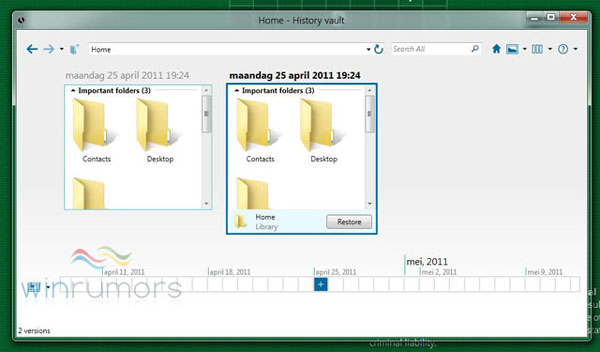
Permette di scegliere quali componenti e file ripristinare, sarebbe veramente un'ottima soluzione
ezio è offline  
Old 29-04-2011, 10:41   #479
damxxx
Senior Member
 
Iscritto dal: May 2003
Città: Gioia Sannitica (CE)
Messaggi: 1436
Per chi chiedeva come funziona lo sviluppo all'interno di Microsoft, è stata dura, ma sono riuscito a recuperare un post di un dipendente di Microsoft, Richard G Russell, intitolato "Working at Microsoft – Day to Day Coding" che però adesso ha cancellato il suo post ma sono riuscito a recuperarlo da altre fonti:

Quote:
I quite often see assumptions on the inter-tubes that writing software at Microsoft is a mind-numbingly boring, tedious, manual, excruciating, soul-crushing bureaucratic exercise. This couldn’t be further from the truth – especially in Windows. Here is what its like to code day to day on my team.

Most people in Windows have a private office – with a door. Not just managers, not just developers – everyone. Even our intern has a private office. The only reason someone might share an office is because the building is crowded. Every so often we’ll move people around, one goal being to give everyone their own office, the other being to co-locate teams. I’m in one of our older buildings, but it is still in great shape. My building has slightly larger offices than newer buildings. Mine is 10×18, large enough for a good size desk, a eight foot white board, a comfy recliner, and a meeting table and chairs.

I also painted my office to suit my tastes. While discouraged and rare, this isn’t forbidden. My paint job is well done and tasefull and failities didn’t fuss at me about it. The understanding is that if you screw it up, then facilities will charge you to restore it to normal.

The standard development system is a quad core 64-bit system with 8 gigs of memory, fast hard drives, a gaming quality graphics adapter, and at least two large monitors. Many people have three monitors, some have four. We’re moving to SSD’s. My boot drive died and I replaced it with an Intel x25M SSD. Our systems are plugged into a fully switched gigabit Ethernet network. Networking access is almost never a bottleneck. There is a regular cycle of system replacement and upgrade – roughly every two years.

Developers also usually have two or three test systems (sometimes more). We also have access to large test labs. Our lab is on a high fidelity KVM system – it is like having 300 test systems right in my office. Good systems are not limited to developers, program managers also have good systems – some PM’s actually do development being developers themselves.

All managers have laptops. Most prety good ones. I have a ThinkPad W500. ThinkPads are by far the most common mobile system. Many IC’s do too. We always have a few loaner laptops.

Developers are free to use whatever editor they choose. I use SlickEdit for native C/C++ and assembly language work, and Visual Studio 2010 for managed code (C#).

The code-compile-test-debug turnaround time is very fast. The tool I’m currently working on is about 25 thousand lines of C# code (not including comments, blank lines and other fluff). Not big, but not tiny. I can compile and run the 250 or so unit tests in about two minutes – on my laptop. My desktop is faster. Native C/C++ code takes a little longer to compile, I have an nine thousand line project that takes about 1 minute to compile, and a few minutes to run through the basic unit tests.

Our team can compile, test and debug all our projects right on our development systems. Most other teams can do the same even for complex or core components. We do keep test systems for running different versions or flavors of Windows (like debug builds). For full runs of functional tests, we have large fully automated test labs. Some complex tests can only be run in the test labs.

The Windows build environment supports building and debugging from the command line and Visual Studio 2010. Both work equally well. Each developer is free to use either one or both.

You may be amazed, or even find this heretical, but there is no common mandated coding style at Microsoft. There isn’t even one in Windows. Teams are free to code in their own style. By style here I mean typographic style – where curly braces go, tab indent size, where spaces go, comment format: things that have no semantic impact. There is no draconian common coding style mindlessly forced on everyone.

UPDATE based on comments here and on Reddit: There are comon coding styles (standards) used in Windows. For example, the Shell team and the Kernel team use a common coding style. The kernel team holds this to a high art. It is common for a set of modules, and comoents to all be written in the same style. They key point is tha tthis is up tot the team (or team’s) that own the code. There is no thoughless imposistion of one guys coding standards on the organization.

On my team, I let developers code components they own in their own typographic style. The rule is that if you work on someone else’s code, you follow their style. Other teams do choose to adopt a team wide style – this is fine too. We hghly value readable and clean code – we use code reviews to mataint clean, readable code with accurate reasonble comments.

I’m sure some people will think this is awful. Some people find value in forcing people to code in exactly the same typographic style. Some organizations are maniacal about this. Usually, the people most vociferous about enforcing a common coding style want people to code their way. They don’t want to follow a standard, they want other people to follow theirs. I personally find this a massive bureaucratic distraction – it adds little value and goes a long way to really annoying developers.

Windows does have some Windows wide common coding practices and standrds that affecdt semantics. For example, we use SAL annotations on all our code. This is non-negotiable and you can’t check your code in unless it has SAL annotations – there are automated tools to check this. SAL annotations are vitally important; they enable static analysis tools to perform very deep analysis of native C/C++ code. This is a great bug finding tool – especially for reliability and security bugs.

All our static analysis tools are easy to run directly by each developer. They also run automatically, sending us bugs if they find problems. The automatic runs will sometimes find bugs our manual runs do not. Static analysis tools find more things the longer they run. The automatic runs happen on server class systems and run for hours.

All developers in Windows have access to all the Windows source code. The source code is completely indexed and we have a really nice tool for searching the code. Everyone also has access to all bugs, all source code control change descriptions, and all specifications. Note, there are sometimes a very few things that are locked down to just a team. These are usually security and cryptography related.

We have a fully automated system for doing code reviews. When a developer is ready to check-in some code, he (or she) uses a web based tool to describe the change. A code review notification is then emailed to the team. Every team does this a bit differently. On our team, we have well established code review roles.

Reviewers can see the change in context, using a very good diffing tool, and can enter comments and suggestions directly in the tool. These are automatically sent back to the developer. Many code reviews are done just using the tool. If people have more detailed questions, they can just stop by and chat with the submitting developer – we all sit close together. Sometimes, people will stop by my office and we’ll spend some time in front the white board talking about issues. If there is a big complex change, we’ll schedule a code walk through meeting, but this is an exception.

Just like building – code review turnaround time is usually very fast. It is not limited by our tools, or process. The thing that usually slows down code reviews is that people are simply busy.

In addition to code reviews, each developer is expected to complete some basic quality checks before code is checked in. This includes

· Making sure it builds on all “build flavors” – 32-bit optimized, 32-bit debug, 64-bit optimized, 64-bit debug.

· All unit tests run and pass

· No errors using the static analysis tools.

These checks are not hard to do – for our projects they usually take me about 10 minutes (give or take).

For more complex changes, or things that might have some risk, we do smoke test with our test team. For a smoke test, I’ll send my test peers compiled bits of my proposed change. They will test the bits and let me know fi they find any problems. We’ll usually do this in parallel with code reviews.

Bug management is a common complaint for most developers. On our team, our bug management process is pretty efficient. As with all our other things, we have a set of highly automated tools for managing bugs – including a bug management tool called “Product studio” (or just PS). We also have tools that notify people when they get a new bug, or a bug hey own is changed. Many people run this on their desktop and monitor bug changes in real time.

Most bugs can be handled just like code reviews – simply by using the tool. We have very few bug triage meetings or face to face meetings about particular bugs. It is a bit of work to keep a bug’s record up to date, but it’s not difficult and the payoff is an efficient system. When the team keeps bug records up to date, then the managers can use queries to keep up with the work – with out nagging the team and asking for status reports or bug review meetings.

Windows is a colossal software product – it’s a gazillion lines of code. We manage all this code with a very sophisticated source code control system called source depot (or just SD).

The entire build environment is checked into source depot – not just the source code. This includes the compiler, linker and other build tools. We can re-build any version of any Windows product going back to XP SP1 very easily.

Like many other large software projects, we manage all this using branching (man, I just love Jeff Atwood). We are very, very good at this.


There are many ways to use branching, we mange them as a tree. The WinMAIN branch is at the top. “Official” builds of Windows are built from WinMAIN. This includes the RTM, CTP and BETA versions.

Underneath WinMAIN are aggregation branches. These correspond to large team’s of developers. We call these L1 branches.

L2 branches corresponds to teams – generally 60 to 90 people including developers, testers and program managers.

L3 branches correspond to feature crews. A crew is usually 3 to 10 people that collectively own a feature, or set of features. My team of six developers, four testers and three PM’s (in addtion to our three leads, development, PM and test) has its own L3 branch.

WinMAIN, L1, L2 and L3 branches are all managed by a central build team. There are dedicated build servers for each branch. Crews can create L4 (or even L5) branches, but they must mange these themselves (its not difficult or time consuming).

Changes propagate up and down the tree. For example, we may check in some new code or bug fixes into our L3 branch. After testing, we move it to its parent L2 branch. We call moving changes up the tree a reverse integration or RI. After some more testing in the L2 branch, the code is then RI’d to the L1 branch and then WinMAIN. Normally, the RI process for L3 branches is on a two week cadence. Once the L3 RI process begins, it takes about 5 days for the changes to reach WinMAIN. We can easily do it more often if needed, or slow down if things are not busy. For example, we sometimes need to fast track a bug fix to WinMAIN. Here we RI the bug fix (a change) up to WinMAIN in a couple of days.

Changes move down the tree from WinMAIN to all the branches using forward integration. These happen every day for every single L1and L2 branch. It takes no more than about three working days for changes to move from WinMAIN to all the L3 branches.

You may recognize this as the process of continuous integration. We are very good at this and its all handled by the centralized build team. It works like clock work every day – day in, day out and has for many years.

WinMAIN and all of the L1, L2 and L3 branches fully build every single day. Builds usually start about 5:00pm though teams can set their own defaults, or change it for a day. This means that a fully installable version of Windows is built from source every single night – though we pause for holidays, and sometimes if there are snow days. Builds are ready for use when we arrive for work the next day. We build four ‘flavors’ of each branch every night; x86-optimized, x64-optimized, x86-debug, x64-debug.

Build breaks are uncommon, even in the L3 branches. When they do happen they are easily fixed. The build team handles them most of the time. If not, the we get an email, log directly into the build sever and fix the break.

Integration (merge) problems are also pretty rare. Source Depot has a very smart automatic merge and integration tool. If it can’t figure out a merge then it automatically sends an email to the us and we fix it.

Pretty much everyone in Windows self hosts. This is the process of running a current Windows build – not a shipping retail build. This is important as it lets us test and debug our current work on our development systems. Daily builds are almost always very stable and useable. I don’t think my developer system has ever had a retail build installed.

This all sounds great, but everthign isn’t unicorns and ponies every day: There are problems to be sure – somtimes the bug data base is slow, or source depot is down for maintenance, or a build is trash. But by and large these kind of problems are very much the exceptoin rather than the rule.

The day to day coding life of a Windows developer is work to be sure, but coding, testing, check-in and getting changes up to WinMAIN is pretty painless. There is a lot of automaton to help developers. The Windows engineering systems realy do run extrmely well and problems are rare. There are very few synchronous requirements and very little bureaucratic overhea imposed by the Windows organzation.
__________________
Lian-li PC-A10Hyper Type-R HPU-4S730ASUS P5B-E Plus2x2GB G.Skill F2-6400CL4D-4GBHK 4-4-3-5Intel Core 2 DUO E6600Asus EN8800 GTX (+ACCELERO)
DELL UltraSharp 2707WFPOlidata17"Microsoft Wireless Entertaiment Desktop 8000WRT610n(v2) - DD-WRT Synapse-0.1.6 (by paperboy)DreamBox DM7025DreamBox DM8000

Ultima modifica di damxxx : 29-04-2011 alle 11:08.
damxxx è offline  
Old 29-04-2011, 10:59   #480
birmarco
Senior Member
 
L'Avatar di birmarco
 
Iscritto dal: Mar 2008
Città: Milano; 9 Vendite concluse -> Wilde; emmepi; Homerj81; cos1950; mariotanza; Benia; grigor; alekia; ARG0
Messaggi: 11160
Quote:
Originariamente inviato da arnyreny Guarda i messaggi
credo che sia personalizzabile... ci sarà qualche opzione che la faccia diventare piccolo o grande ....o senza
Speriamo... perchè grossa è troppo grossa!

Quote:
Originariamente inviato da cajenna Guarda i messaggi
Ciao a tutti,ho un problemino con la 7955,non riesco ad abilitare il modern reader e la webcam...eppure ho eseguito sia il poison che il redpill...dove sbaglio?
Vai su win8beta.com e scaricati il tweaker automatico fai tutto con un click

Quote:
Originariamente inviato da TonyVe Guarda i messaggi
Usa RedPill + aggiunta di chiave come per la 7850.
Avrai il Moder Reader con Aero attivo, prima non si poteva il combo.
Aero io ce l'avevo di serie

Quote:
Originariamente inviato da ezio Guarda i messaggi
Avete fatto caso al nuovo possibile "Ripristino di sistema", ora chiamato History Vault?
http://www.hwfiles.it/articoli/2816/...ettagli_2.html

Permette di scegliere quali componenti e file ripristinare, sarebbe veramente un'ottima soluzione
Così sarebbe ottimo!!! Anche se è già possibile farlo con shadow copy... è solo un po' più macchinoso

Quote:
Originariamente inviato da damxxx Guarda i messaggi
Per chi chiedeva come funziona lo sviluppo all'interno di Microsoft, è stata dura, ma sono riuscito a recuperare un post di un dipendente di Microsoft, Richard G Russell, intitolato "Working at Microsoft – Day to Day Coding" che però adesso ha cancellato il suo post ma sono riuscito a recuperarlo da altre fonti:
Grazie mille!!! E' bello lungo! Ora me lo leggo!
birmarco è offline  
 Discussione Chiusa


LG UltraGear evo GM9: 27 pollici, 5K, Mini LED e Dual Mode LG UltraGear evo GM9: 27 pollici, 5K, Mini LED e...
Motorola edge 70 Fusion FIFA World Cup 26 Edition: un ottimo smartphone per i fan del calcio Motorola edge 70 Fusion FIFA World Cup 26 Editio...
Renault 5 elettrica al giudizio definitivo: solo stupore iniziale o premi meritati? Renault 5 elettrica al giudizio definitivo: solo...
HONOR CHOICE Projector Air Pro: piccolo, portatile e con Netflix HONOR CHOICE Projector Air Pro: piccolo, portati...
ASUS ProArt GoPro Edition è il notebook compatto per chi crea ASUS ProArt GoPro Edition è il notebook c...
Oltre 1.500 miliardi di dollari: il merc...
'Sorry, typo': l'IA cancella tutto il pr...
The Legend of Zelda sarà l'ultima...
NVIDIA CMP 170 HX: il mining l'aveva abb...
Philips Shaver S9000 a 181,99€: il rasoi...
Samsung Galaxy S26 FE si mostra nei prim...
Il nuovo sensore da 200MP di Samsung è m...
Clamoroso ritorno in Ubisoft: ecco chi d...
1600W, tecnologia GaN, display LCD e fin...
Addio Google Translate? Questo traduttor...
Honor al lavoro sul nuovo MagicPad: in a...
Blue Origin rende note le cause dell'esp...
Le prime AirPods con fotocamere e IA pot...
I dati della sonda spaziale NASA New Hor...
Si sposta su quattro zampe e impugna una...
Chromium
GPU-Z
OCCT
LibreOffice Portable
Opera One Portable
Opera One 106
CCleaner Portable
CCleaner Standard
Cpu-Z
Driver NVIDIA GeForce 546.65 WHQL
SmartFTP
Trillian
Google Chrome Portable
Google Chrome 120
VirtualBox
Tutti gli articoli Tutte le news Tutti i download

Strumenti

Regole
Non Puoi aprire nuove discussioni
Non Puoi rispondere ai messaggi
Non Puoi allegare file
Non Puoi modificare i tuoi messaggi

Il codice vB è On
Le Faccine sono On
Il codice [IMG] è On
Il codice HTML è Off
Vai al Forum


Tutti gli orari sono GMT +1. Ora sono le: 00:13.


Powered by vBulletin® Version 3.6.4
Copyright ©2000 - 2026, Jelsoft Enterprises Ltd.
Served by www3v